AI in digital marketing: what actually works right now
Where AI genuinely saves marketers time on real client work, and where it quietly makes things worse.
Read article →
Stuck on video editing vs graphic design? Both are beginner-friendly skills that brands pay for every week, and you can start both for free. The real difference is what you enjoy doing for hours: arranging a still image until it looks right, or cutting moving footage until it feels right. This guide compares the two in plain words and ends with a quick checklist so you can pick one today.
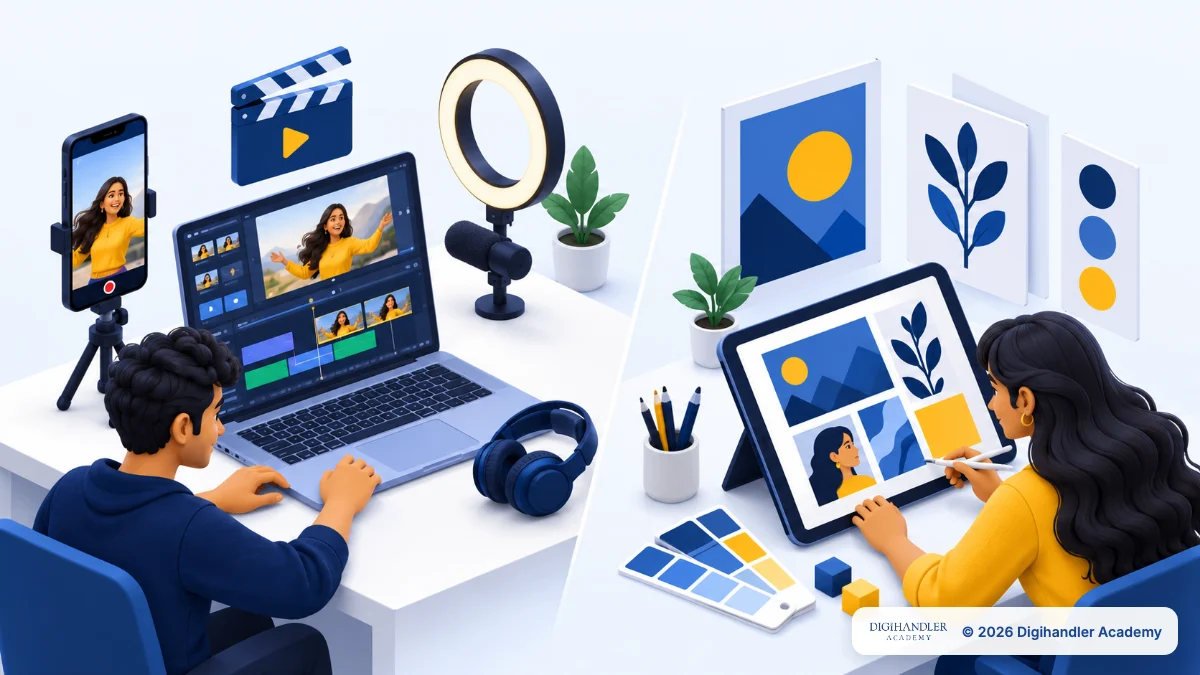
Graphic design is making still visuals: Instagram posts, banners, thumbnails, logos, menu cards and ad images. Video editing is turning raw clips into a finished video: Reels, Shorts, YouTube videos, ads and event films.
Think of a restaurant. The designer makes the menu card and the signboard. The editor makes the 30-second Reel of food arriving at the table. The restaurant needs both.
Neither is better for everyone. Design is quicker to start and easier on your laptop. Editing takes longer to learn, but even small brands now post Reels, and someone has to edit them. Both sit inside a wider digital marketing career, so neither is a dead end.
Here is an ordinary working day for a beginner in each role, at an agency, a local business or freelancing.
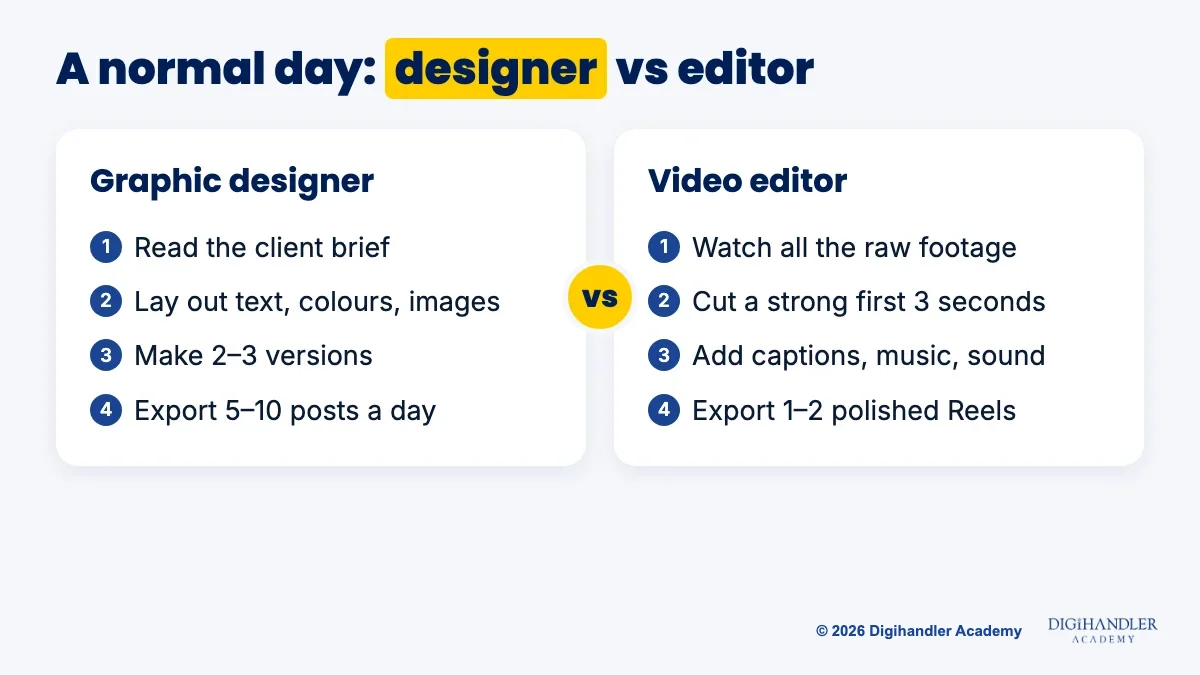
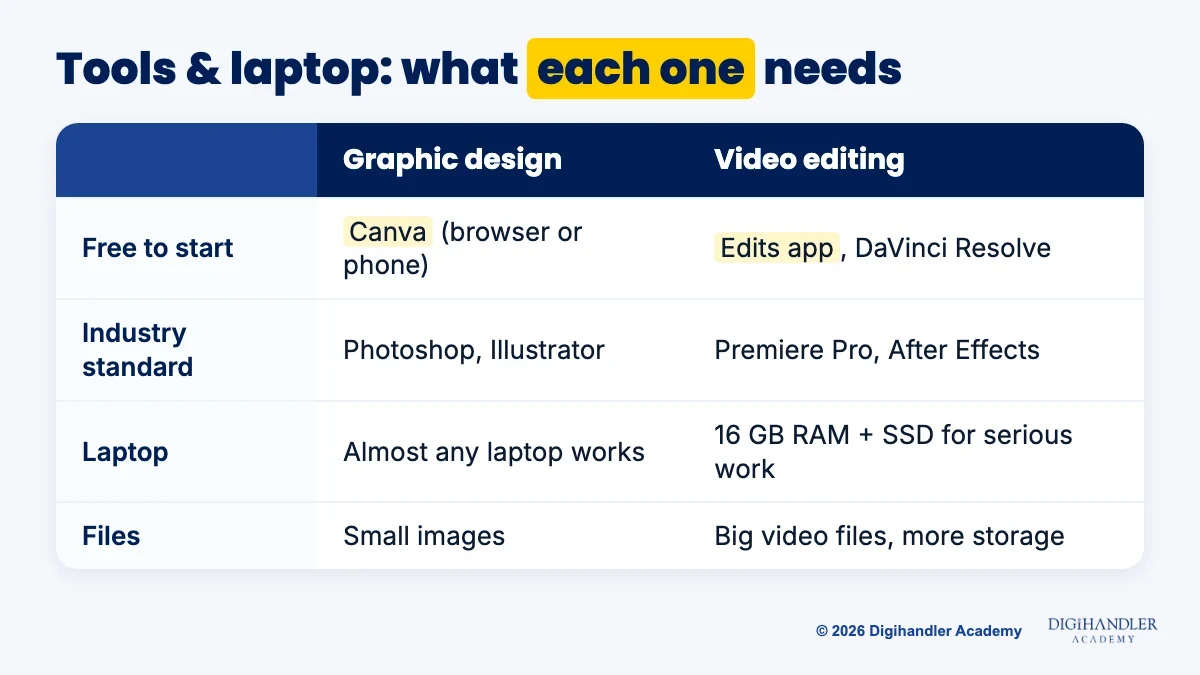
There is no winner on every line. Read the rows that matter to you; tools, laptops and AI get their own sections below.
Start free. Move to paid software only when a job or client asks for it.
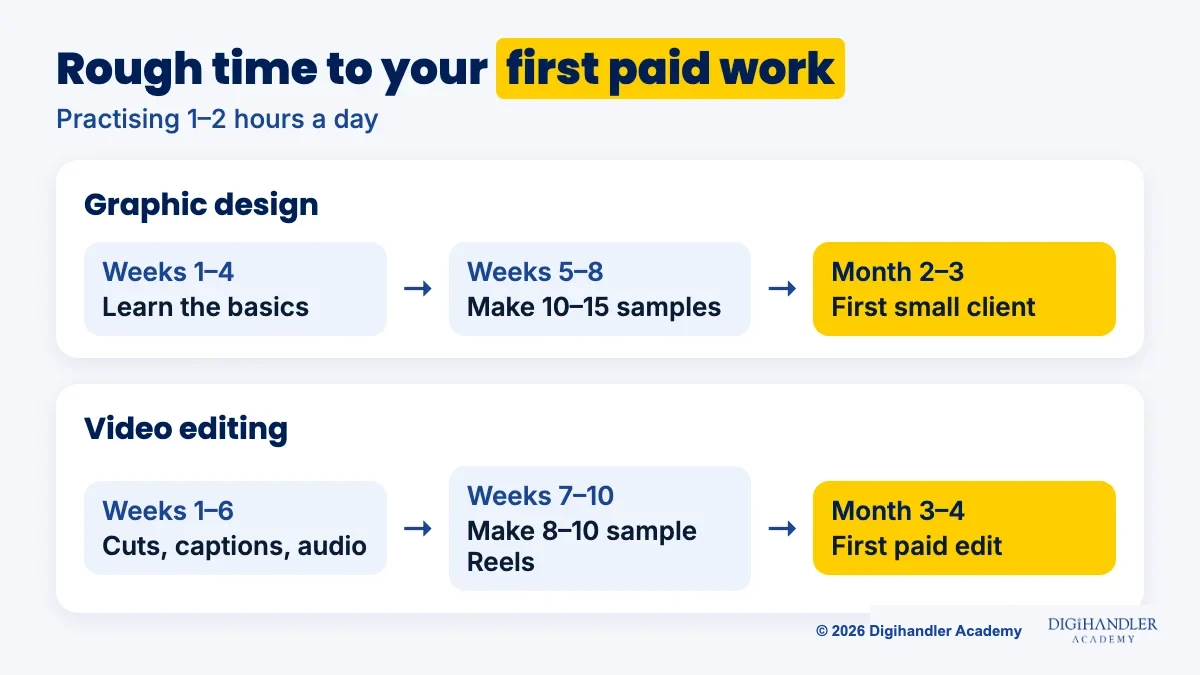
These are rough guides for someone practising 1 to 2 hours a day, not promises.
Design: about 4 weeks of basics, 4 weeks making 10 to 15 sample posts, then pitching. A first small paid job around month 2 or 3 is a fair target. Editing: about 6 weeks on cuts, captions and audio, 4 weeks making 8 to 10 sample Reels, then pitching creators. A first paid edit around month 3 or 4 is a fair target.
Honestly, AI is taking over the simplest, most repetitive parts of both jobs.
In design, Canva's AI features and Ideogram can draft a post, remove a background or resize it in seconds. What clients still pay for is someone who keeps every post on-brand and writes the headline that gets the click.
In editing, automatic captions, silence removal and AI clips save hours. Choosing the hook, the pace and the story still needs a person who understands the audience.
So learn the AI tools early: a beginner who uses them well simply works faster.
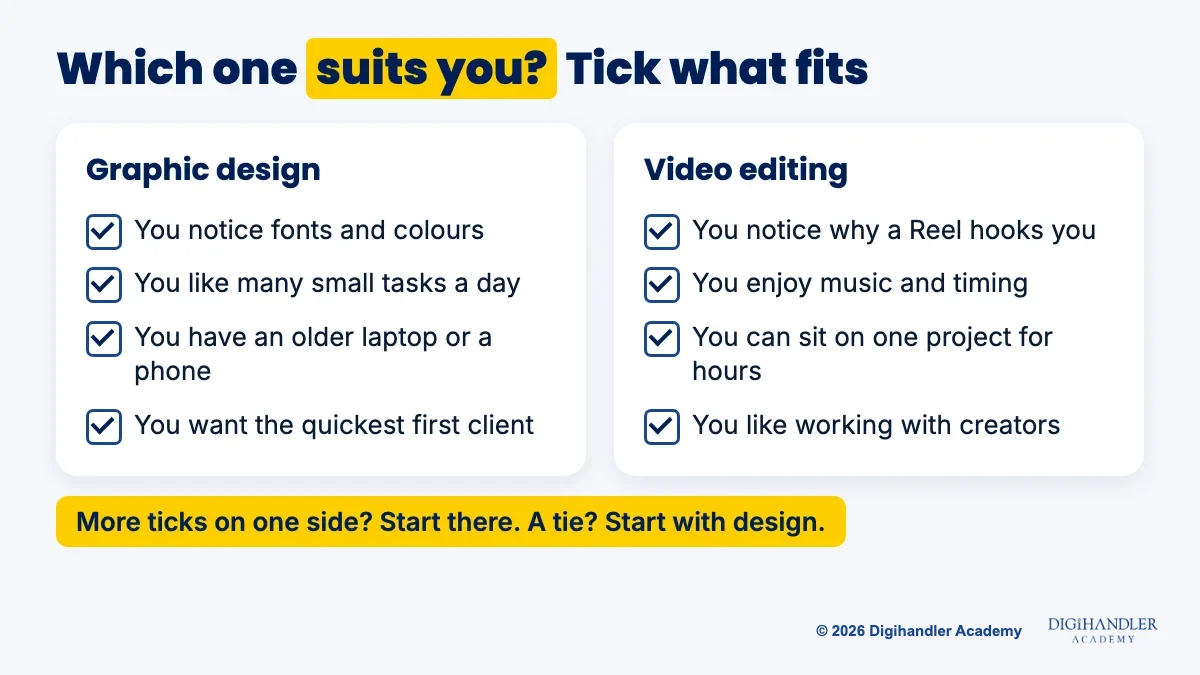
Tick the lines that sound like you. The side with more ticks is a good place to start.
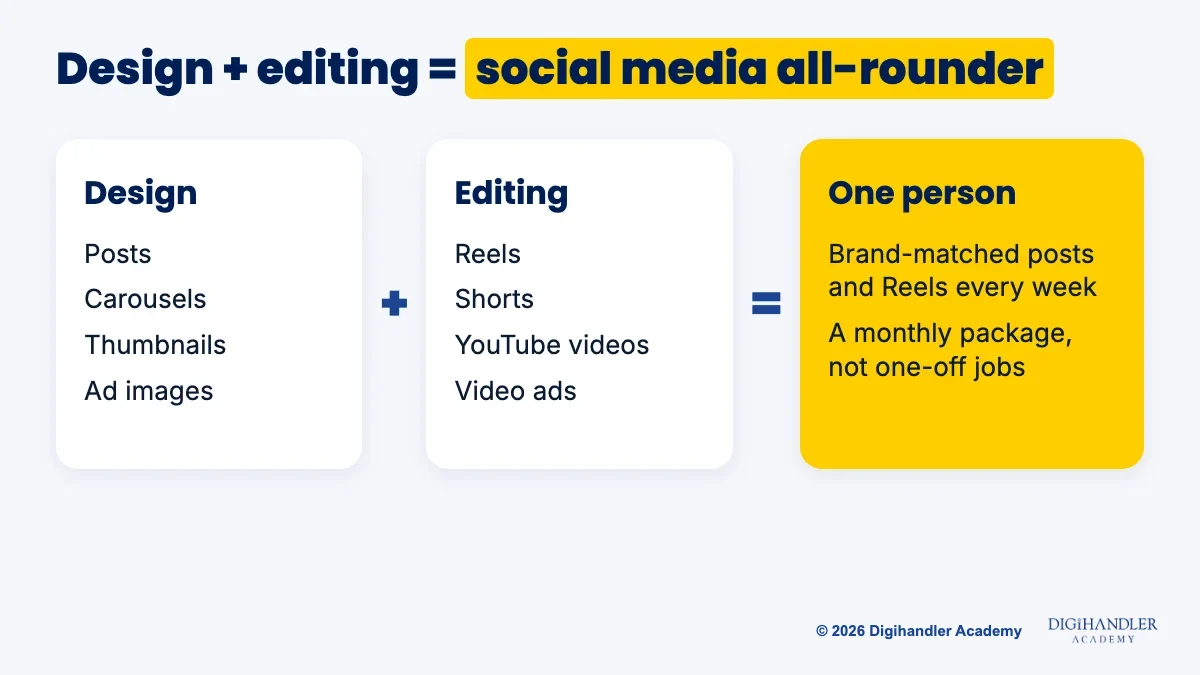
Small businesses rarely hire two people for Instagram. They want one person who can make the post and the Reel.
A designer who can edit turns one campaign into a carousel, a story and a short video. An editor who can design makes thumbnails and captions match the brand, and the thumbnail often decides whether a video gets clicked.
That mix lets you sell a monthly package instead of one-off pieces, and if AI makes one kind of work cheaper, you still have the other.
Pick one, follow its roadmap for 6 to 8 weeks, then add the other. Our graphic design roadmap for beginners goes from Canva basics to a first client, and the step-by-step video editing roadmap does the same with Edits and DaVinci Resolve. The digital marketing roadmap shows how both feed into ads and social media.
Prefer a trainer from day one? See what the video editing module in our course covers.
No budget? You can follow both roadmaps for ₹0 if you practise every week.
Self-study works, but it is slow. Most people stall when nobody checks their work or explains why viewers leave a Reel at second 4.
Our course teaches both skills. The Graphic Design & AI Content track covers brand guidelines, Canva designing with AI, Ideogram and creative testing, plus AI video creation used on live campaigns. The video editing module covers hooks, captions, sound and pacing in Premiere Pro and DaVinci Resolve, AI video tools and thumbnail design, and you build a 30-piece portfolio. See where graphic design sits inside the course.
Around that sit 44 modules over 6 months: 5 months practical, then 1 month of professional training on freelancing and client acquisition. You get a trainer checking your work, real client projects, a fixed weekly schedule, a batch to learn with, internship and placement assistance, and a certificate from an ISO 9001 certified academy that has trained 300+ students.
Join at our Rohtak campus or live online, in weekday or weekend batches. The first 3 days are a free demo, so you can sit in before paying. Fees depend on the track and batch and are shared on a call. We don't promise jobs; we help you get ready for them.

Riya writes Digihandler Academy's guides and roadmaps. Every article is fact-checked and reviewed by Lovish Madaan, founder & trainer, who has run the Digihandler agency since 2018. More from Riya →
Neither is better for everyone. Graphic design is quicker to learn, runs on almost any laptop and usually leads to a first small paid job sooner. Video editing takes longer to learn and needs a stronger laptop, but short-form video is a regular part of how brands post, so editors stay in demand. Choose the one you would happily practise for an hour every day. If you cannot decide, start with design, then add editing, because people who can do both are more useful for social media work.
For most beginners, yes, a little. Graphic design basics come down to spacing, fonts, colour and alignment, which start to make sense within a few weeks. Video editing adds timing, audio, captions, colour and export settings, so it usually takes longer before your work looks professional. Neither needs a degree or drawing talent. Free tools like Canva for design and Edits or DaVinci Resolve for editing are enough to learn the basics and build a first portfolio.
You can start both on a phone. Canva works on mobile for social posts and simple designs, and Instagram's free Edits app handles editing Reels and Shorts. A phone is fine for learning the basics and making your first samples. For client work you will want a laptop, mainly for a bigger screen, precise control and handling large files. Editing longer videos in particular is much easier on a laptop with enough RAM and storage.
AI is replacing the simplest tasks in both jobs, such as basic templates, background removal, resizing, automatic captions and cutting silences. It is not replacing the judgement clients pay for: keeping a brand consistent, choosing a strong hook, setting the pace of a video and knowing what the audience will respond to. The safest approach is to learn AI tools early and use them to work faster, so you can handle more clients while focusing on the creative decisions AI cannot make well.
Yes, if you want to work in social media. Most small businesses want one person who can make both the post and the Reel, and creators often need thumbnails as much as edits. Learn one skill first, for six to eight weeks, so you do not get overwhelmed, then add the other. Knowing both lets you offer a monthly social media package instead of one-off pieces, and it protects you if demand for one kind of work drops.
Where AI genuinely saves marketers time on real client work, and where it quietly makes things worse.
Read article →
What decides whether an AI assistant quotes your page, and the fixes worth doing first.
Read article →