
AI in digital marketing: what actually works right now
Where AI genuinely saves marketers time on real client work, and where it quietly makes things worse.
Read article →
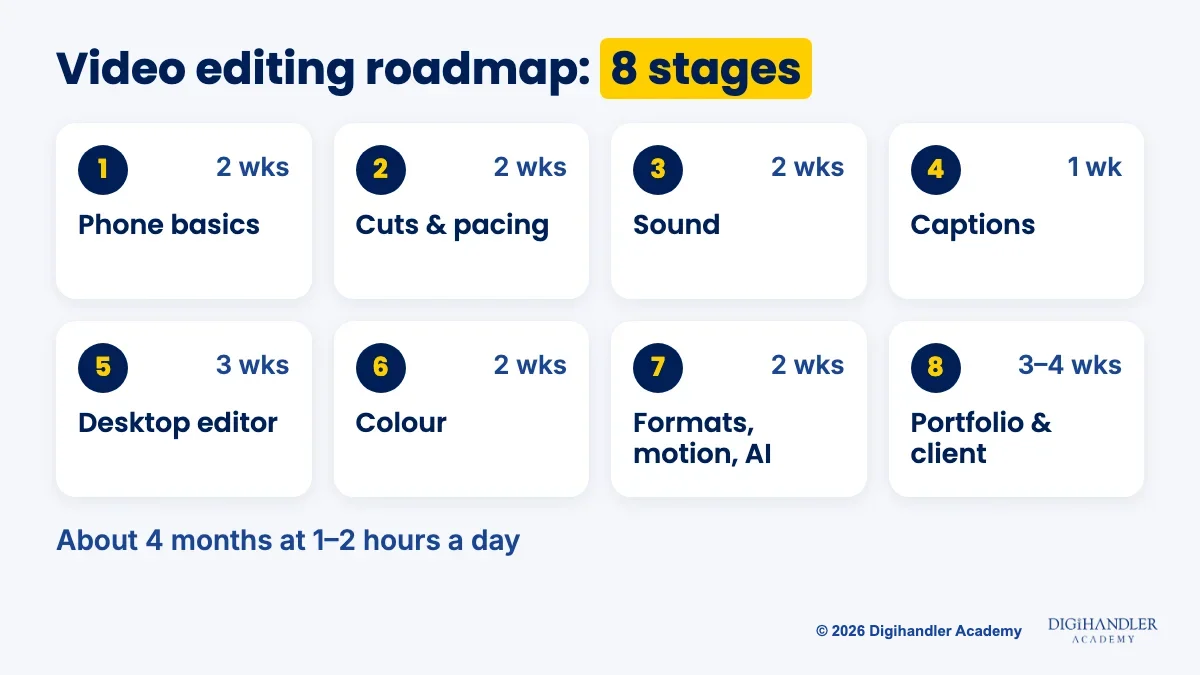
This video editing roadmap takes you from never having cut a clip to editing Reels, Shorts and YouTube videos for real clients. It starts on the phone you already own, moves to free desktop software, and ends with a portfolio and your first client. Every stage has a free tool, a mini-project and a rough time guide.
A video editor turns raw footage into something people watch to the end. You pick the best takes, cut the pauses, add music, put captions on screen, fix the colour and export the right size for each platform.
Think of raw footage as a basket of vegetables. The editor is the cook who decides what goes in and in what order. Video editing is one skill inside the wider digital marketing roadmap, and one of the easiest to start on a phone.
Editors work for creators, coaches, local shops that want Reels, agencies, wedding studios and brands running video ads. A normal day: get footage, cut a version, take feedback, fix, export, deliver.
Times assume 1 to 2 hours of practice a day. Treat them as a guide, not a promise. Do not skip the mini-projects: one finished edit teaches more than ten tutorials you only watched.
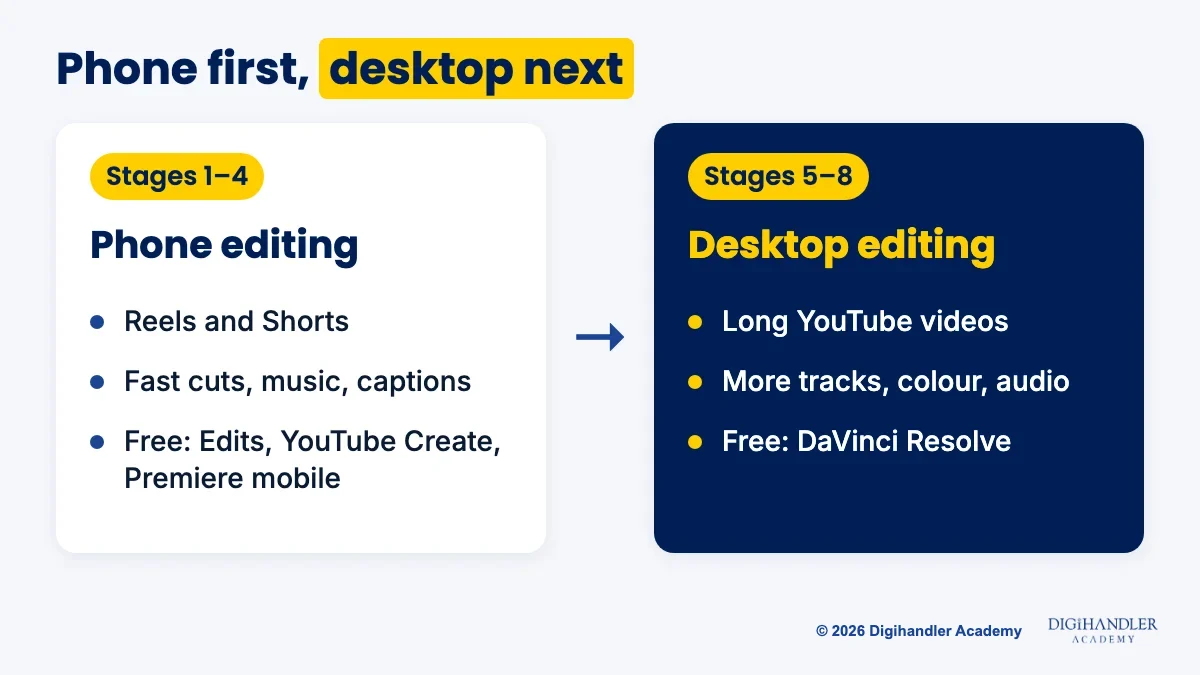
Start on your phone. The apps are free, and short vertical video is most beginner work.
Good free apps in India: Edits (Instagram's video app for iPhone and Android, no watermark on exports), YouTube Create (free on Android, with auto captions and royalty-free music) and the Adobe Premiere mobile app (free on iPhone and Android; some AI features cost credits). Many tutorials use CapCut, but CapCut has been blocked in India since 2020, so never install it from random APK sites.
Stage 1 is the timeline: a strip where clips sit left to right in the order they play. Learn to trim, split, delete and reorder. That covers most of editing.
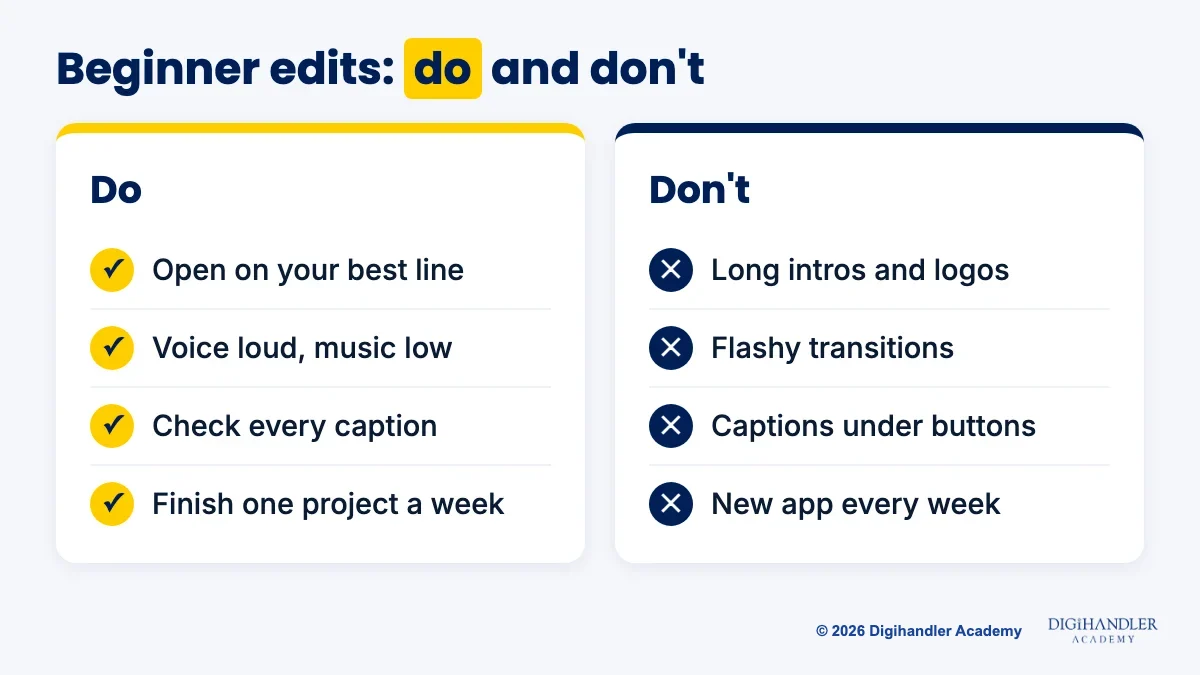
Stage 2 is pacing. Cut every pause, 'umm' and repeated line. The first three seconds decide whether people keep watching, so open on your best line, not 'hi guys'.
Stage 3 is sound. Viewers forgive average video, not bad audio. Keep the voice clear and the music low underneath. For free music and effects, use the Audio Library in YouTube Studio; some tracks ask you to credit the artist.
Stage 4 is captions, because many people scroll on mute. Use auto captions, then check every word: names, numbers and Hinglish often come out wrong. Keep captions near the middle, away from the app's buttons at the bottom.
Move to a laptop once phone editing feels easy. You get more tracks, finer audio, proper colour tools and room for long videos.
DaVinci Resolve is free on Windows, Mac and Linux. The free version handles up to Ultra HD (3840 x 2160) at 60 frames per second, plenty for learning. Its AI features are in the paid Studio version.
Premiere Pro is a paid subscription with a 7-day free trial, and many agencies use it. It transcribes footage on import, so you can cut by deleting words. Learn on Resolve, then try Premiere before applying to an agency that uses it.
Stage 5 is good habits: folders for footage, audio and exports, and shortcuts like ripple delete (delete a clip and close the gap in one go).
Stage 6 is colour. Fix exposure first, then white balance (white should look white, not orange or blue), then match shots. Go easy on LUTs, which are ready-made colour looks. Natural skin beats a dramatic filter.
Reels and Shorts are vertical, 9:16, commonly exported at 1080 x 1920 pixels. YouTube counts square or vertical videos up to three minutes as Shorts. Wide 16:9 videos, usually 1920 x 1080, are long-form.
Motion basics means keyframes. A keyframe saves a setting at a moment, like 'zoom 100% here, 110% two seconds later', and the software moves smoothly between them. Two clean moves beat ten flashy transitions.
AI tools now handle the boring parts: auto captions, cutting by transcript, voice clean-up, background removal. But AI does not know which line is the hook or how a brand should feel. That judgement is the job. The content marketing roadmap shows how each video fits a bigger plan.
Want a trainer checking these edits? Our video editing course covers hooks, pacing, captions and sound design with feedback on your work.
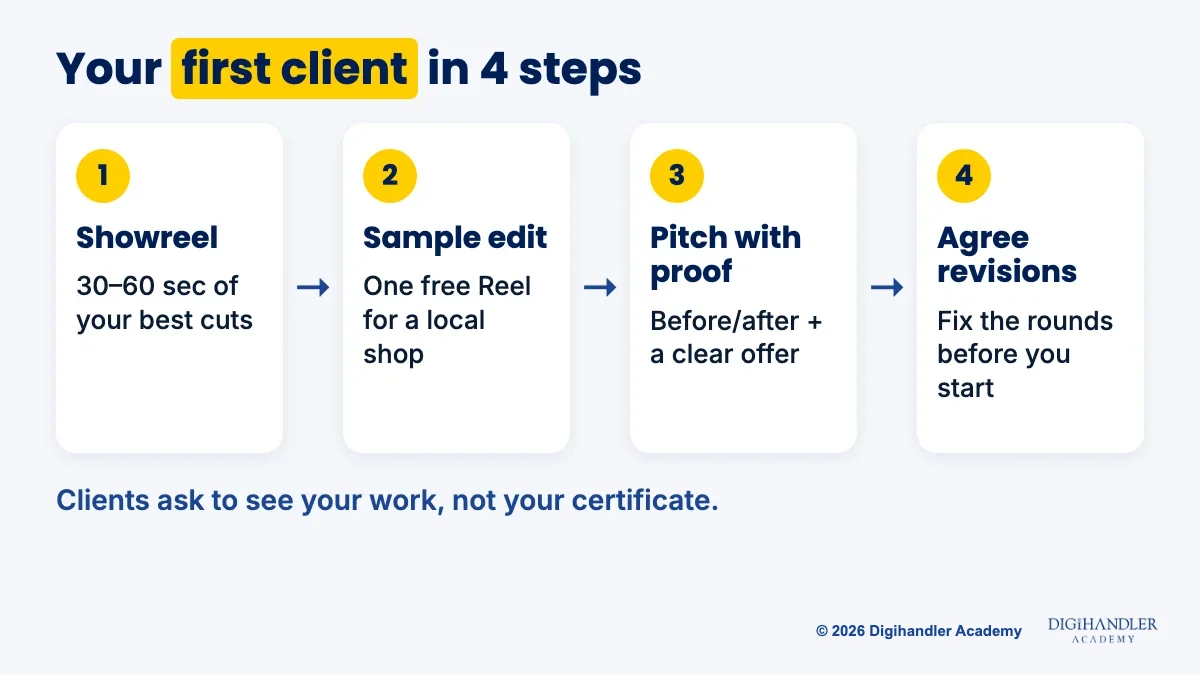
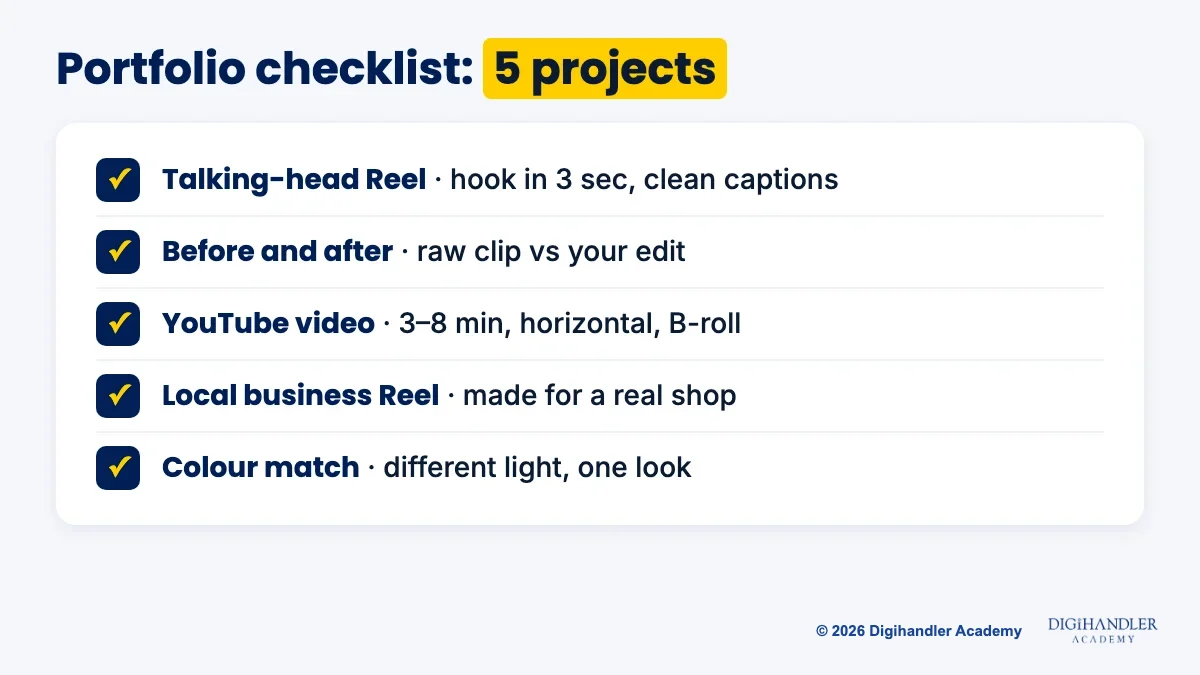
Clients rarely ask for certificates. They ask to see your work. Build a 30 to 60 second showreel plus 3 to 5 full pieces.
Start close to home. Local shops, gyms, cafes and clinics often need Reels but cannot cut one. Offer to edit one video from footage they already have, deliver fast, and ask to use it in your portfolio.
Then pitch with proof: one before-and-after example and a clear offer, like four Reels a month. Fiverr and Upwork work too, but expect a slow start while you collect reviews. Agree on revision rounds before you begin.
The social media marketing roadmap explains why some Reels perform.
Yes. Every tool in stages 1 to 7 has a free option, and so do the lessons.
Self-study works, but nobody tells you what is wrong with your edit. You can watch fifty tutorials and keep a bad habit, like music that drowns the voice.
Our video editing course fixes that. A trainer reviews your cuts, you edit live client projects, and you follow a fixed weekly schedule with a batch beside you. It covers hooks, pacing, captions, sound design, AI video tools, thumbnails and client revisions. Your first deliverable is a 30-second vertical edit from footage you shot yourself.
The module sits inside our 44-module, 6-month programme (5 months practical, 1 month professional training), with internship and placement assistance and a Certificate of Achievement from our ISO 9001 certified academy. We have trained 300+ students in the last three years. Placement assistance means help with your portfolio, resume and interviews; the offer depends on your interview.
Join at our Rohtak campus or live online, in weekday or weekend batches. Sit in on 3 days of free demo classes before you pay anything. Fees depend on the track and batch, and are shared on a call.

Riya writes Digihandler Academy's guides and roadmaps. Every article is fact-checked and reviewed by Lovish Madaan, founder & trainer, who has run the Digihandler agency since 2018. More from Riya →
If you practise 1 to 2 hours a day, you can follow a full video editing roadmap in about four months: around two months of phone editing basics, cuts, sound and captions, then desktop editing, colour, formats and a portfolio. You can edit a decent Reel within the first few weeks. Getting fast and confident takes longer and comes from finishing many real projects, not from watching more tutorials. Treat any timeline as a guide, because your pace depends on how often you practise and how much feedback you get.
Yes, you can start and even earn with phone editing, because most beginner client work is short vertical video for Reels and Shorts. Free apps such as Edits, YouTube Create and the Adobe Premiere mobile app let you trim, add music, auto caption and export without a watermark. A phone becomes limiting for long YouTube videos, detailed colour work and many audio tracks. Most editors start on the phone, learn pacing, sound and captions there, then move to free desktop software like DaVinci Resolve when they need more control.
Start with DaVinci Resolve if budget matters. The free version runs on Windows, Mac and Linux and handles projects up to Ultra HD at 60 frames per second, which covers everything a beginner needs. Premiere Pro is a paid subscription with a 7-day free trial and is common in agencies. The core skills, cutting, pacing, sound, captions and colour, carry over between the two. Learn on Resolve, then spend a week with Premiere's trial before applying to an agency that uses it.
No degree is required to become a video editor. Clients and agencies mostly judge you on your portfolio: a short showreel plus a few complete videos that show pacing, clean audio, readable captions and good colour. A certificate can help with a job application, and Blackmagic Design offers official DaVinci Resolve certification exams alongside its free training books. Still, a strong Reel made for a real local business will usually open more doors than a certificate with no work to show beside it.
AI tools are changing the work, not removing the need for editors. Auto captions, transcript-based cutting, voice clean-up and background removal now take minutes instead of hours. What AI cannot do well is judge which moment is the hook, what to cut for pace, or how a brand should feel. Editors who use AI for the boring parts can deliver faster and take on more clients. The safest plan is to learn the fundamentals first, then add AI tools to speed up your workflow.
Where AI genuinely saves marketers time on real client work, and where it quietly makes things worse.
Read article →
What decides whether an AI assistant quotes your page, and the fixes worth doing first.
Read article →