
AI in digital marketing: what actually works right now
Where AI genuinely saves marketers time on real client work, and where it quietly makes things worse.
Read article →
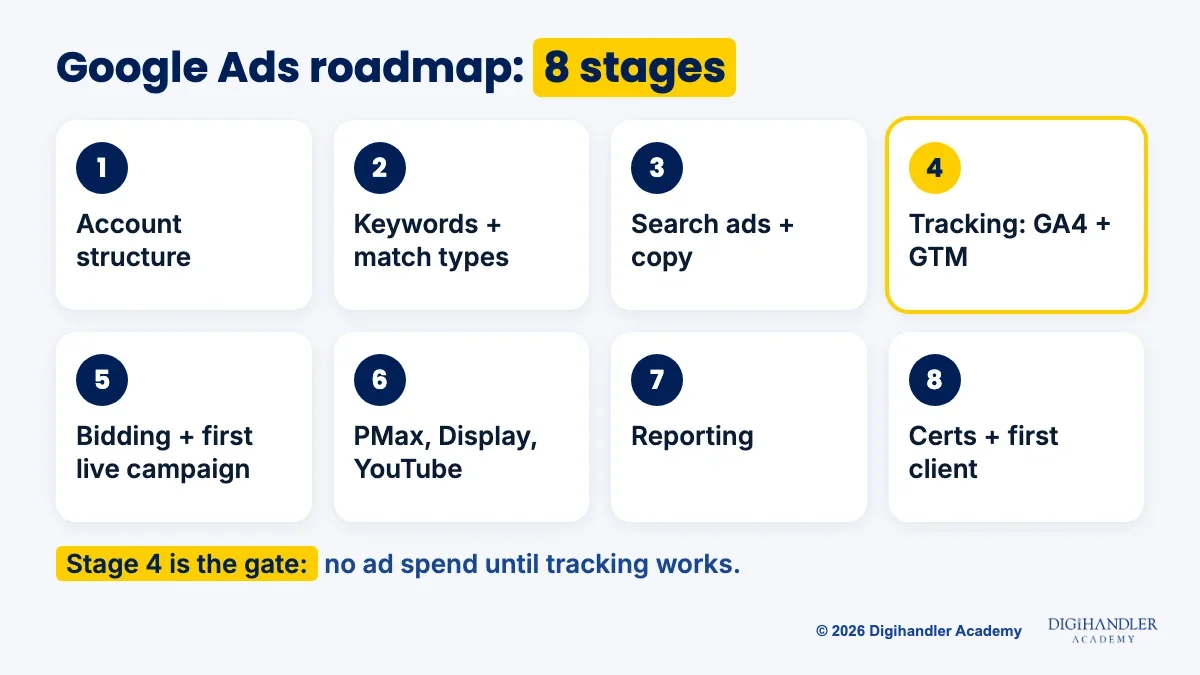
This Google Ads roadmap takes you from never opening an ad account to running a tracked campaign for a real business. It has 8 stages, and each one comes with a free tool to practise on and a small project to finish. One rule runs through all of it: no money goes into ads until conversion tracking works.
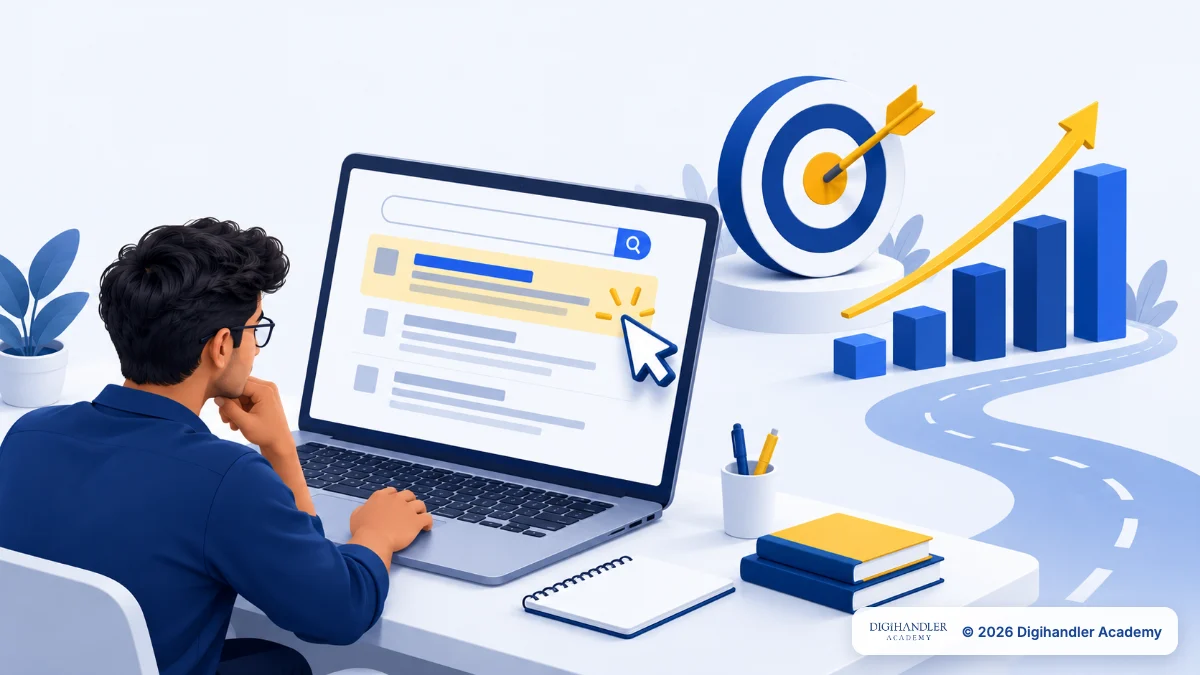
Google Ads is Google's paid advertising platform. A business pays to show its ad when someone searches, watches a YouTube video or browses a website. Your job is to make that money come back as leads or sales, not just clicks. For the bigger picture of where paid ads sit next to SEO and social media, start with our digital marketing roadmap.
Agencies, online stores, coaching institutes, clinics and real estate firms all hire for this. A normal day: check yesterday's spend and leads, read the searches people typed, pause keywords that waste money, test new ad copy and send the client a short report.
Think of the stages as floors of a building: you can't fit windows on the third floor before the second exists. Times assume 1 to 2 hours a day and are a guide, not a promise. Most people finish in about 4 months.
Every Google Ads account has four layers. The account holds billing and access. Campaigns hold the budget and decide where ads show. Ad groups each cover one narrow theme, and inside them sit the keywords and ads.
Picture a cupboard: the account is the cupboard, campaigns are shelves, ad groups are boxes, and keywords and ads are the clothes. Throw shirts and socks into one box and you never find anything.
Google asks for billing details to finish setup, but ads only cost money while a campaign runs. Keep practice campaigns paused, or build them in Google Ads Editor, a free desktop app that works offline.
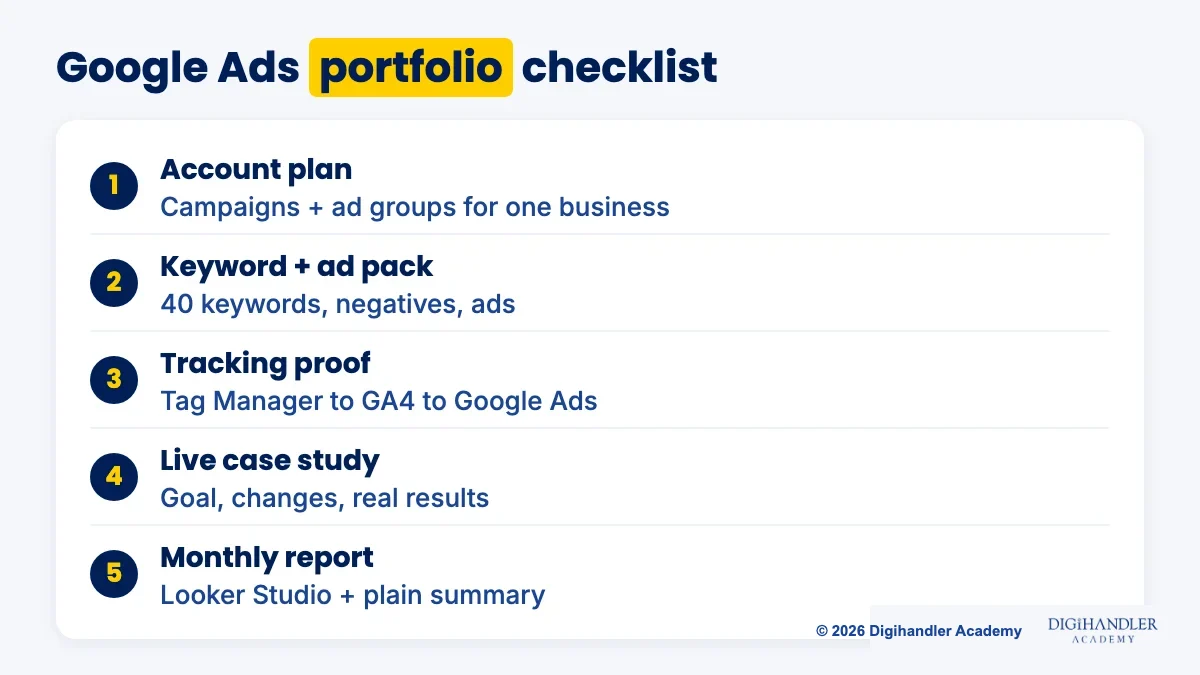
Mini-project: plan a full account for a local business in Google Sheets, with 2 campaigns and 3 ad groups each.
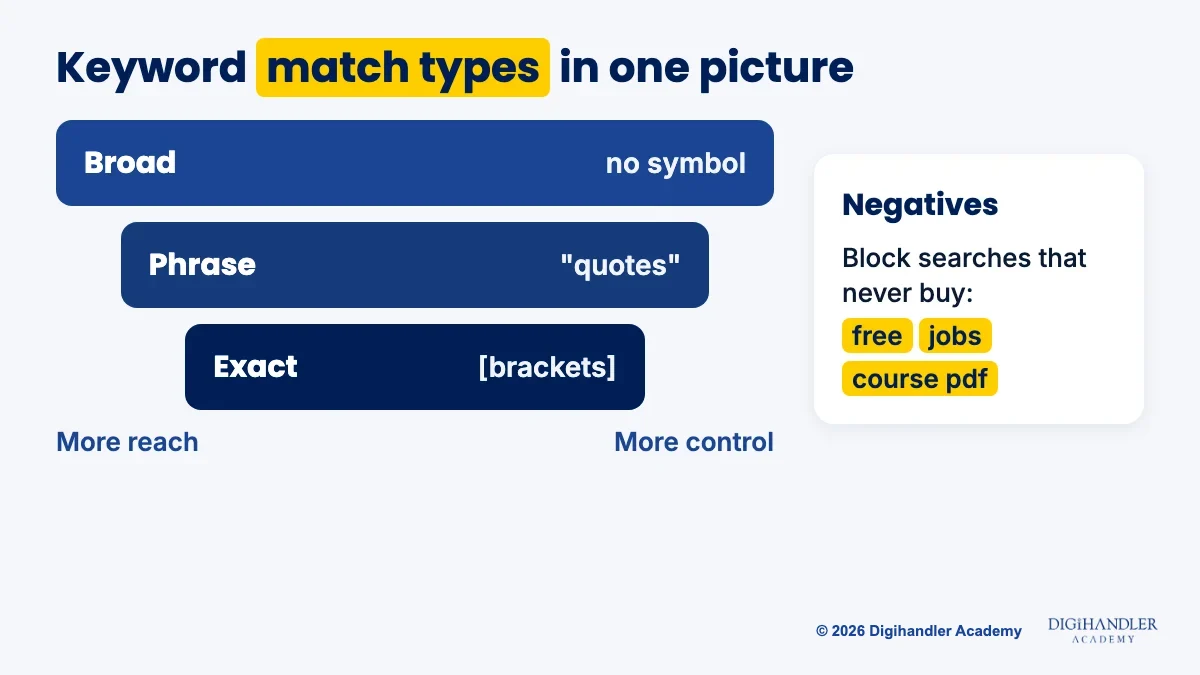
Keywords are the searches you want to show up for. Find ideas and rough volumes in Keyword Planner inside your account. Match types decide how closely a search must match:
Mini-project: build 40 keywords for one business, sort them into ad groups, pick match types and add 15 negatives.
Search ads today are responsive search ads. You give Google up to 15 headlines of 30 characters and up to 4 descriptions of 90 characters, and it mixes them to find what works best.
Good headlines repeat the searcher's words, give a reason to choose you (price, speed, location) and end with a clear next step. Each must make sense on its own, because any two can be paired.
Here you also meet Quality Score, a 1 to 10 rating per keyword based on expected click-through rate, ad relevance and landing page experience. Better scores help you pay less for better positions.
Mini-project: write a full ad for each ad group from stage 2 and choose the landing page each one sends people to.
Most beginners skip this stage, and it matters most. Without tracking, Google Ads shows who clicked, but not who called, filled a form or bought. Spending without it is like running a shop with no till: people come and go, and you have no idea what sold.
Google Tag Manager is a container on the website that holds your tracking codes, so you don't edit site code each time. Google Analytics 4 (GA4) records what visitors do. You mark important actions, like a form submission, as key events and import them into Google Ads as conversions.
Practise reading data in Google's free Analytics demo account, then set up GA4 and Tag Manager on a website you control.
Mini-project: submit a form yourself and confirm it appears in GA4, then in Google Ads. Only then is an account ready to spend.
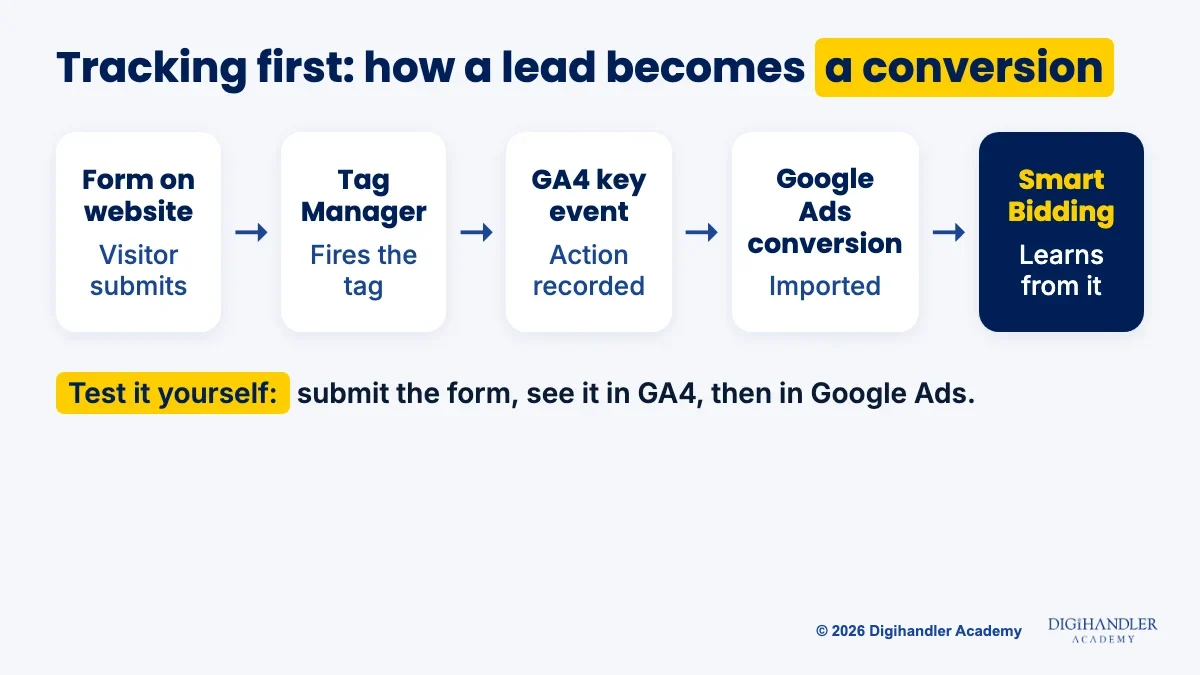
Smart Bidding strategies such as Maximize conversions, Target CPA, Target ROAS and Maximize conversion value set each bid for you, but they learn only from the conversions you feed them. That is why tracking comes first.
Budgets are set per campaign. Keep your first live campaign small: one tight ad group of exact and phrase keywords, for a real business that pays its own ad budget, after stage 4 works. In our Google Ads course, students do this on live campaigns with a trainer watching the account.
Then widen out. Performance Max is a goal-based campaign that can show ads across YouTube, Display, Search, Discover, Gmail and Maps, and it leans heavily on conversion goals. Display puts image ads on websites and apps; video campaigns run on YouTube. Search catches people already looking, while Display and YouTube build awareness.
Mini-project: run one search campaign for 2 weeks with tracking on, then plan a paused Performance Max campaign for the same business.
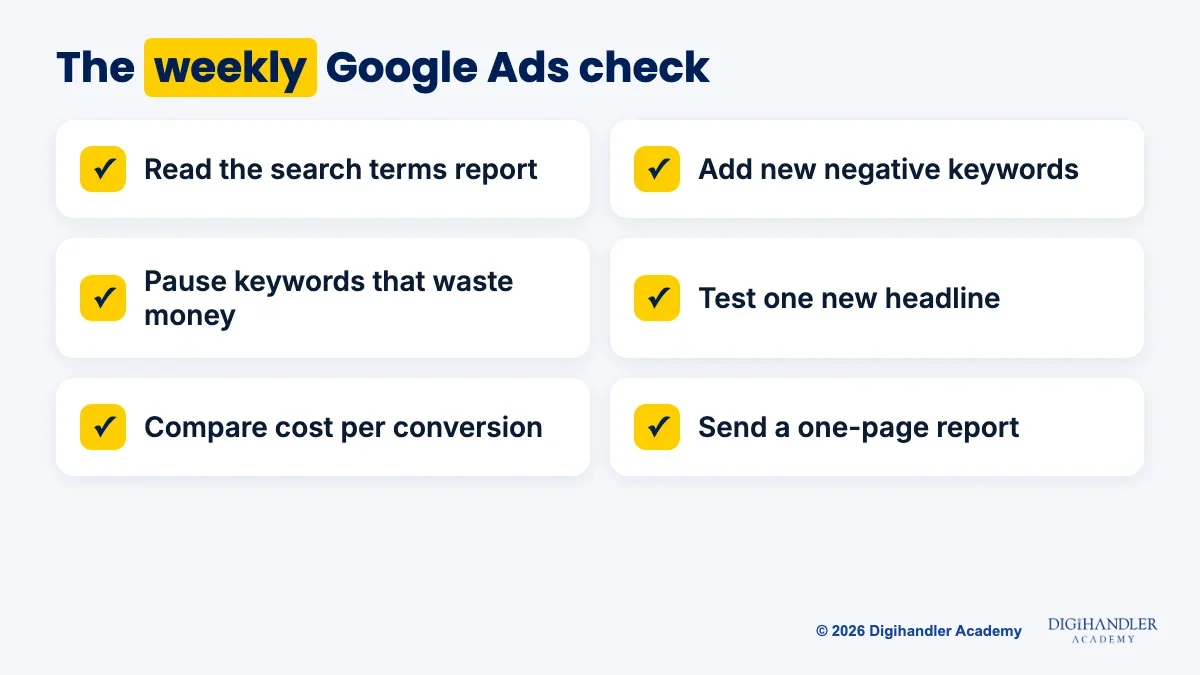
Experts aren't the people who know every button. They check the right numbers weekly and act: read the search terms report, add negatives, pause waste, test one headline and compare cost per conversion with last week.
Clients don't want the Ads dashboard. Build a one-page report in Looker Studio, Google's free reporting tool.
Then get certified on Skillshop, Google's free training site. Its Google Ads certifications include Search, Display, Video, Measurement, Shopping ads and Apps, and Google says foundational certifications stay free. They expire, so you retake the assessment to renew.
Mini-project: pass the Search certification and turn your stage 5 campaign into a one-page case study.
No paid tool is needed to become job-ready.
Yes. Every stage above can be learned without paying for a course. Our free channels, YouTube and Instagram, are where we share lessons and tips. Here is how to use them with Google's own free training.
Self-study works, but it is slow. Nobody tells you your tracking is broken until the money is gone.
We have trained 300+ students. The first 3 days of classes are a free demo, so you can sit in before deciding. Explore the Google Ads course or call 9991 729 730.
Next, see how paid social works in our Meta Ads roadmap, and how to win free traffic in our SEO roadmap.
Riya writes Digihandler Academy's guides and roadmaps. Every article is fact-checked and reviewed by Lovish Madaan, founder & trainer, who has run the Digihandler agency since 2018. More from Riya →
Studying 1 to 2 hours a day, most beginners can work through the core skills in about 4 months: account structure, keywords and match types, search ads, conversion tracking, bidding, Performance Max, reporting and certification. That is a guide, not a promise. You get faster by running a real campaign as early as tracking allows, because a live account teaches you things no video can. Becoming genuinely good takes longer, since expertise comes from managing different businesses and budgets over many months and learning from what each account shows you.
Yes, almost all of it. You can build campaigns in the free Google Ads Editor, keep practice campaigns paused, take Google's free Skillshop learning paths and practise reports in the free Google Analytics demo account. Google asks for billing details to finish account setup, but ads only cost money while a campaign is running. The one thing you can't fully learn for free is managing live spend. The best route is to run a small campaign for a real business that pays its own ad budget, and only after conversion tracking is working.
Google Ads certifications are earned on Skillshop, Google's training site, and the foundational certifications are free. They cover areas such as Search, Display, Video, Measurement, Shopping ads and Apps. Each one expires, so you retake the assessment to stay certified. They are worth doing because they prove you know the platform's vocabulary and settings, and they look good on a CV. On their own they don't prove you can run an account, so pair them with a live campaign case study that shows real results.
No. Most tracking today is done through Google Tag Manager, which you install on a website once and then manage through menus and forms instead of code. You then use Google Analytics 4 to mark important actions, like a form submission or a purchase, as key events and import them into Google Ads as conversions. Basic comfort with how websites work helps, and you need edit access to the site. The key skill is testing: submit the form yourself and check the conversion appears before any money is spent.
Many beginners find Google Search ads easier to start with, because the logic is simple: someone searches for something, and you show a relevant ad. Meta Ads on Facebook and Instagram reach people who are not searching yet, so they depend more on creative and audiences. Both rely on the same foundations: clear goals, conversion tracking and weekly optimisation. If your target clients are local service businesses, start with Google Ads. If they sell products to impulse buyers, Meta Ads may come first. Most paid ads jobs expect you to learn both.
Where AI genuinely saves marketers time on real client work, and where it quietly makes things worse.
Read article →
What decides whether an AI assistant quotes your page, and the fixes worth doing first.
Read article →