
AI in digital marketing: what actually works right now
Where AI genuinely saves marketers time on real client work, and where it quietly makes things worse.
Read article →
This SEO roadmap shows you how to learn SEO from zero in eight clear stages, using free tools you can open today. Each stage tells you what to learn, where to practise, one small project to finish and a rough time guide. Follow it alone for ₹0, or move faster with a trainer checking your work.

SEO (search engine optimisation) helps the right pages show up when people search on Google, Bing or AI answer tools. It is one branch of digital marketing; for the full map, read our digital marketing roadmap.
Think of Google as a huge library. SEO makes sure your book is catalogued properly, sits on the right shelf and is the one readers pick up.
Agencies, brand teams, online stores and local businesses like clinics all hire for it, and many learners freelance.
A normal day: checking Search Console for errors, finding keywords, rewriting titles, fixing a slow page and sending a short report. No coding or big budget needed to start.
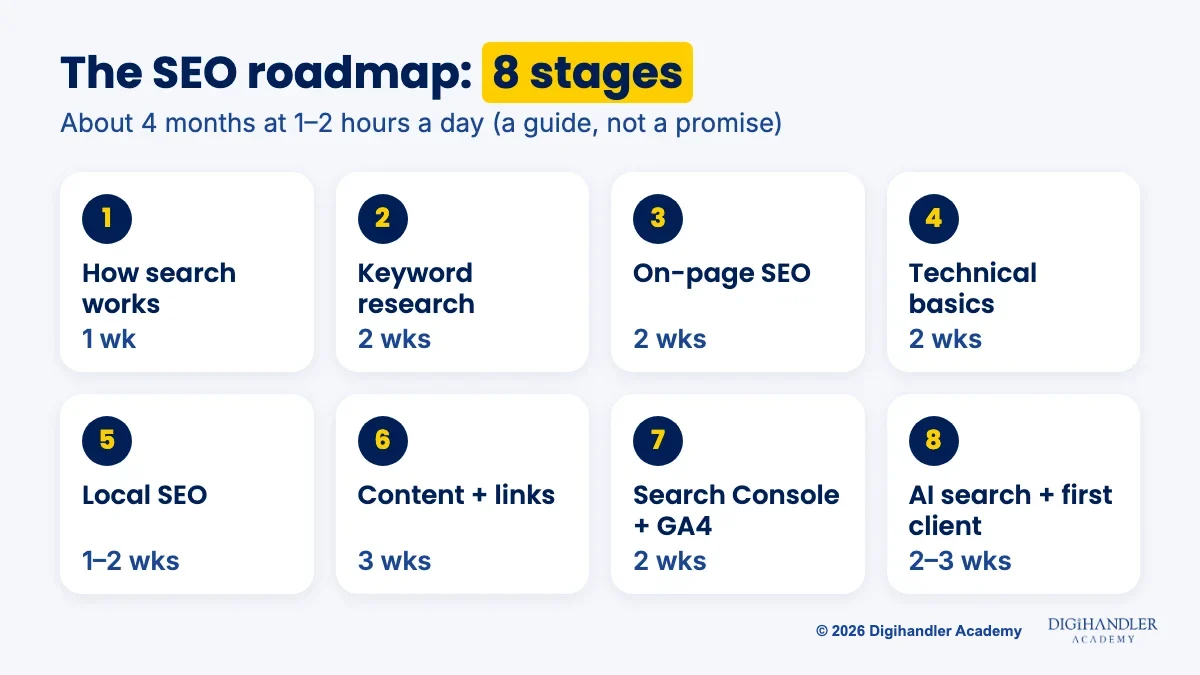
The weeks assume 1 to 2 hours of study a day; treat them as a guide, not a promise. Added up, it is roughly four months to a solid beginner level. Do not skip the mini-projects: they become your portfolio.
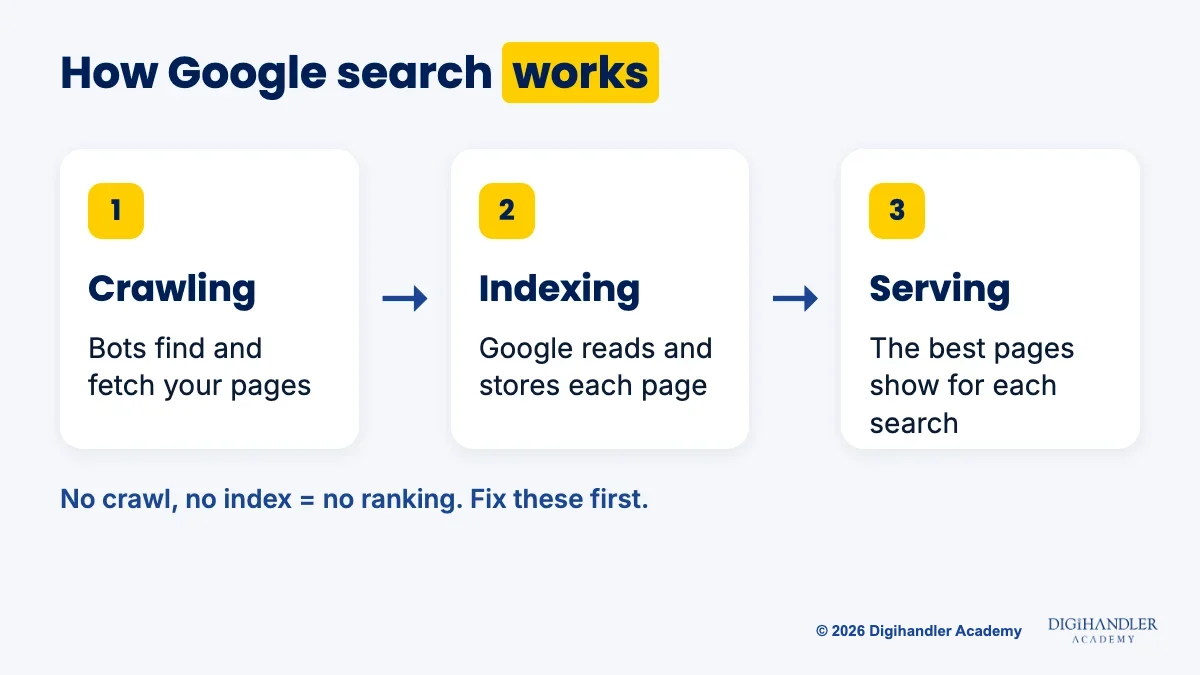
Stage 1 is understanding the machine. Google splits search into three steps. Crawling: bots find and fetch pages. Indexing: Google reads each page and stores it. Serving results: it picks the most relevant pages for each search. A page that is never indexed cannot rank.
Practise on Google itself: type site:digihandleracademy.com to see roughly which pages are indexed, and read Google's free SEO Starter Guide. Mini-project: explain crawl, index and serve to a friend using one real website.
Stage 2 is keyword research: the words people actually type. Google autocomplete, the People also ask box and Google Trends show real demand for free. Keyword Planner is free too, but needs a Google Ads account with a campaign set up.
Group keywords by intent. what is seo means the person wants to learn; seo course in rohtak means they want to enrol. One page, one intent. Mini-project: a 30-keyword list for a local gym, sorted into learn, compare and buy intent.
Stage 3 is on-page SEO: the title tag, meta description, one clear H1, subheadings, short URLs, image alt text and internal links. Above all, answer the search better than what already ranks.
Practise on a free Blogger blog; you can paste Google's verification tag into its theme to connect Search Console later. Mini-project: publish three pages, each targeting one keyword group from Stage 2.
Stage 4 is technical basics, no coding required. Check that pages can be crawled, a sitemap exists, robots.txt blocks nothing important, and the site uses HTTPS and works on a phone.
Google's Core Web Vitals measure loading (LCP, good is 2.5 seconds or less), responsiveness (INP, 200 milliseconds or less) and stability (CLS, 0.1 or less). Free PageSpeed Insights shows them for any page.
Mini-project: audit one real website and list ten issues with a fix each. In our SEO course, audit and reporting is its own module, because clients usually pay for it first.
Stage 5 is local SEO, often the quickest route to paid work. Every shop and clinic wants to appear in nearby map results.
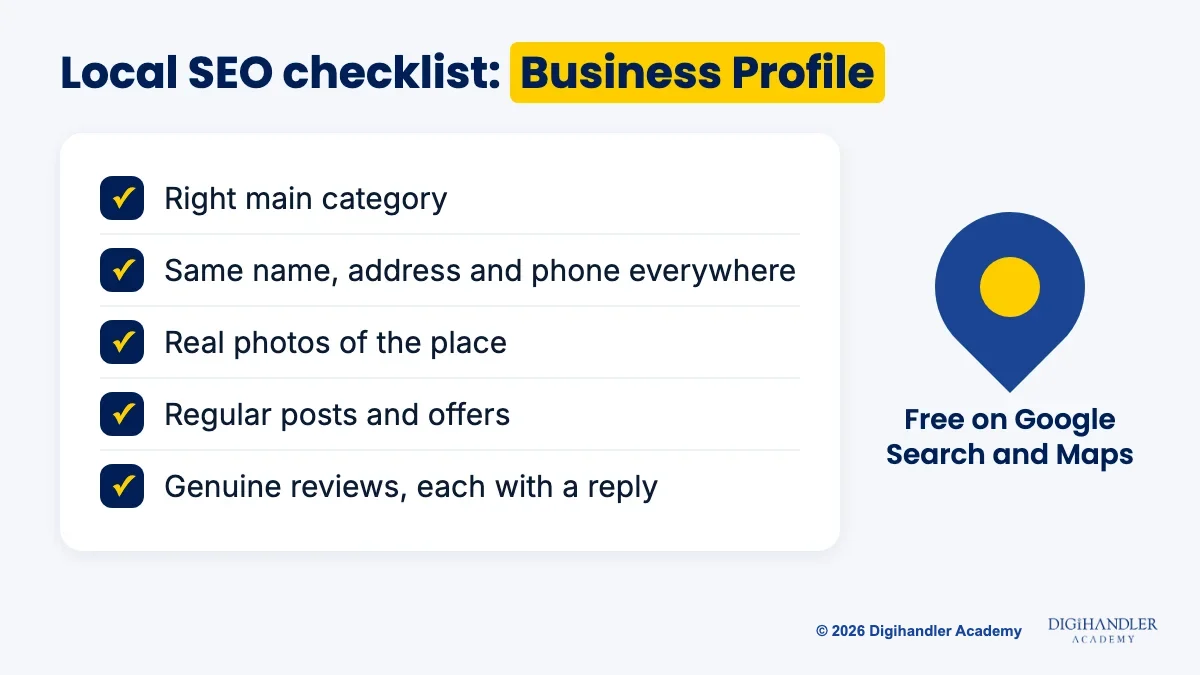
The main tool is Google Business Profile. It is free and controls how a business appears on Google Search and Maps, with photos, services, posts and review replies. Our guide to the power of local business listing covers the setup.
Mini-project: check a nearby business's profile against this checklist and write five improvements. Only edit profiles you manage. Many local businesses also run search ads; our Google Ads roadmap covers that side.
Stage 6 is where beginners start becoming experts. Google asks for helpful, reliable, people-first content, not pages written only to rank.
Plan content in clusters: one main page on a broad topic, smaller pages for specific questions, all linked. Our content marketing roadmap covers the writing.
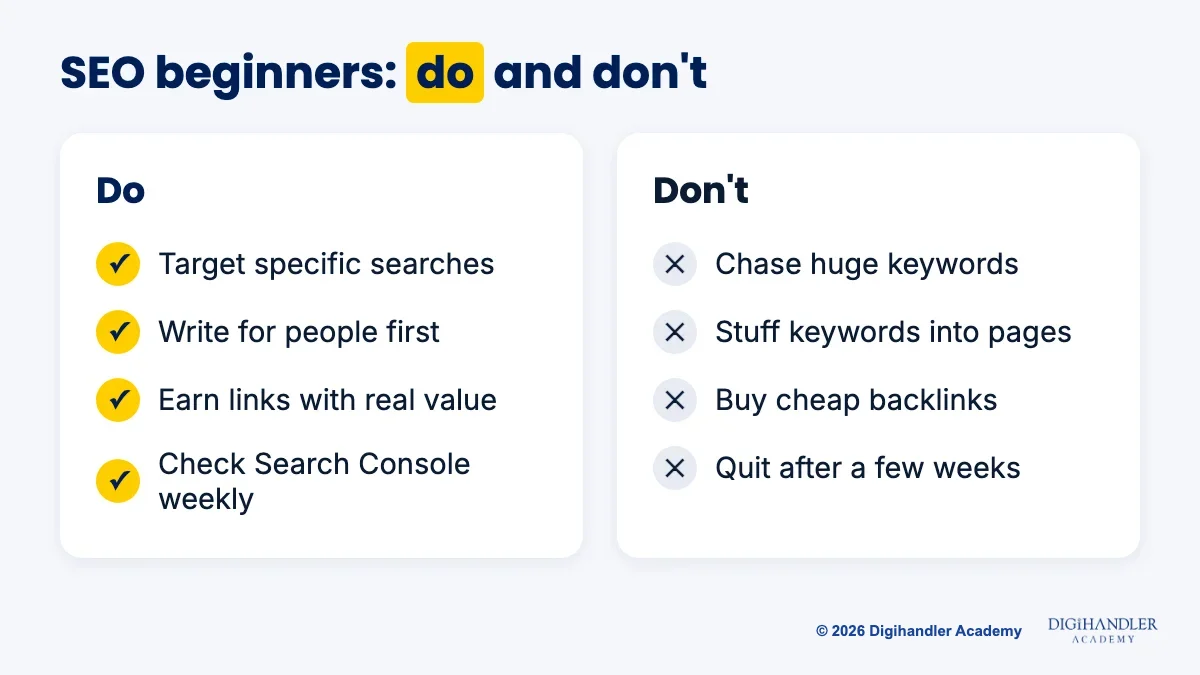
Links from trusted sites act like recommendations. Earn them with useful resources, local directories and genuine mentions. Never buy them: Google's spam policies list buying links for ranking purposes as a violation.
Mini-project: a four-page topic cluster on your practice site, plus two genuine links or mentions.
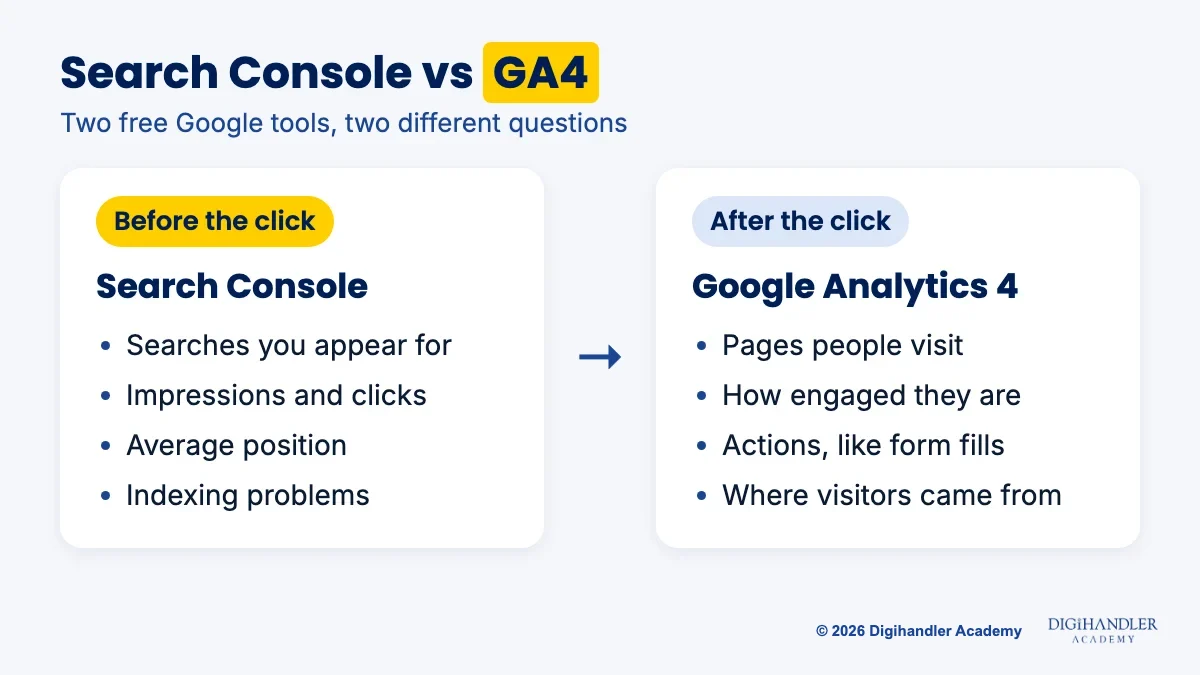
Stage 7 is measurement with two free Google tools. Search Console shows what happens before the click: searches you appear for, impressions, clicks, average position and indexing problems. Google Analytics 4 (GA4) shows what happens after: pages visited, engagement and actions like form fills.
Mini-project: connect both to your practice site and make a one-page monthly report with top searches, top pages, one problem and one next step.
Stage 8 is AI search. People now get answers from Google's AI Overviews and AI Mode, ChatGPT and other assistants.
Google says no extra requirements or special optimisations are needed to appear in AI Overviews or AI Mode: the page must be indexed and eligible to show with a snippet, and that traffic is counted in your normal Search Console report. So the basics win: crawlable pages, clear answers near the top and a brand others mention. Our post on ranking inside AI search goes further.
Final mini-project: a free audit and three-month plan for a real local business. If they act on it, that is your first case study, and maybe your first client.
Start free. Paid suites like Semrush or Ahrefs can wait until a job or client pays for them.
Employers trust proof more than certificates:
You can follow this whole roadmap for ₹0. Subscribe to the Digihandler Academy YouTube channel and follow us on Instagram, where we share free lessons and tips. Add Google's free SEO Starter Guide and Skillshop for Google Analytics training.
The hard part of the free path is discipline and feedback, not information:
Self-study works, but it is slow and lonely, and many people stall at the technical stage. Our SEO course is eight modules inside our 44-module digital marketing program: audit and reporting, fundamentals, Search Console and Analytics, keyword research, local, on-page, off-page and AI SEO, on a live site from early on.
What it adds: a trainer who still runs client campaigns weekly checking your work, real client projects, a fixed schedule, a batch to learn with, internship plus placement assistance and a certificate from an ISO 9001 certified academy. The program runs six months: five practical, one of professional training.
Join at our Rohtak campus or the live online batch; 300+ students have trained with us. Try 3 days of free demo classes before paying anything. No course can honestly guarantee a job, but we give you the practice that makes you hireable.
Riya writes Digihandler Academy's guides and roadmaps. Every article is fact-checked and reviewed by Lovish Madaan, founder & trainer, who has run the Digihandler agency since 2018. More from Riya →
With 1 to 2 hours of study a day, most beginners can cover the basics of SEO in about four months by following a stage-by-stage roadmap. That includes how search works, keyword research, on-page and technical SEO, local SEO, content and links, Search Console and GA4, and AI search. This is a guide, not a promise. Speed depends on how much you practise on a real website. Reading alone is not enough, because SEO is a practical skill that you learn by publishing pages, fixing problems and watching what changes in the data.
Yes. You can learn and practise most of SEO without writing code. Keyword research, on-page SEO, content, local SEO, link building and reporting in Search Console and Google Analytics 4 need no programming. Technical SEO asks you to understand things like sitemaps, robots.txt, HTTPS and page speed, but beginners mostly check these with free tools such as Search Console and PageSpeed Insights rather than coding fixes. Basic HTML knowledge helps later, for example to read a title tag or spot a missing alt text, and you can pick that up along the way.
Yes. Google says pages need no extra requirements or special optimisations to appear in AI Overviews or AI Mode. A page must be indexed and eligible to show with a snippet in Search, which is exactly what normal SEO work achieves. Traffic from these AI features is counted inside the regular Search Console performance report. AI tools also lean on pages that are crawlable, clear, well sourced and mentioned by other sites. So SEO skills now cover both classic search results and AI answers, which makes them more useful, not less.
Google Search Console is the best free tool to start with. Google describes it as a free service that helps site owners monitor and troubleshoot how their site appears in Google Search. It shows which searches your pages appear for, how many clicks they get, their average position and any indexing problems. Pair it with Google Analytics 4 to see what visitors do after they click, PageSpeed Insights for speed, and Google Business Profile for local SEO. All four are free, and together they cover most of what a beginner needs.
Becoming an SEO expert comes from repeated practice on real websites, not from one course or certificate. Build a free practice site, rank a few pages, and keep a portfolio with a keyword map, a site audit, a local SEO plan and a monthly report. For your first client, offer a free audit and three-month plan to a local business you know, such as a shop or clinic. If they act on it and results improve, you have a case study to show the next business. Learning in a structured batch with feedback can speed this up.
Where AI genuinely saves marketers time on real client work, and where it quietly makes things worse.
Read article →
What decides whether an AI assistant quotes your page, and the fixes worth doing first.
Read article →