AI in digital marketing: what actually works right now
Where AI genuinely saves marketers time on real client work, and where it quietly makes things worse.
Read article →
AI agents for small business are no longer just for big companies. With tools like WhatsApp Business AI, Zapier Agents and Google Workspace Studio, a shop, clinic or coaching centre can now reply faster, follow up every lead and get a weekly report without extra staff. Here are 9 hacks you can try today, checked on official pages as of November 2026.

An AI agent is software that can read a message, decide what to do, and take a step for you, like writing a reply or updating a sheet. If the idea is new, read what AI agents are first.
For a small shop, clinic or coaching centre, agents are most useful in three jobs: replying to customers, following up with leads, and making simple reports. These are the boring, daily tasks that slip when you are busy.
The hacks below use tools you can verify on official pages, checked as of November 2026. Each one starts small and keeps a person in charge.
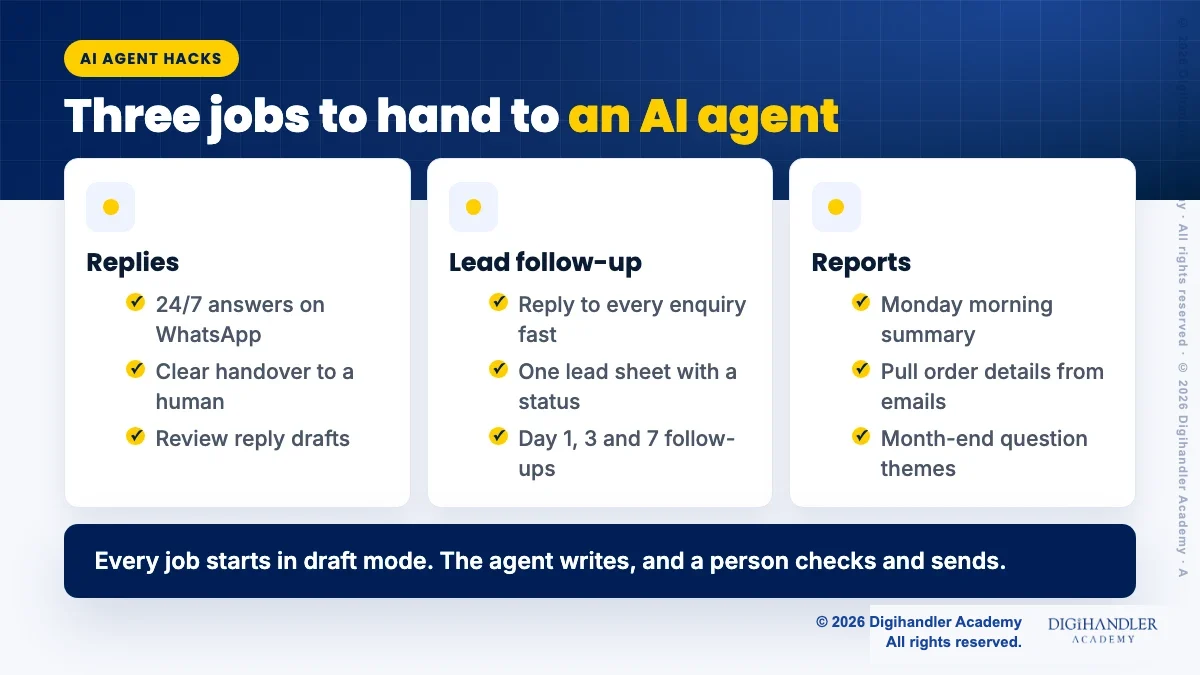
Most Indian customers ask questions on WhatsApp. Meta announced Business AI for small businesses in India on 14 May 2026. It sits inside the WhatsApp Business app and can answer questions at any hour, share product details, capture leads and book appointments.
To try it, open the Tools tab in the WhatsApp Business app and tap "Your Business AI". Meta says it works in all native Indian languages, but only for businesses that meet certain criteria, and it was rolling out over several weeks. If you do not see it yet, your account may not be eligible. Meta's launch post did not mention a price.
Meta also says you stay in control. You can reply yourself at any time, take over a chat, or switch the AI off. Start your rules with ready messages from our WhatsApp Business message templates.
Ten copy-ready recipes for replies, lead follow-up and reports, plus a Business Facts Sheet, handover rules, a safety checklist and a weekly results log.
© 2026 Digihandler Academy. All rights reserved. Free for personal use.
An agent is only as good as what you tell it. Meta says Business AI learns from the details you add to your profile and catalogue, such as product details, pricing, discounts and shipping.
So write one simple facts sheet: what you sell, prices, timings, address, delivery areas, refund rules and your 10 most common questions with answers. A Jaipur boutique might add "no exchange on sale items" and "delivery in 3 days inside Jaipur".
Use the same sheet for every agent you build later. When something changes, update it in one place. The free PDF above includes a fill-in Business Facts Sheet.
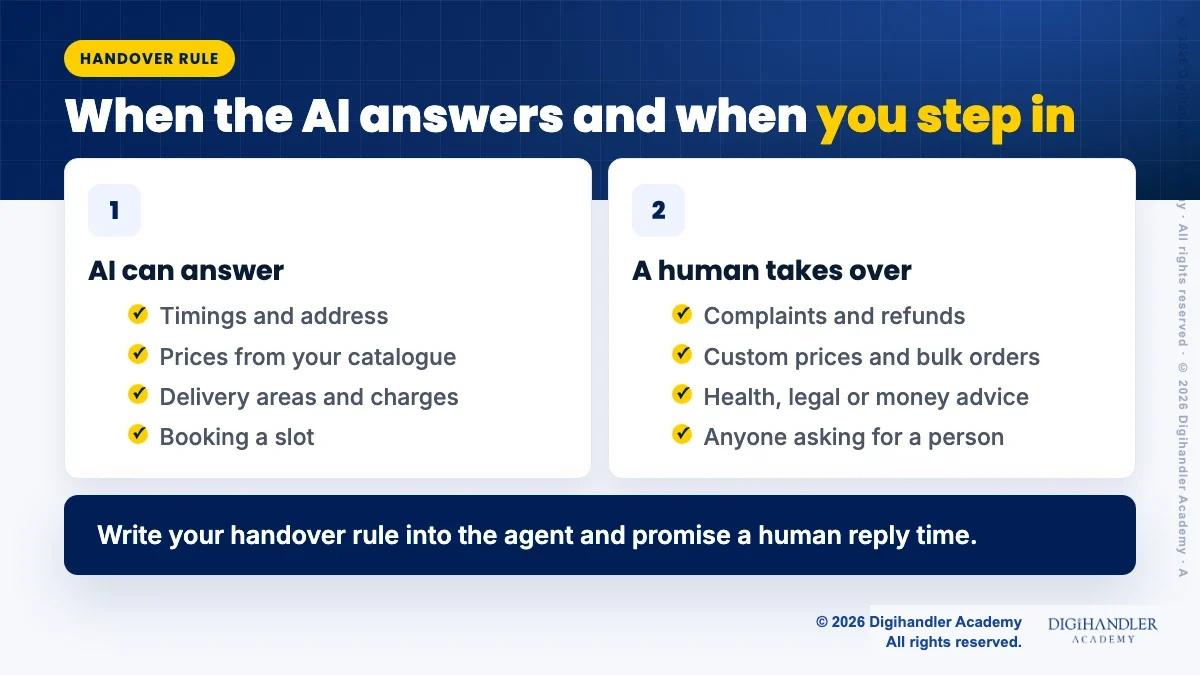
Think of your agent as a new trainee at the counter. It can answer the easy questions. It should call you for the hard ones.
Give it a short rule: "If the customer asks about a refund, a complaint, a custom price or anything not in our business info, say a team member will reply within two hours, and stop." Then keep that promise.
For the first two weeks, read 10 AI chats every evening. When the agent gets something wrong, fix the facts sheet, not just that one chat.
A lead who fills your form at 10 pm is still thinking about you at 10 pm. By the next afternoon, they may have called someone else.
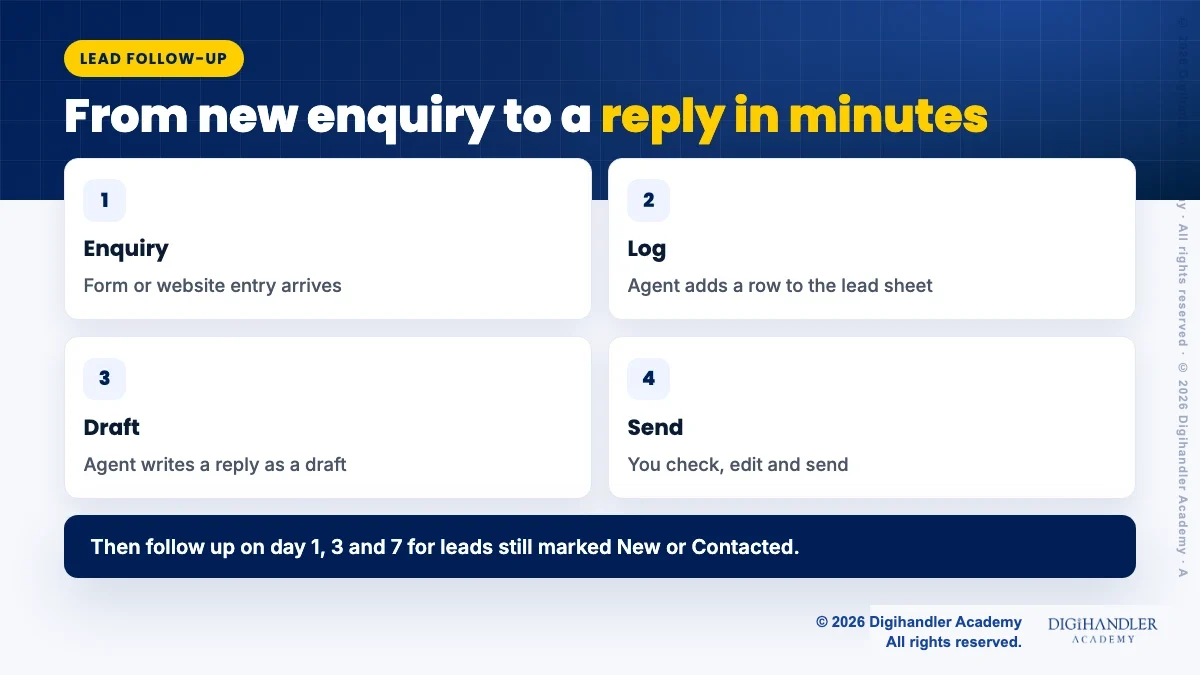
Zapier Agents can watch for a new form entry and draft a reply for you. Its help pages describe the setup: click New agent, write instructions, add a trigger and actions, test it, then publish. As listed on Zapier's site in November 2026 (limits may change), the free plan gives 400 agent activities a month, with up to 10 per run, and tests count toward that limit.
A sample instruction: "Read the new enquiry. Using our business facts file, draft a friendly email that answers the question and offers two call times. Save it as a Gmail draft. Do not send." You check the draft and press send.
Most leads need more than one message. A simple Google Sheet fixes this: date, name, phone, source, need and a status column (New, Contacted, Visit booked, Won, Lost).
Let the agent add each enquiry as a new row. Then run a daily check: for leads still marked New or Contacted that are 1, 3 or 7 days old, draft a short follow-up. Make day 7 a polite last message.
Never follow up with someone who said no or asked you to stop. A Rohtak coaching centre that follows up kindly gets more demo visits than one that sends the same message five times.
Google Workspace Studio lets you build agents in plain language, with no coding. Google announced it in December 2025, and its March 2026 update says it has launched to all Rapid Release and Scheduled Release domains on eligible plans, including Business Starter.
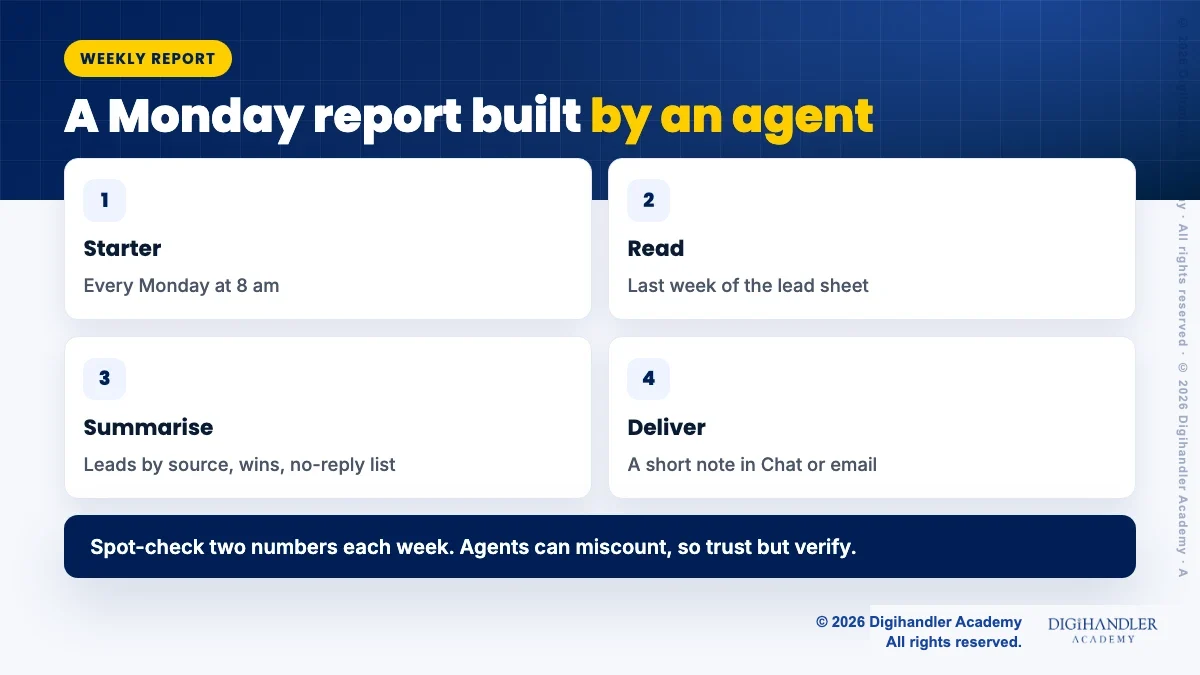
Google's own examples include a daily summary of unread emails and drafting weekly project updates. For a small business, try this: every Monday at 8 am, read last week's lead sheet and send me the number of enquiries by source, the wins, and the leads with no reply yet.
Google's help page adds a useful tip: the AI step does not know what other steps in the flow did, so name the exact sheet or details it should use.
Workspace Studio has steps such as Extract (pull out details like order numbers), Summarize, and Decide (run only when a condition is met). These are perfect for sorting supplier emails or marketplace orders into a Payments sheet.
The rule is simple: the agent fills the sheet, you approve the money. Google itself advises not to send AI responses outside your company without review, and to put the output in a draft instead.
You do not need a big budget. As listed on official sites in November 2026 (these may change):
Prices and offers change, so check the official page before you buy. If you like the n8n route, our n8n automation guide for beginners walks you through it.
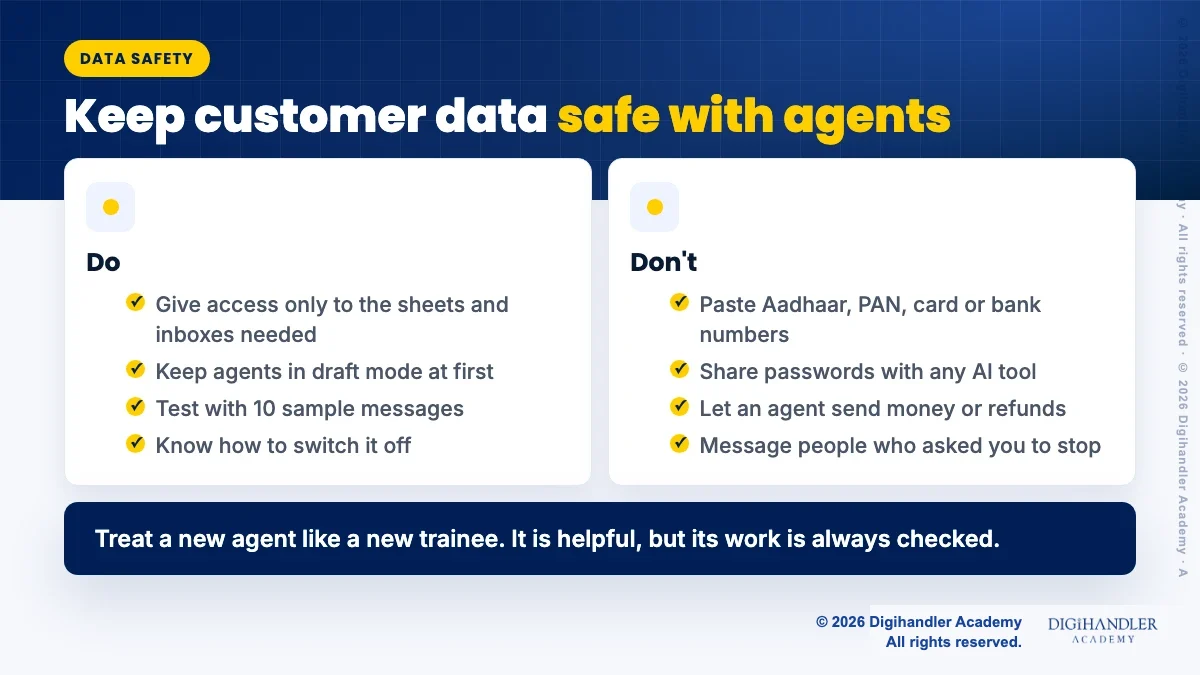
Agents work with real names, phone numbers and orders. Give each agent access only to the sheet, folder or inbox it needs, nothing more.
Never paste Aadhaar, PAN, card or bank numbers, or passwords into any AI tool. Do not let an agent send money or approve refunds. And learn how to pause each agent in one tap before you switch it on.
Pick one, run it for two weeks, and write down what it saves. Then add the next. For more ideas, see the best AI agents for marketers and our guide to AI for small business owners.
If you would rather learn these tools with a trainer, a free demo class is an easy way to see agents built live.

Riya writes Digihandler Academy's guides and roadmaps. Every article is fact-checked and reviewed by Lovish Madaan, founder & trainer, who has run the Digihandler agency since 2018. More from Riya →
An AI agent is software that reads information, decides on a next step and acts, such as drafting a reply, adding a row to a sheet or sending you a summary. Unlike a fixed auto-reply, it can handle questions worded in different ways. For small businesses, the most practical uses are customer replies, lead follow-up and simple weekly reports. Start with one job, keep the agent in draft mode, and let a person check its work before anything reaches a customer.
Yes. Meta announced Business AI for small businesses in India on 14 May 2026. It lives in the WhatsApp Business app under the Tools tab as "Your Business AI". Meta said it would reach eligible businesses over the following weeks, that businesses must meet certain criteria, and that it works in all native Indian languages. If you cannot see it, your account may not qualify yet. Check the app and the WhatsApp Help Center for current details, as of November 2026.
Yes, with limits. As listed on Zapier's site in November 2026, the free plan includes 400 agent activities a month, up to 10 per run, and tests count toward that number. n8n's Community edition is free if you host it yourself, which needs some technical setup. These limits suit one or two small recipes, like drafting replies to new enquiries. Free plans and prices change often, so check the official pricing page before you rely on any number.
It can, especially in the first weeks. Agents guess when information is missing, so give them a clear facts sheet with prices, timings, delivery and refund rules. Add a handover rule for complaints, refunds and special requests. For the first two weeks, keep the agent in draft mode or read its chats every evening. Each time it makes a mistake, fix the facts sheet so the same error does not repeat. Over time, mistakes drop and you check less.
Keep money and sensitive decisions with people. Do not let an agent send payments, approve refunds or give health, legal or money advice. Never share Aadhaar, PAN, card or bank numbers or passwords with any AI tool. Avoid letting it message customers who asked you to stop. Agents are best at repeat work with clear rules, such as answering timings, logging leads and summarising weekly numbers, while you keep the final say on anything that costs money.
Where AI genuinely saves marketers time on real client work, and where it quietly makes things worse.
Read article →
What decides whether an AI assistant quotes your page, and the fixes worth doing first.
Read article →