
AI in digital marketing: what actually works right now
Where AI genuinely saves marketers time on real client work, and where it quietly makes things worse.
Read article →
These vibe coding tips help you build apps with AI without losing your work, your data or your money. Each of the 14 hacks comes from official help pages of tools like Lovable, Replit, Cursor and Claude Code, checked in November 2026, and you can try every one today.
Vibe coding means you describe an app in plain words and an AI tool writes the code. If you are new to the idea, start with what vibe coding means.
The AI is fast, but it only knows what you tell it. Vague prompts give messy apps. Big prompts break things you cannot see. Free credits run out quickly.
The hacks below come from the official help pages of Lovable, Replit, Cursor, Claude Code, GitHub and the AWS Labs team, checked in November 2026. They work in almost any tool. Think of them as four stages: plan, build, check and protect.
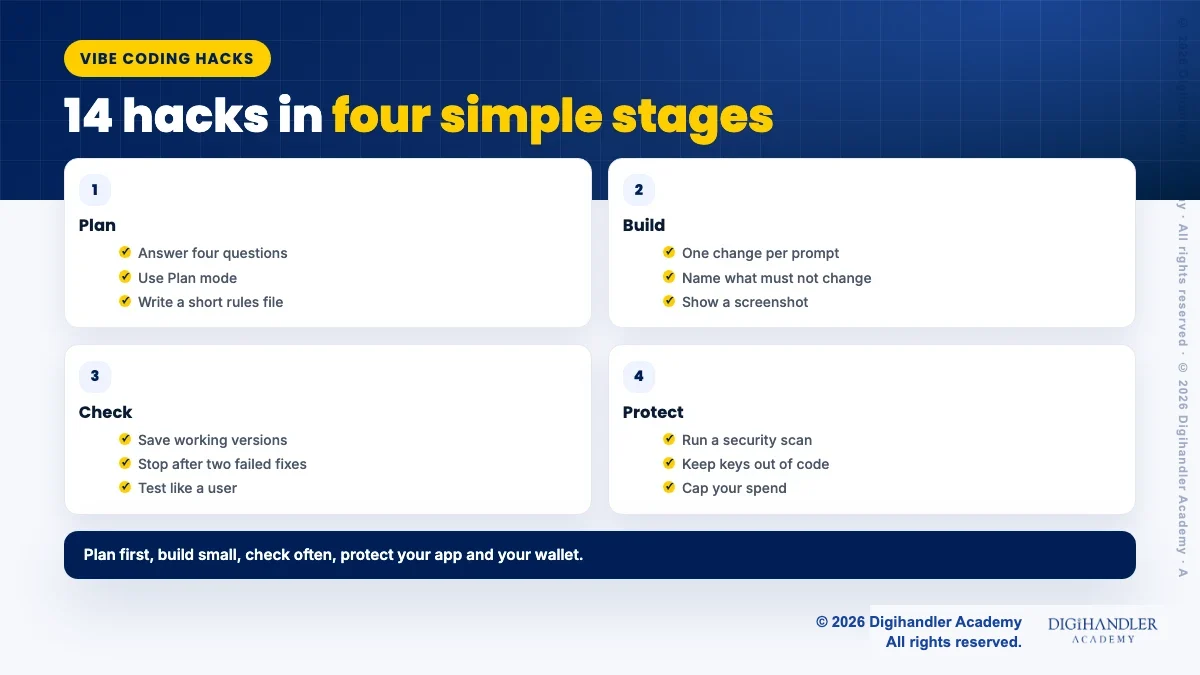
Lovable's best practice guide asks you to answer four questions first: what the product is, who it is for, why they will use it, and what the one key action is.
Example: a Rohtak coaching centre wants a test booking page. Product: a booking page. Users: parents. Why: to book a demo test without calling. Key action: pick a slot. Keep version one this small. Payments can wait.
All 14 hacks as a tick list, plus a project brief, a rules file starter, a prompt template and a pre-publish checklist to fill in for each app.
© 2026 Digihandler Academy. All rights reserved. Free for personal use.
Most tools now have a planning or chat mode where the AI discusses the work without changing code. Lovable says "Plan mode is for decision-making, Build mode is for execution." The AWS Labs vibe coding tips also suggest refining details in Plan mode before writing any code.
A simple trick: ask the AI to interview you. "Ask me the questions you need answered before building this. Do not write code yet." You will catch missing details early, when changes are cheap.
A rules file is a note the AI reads with every prompt: your audience, colours, tech choices and mistakes to avoid. Lovable calls it project knowledge, Cursor uses .cursor/rules or an AGENTS.md file, and Claude Code uses CLAUDE.md.
Keep it short. Cursor's docs advise keeping rules under 500 lines and adding a rule when the agent repeats the same mistake. Claude Code's guide says the file should hold only what the AI cannot work out from the code, plus anything you have had to correct twice.
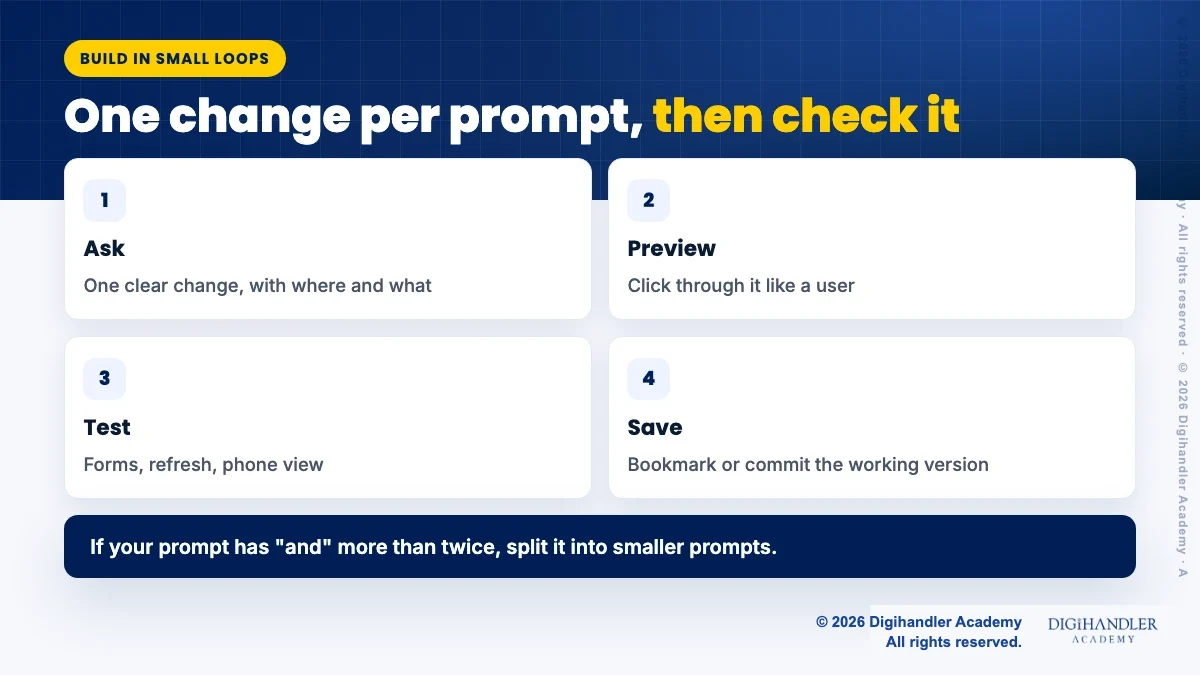
Lovable puts it simply: one change per prompt, check it in the preview, then move on. Their own test: if your prompt has the word "and" more than twice, split it.
Think of it like giving directions to an auto driver. One turn at a time is easy to follow. Ten turns in one breath, and you end up in the wrong market.
AI tools sometimes "tidy up" parts you were happy with. Stop this by naming the boundaries in your prompt.
Example: "Change only the contact form on the home page. Do not change the header, the colours or the pricing section." Lovable's guide calls these guardrails and also suggests naming which user role a change is for.
A picture saves a paragraph. Lovable recommends attaching screenshots of bugs and sketches of layouts rather than describing them in words.
Long prompts are easier to speak than type. Lovable's guide mentions dictating long prompts with the microphone, which is quicker than typing a long brief.
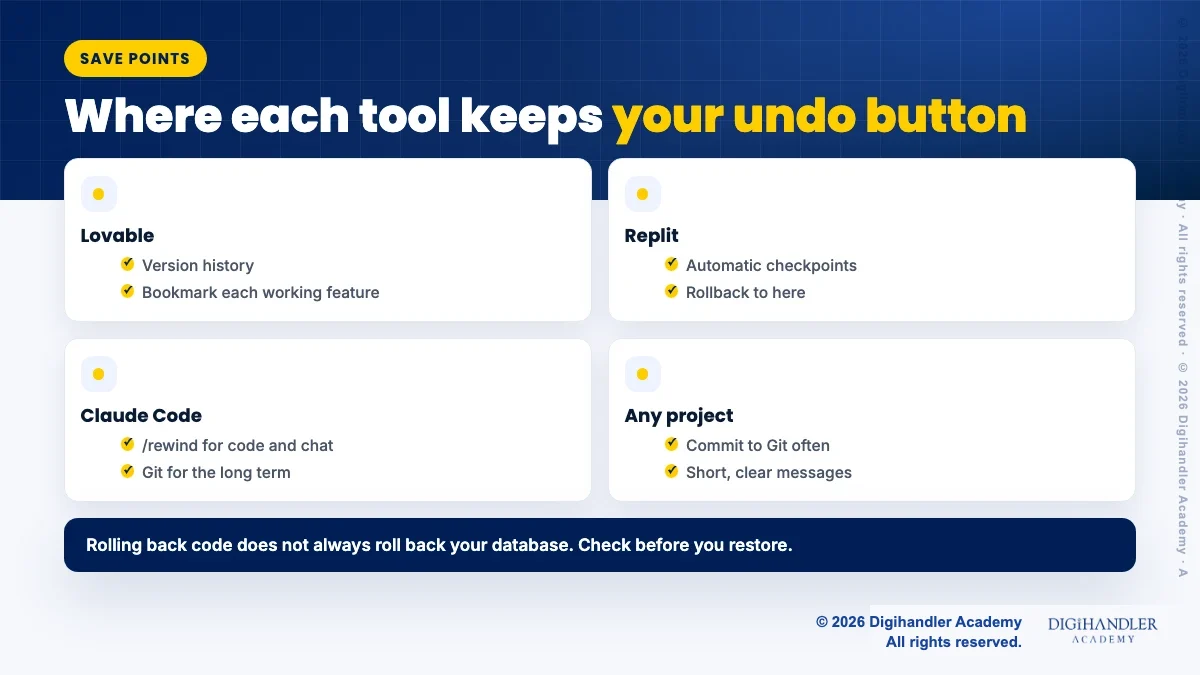
Version history is your undo button. Lovable lets you bookmark each working feature and restore it later. Replit Agent creates checkpoints automatically, and you can choose "Rollback to here". In Claude Code, /rewind rolls back code, chat or both to an earlier prompt.
Also commit to Git often with clear messages, as the AWS Labs tips advise. One warning from both Lovable and Replit: restoring code does not always restore your database, so check what a rollback covers before you click.
When the AI fails to fix a bug twice, a third "please fix it" rarely works. The chat now holds two wrong attempts, and the AI keeps reading them.
Claude Code's guide says to clear the chat after two failed corrections and write one better prompt with what you learned. Lovable suggests switching to Plan mode after a couple of failed fixes to find the root cause first.
Long chats get slow and confused. The AWS Labs tips recommend separate conversations for different features.
It also saves money. Claude Code's guide notes that every request sends the whole conversation, so old history keeps costing you. Its /clear command starts fresh between unrelated tasks.
The AI stops when the work looks done, not when it is done. Give it a way to know: a test, a page to open, or a result to match.
Ask for evidence, such as the command it ran and the output. "All tests pass" on its own tells you little. The AWS Labs tips go further and strongly recommend writing your own test cases, so you decide what "working" means.
Before you share the app, use it like a stranger would. Lovable's checklist is a good model.
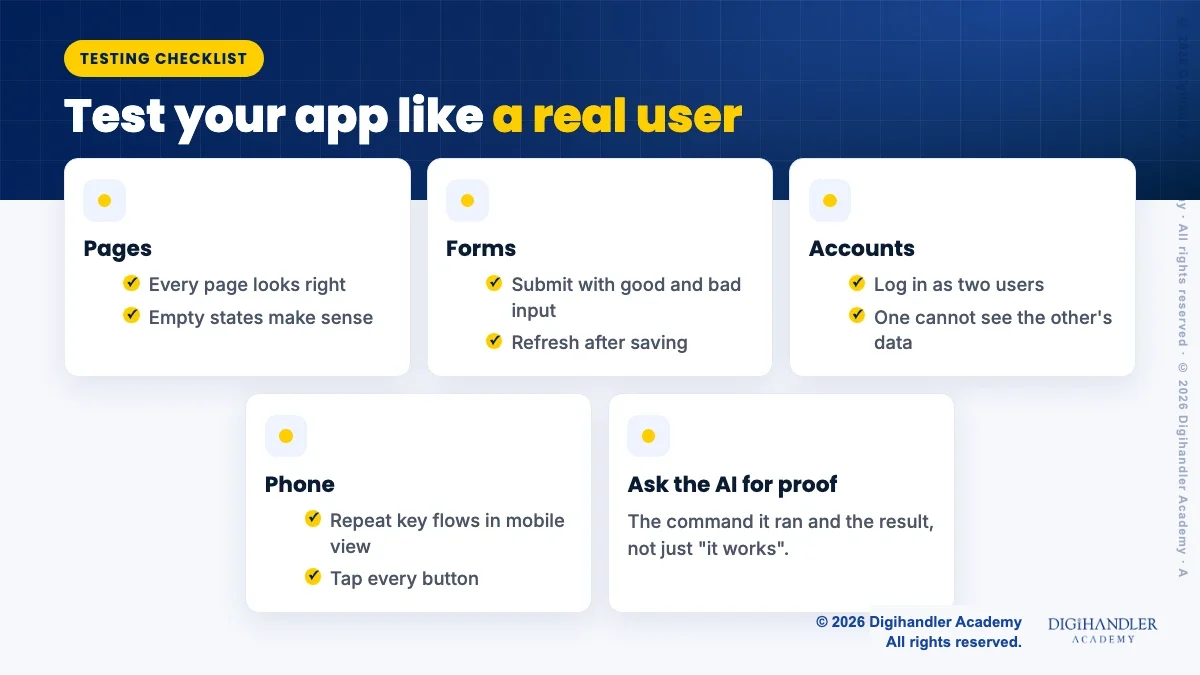
The AWS Labs tips say to never blindly trust AI-generated code. Treat it like work from a new intern: useful, but checked before it goes live.
Lovable advises running its security scan before the first publish and fixing anything marked critical. If your app takes payments or personal data, get a developer to review it. The download above includes a pre-publish checklist.
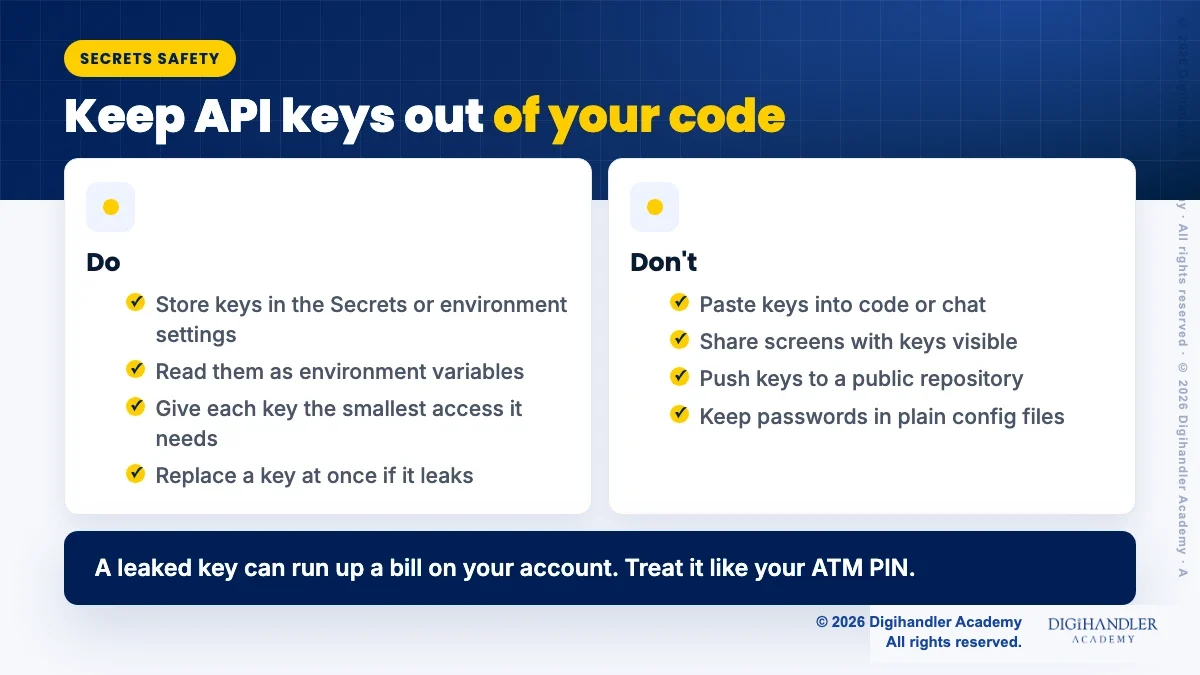
An API key is like your ATM PIN for a service. Replit warns that keys written into code can leak when you share code, push it to a public repository or share your screen.
Store keys in your tool's Secrets or environment settings instead. Replit says it encrypts secrets at rest and passes them to your app as environment variables. GitHub's push protection, on by default for user accounts, also blocks pushes to public repositories when it detects a secret. Never paste a key into the AI chat.
Vibe coding tools charge in credits or usage, and a looping agent can burn through them. As listed on Lovable's pricing page in November 2026, the free plan gives 5 build credits a day, up to 30 a month, and a Plan mode message costs 1 credit. These values may change. Lovable also lists a student discount for valid student emails.
On Replit, you can set a usage limit in Settings, and usage-based services pause when you hit it. Claude Code shows where usage goes with /usage. Prices and offers change, so check the official page before you buy: Lovable pricing, Replit pricing.
You do not need all 14 on day one. Pick by your stage. To compare tools first, see the best vibe coding tools, and to put these hacks into practice, try to build a website with AI.
Better prompts come from practice. Our guide to prompt engineering for marketers helps, and a free demo class is a good way to see AI tools used live.

Riya writes Digihandler Academy's guides and roadmaps. Every article is fact-checked and reviewed by Lovish Madaan, founder & trainer, who has run the Digihandler agency since 2018. More from Riya →
Make one small change per prompt and check it before moving on. Beginners often ask for a whole app in one message, and the AI then makes many hidden choices you cannot follow. Lovable's own guide says to change one thing, verify it in the preview, then continue. Pair this with saving each working version, so a bad prompt never costs you more than a few minutes of work. These two habits fix most beginner problems in any vibe coding tool.
It can be, if you treat the AI's code as unchecked work. Official guidance, such as the AWS Labs vibe coding tips, says never to trust AI code blindly. Test every form, log in as two users to check data stays private, keep API keys in a secrets manager, and run your tool's security scan before publishing. For apps that handle payments, health data or other personal details, ask an experienced developer to review the code before real users sign up.
Use three habits together. First, name what must not change in every prompt, for example "only edit the contact form". Second, save a version or Git commit each time a feature works, so you can roll back in one click. Third, if the AI fails to fix something twice, stop asking. Clear the chat or switch to plan mode, then write one better prompt that includes what you learned from the failed attempts.
Plan before you build, because fixing a bad plan costs less than fixing bad code. Keep prompts small and specific so the AI does less rework. Start a new chat for each feature, since long chats resend old history with every request. Set a spending cap where your tool allows it, such as Replit's usage limit in settings. Students should also check official student discounts, like the one Lovable lists on its pricing page as of November 2026 (offers may change).
No. Every hack here works with plain English prompts, so you can start with zero coding knowledge. Basic ideas still help a lot, though: what a database is, what an API key does, and how Git saves versions. Knowing these lets you write clearer prompts and spot risky answers. Many people learn these basics while building small projects, one feature at a time, which is also the safest way to vibe code.
Where AI genuinely saves marketers time on real client work, and where it quietly makes things worse.
Read article →
What decides whether an AI assistant quotes your page, and the fixes worth doing first.
Read article →