
n8n automation for beginners: build your first AI chatbot workflow
n8n was Day 1 of our “7 Days, 7 Masterclasses” programme in February, and we put it first on purpose. Automation changes how people think about marketing work: once you have watched an enquiry arrive, get answered and land in a spreadsheet without anyone touching it, you start seeing repetitive tasks everywhere. This n8n tutorial for beginners covers the three ideas you need, then walks through the three projects we built in that session, in plain language.
What n8n is, and the three ideas behind it
n8n is a workflow automation tool. You connect apps and services on a visual canvas, and n8n moves data between them when something happens. It sits in the same family as Zapier and Make, with two differences that matter to beginners: you can use its hosted cloud version or run it yourself on your own server, and it has strong built-in support for AI models, so building a chatbot does not require writing an application from scratch.
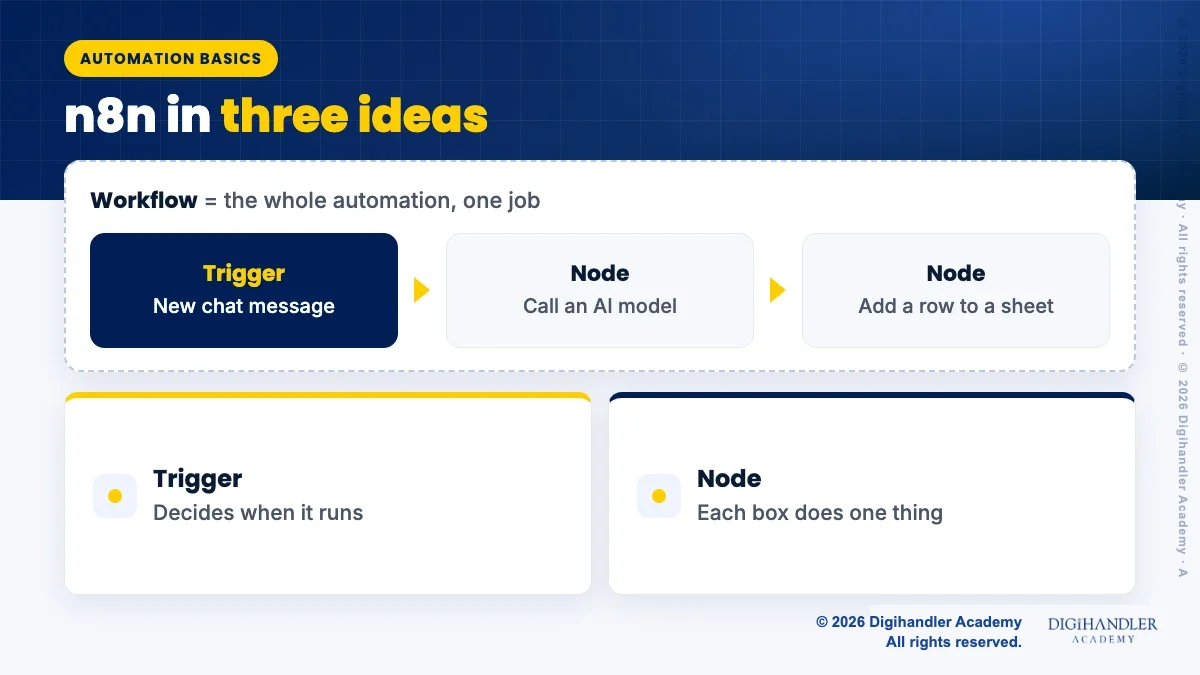
Everything in n8n comes down to three ideas. Once these are clear, the rest is practice.
- Workflow: the whole automation, drawn as a chain of boxes on the canvas. One workflow does one job, such as answering enquiries.
- Trigger: the first box, which decides when the workflow runs: a new chat message, a form submission, a schedule, or a webhook call from another app.
- Node: every box after the trigger. Each node does one thing: call an AI model, send a Telegram message, add a row to a sheet, check a condition.
Project 1: an AI chatbot using the Gemini API
The first build is a chatbot you can talk to inside n8n itself. Start a new workflow and add a chat trigger, which gives you a test chat window. Connect it to an AI agent node, and give that node a chat model. We used Google’s Gemini models, which you connect by creating an API key in Google AI Studio and adding it to n8n as a credential. Credentials are stored separately from the workflow, which means you never paste the key into a node directly.
The part beginners skip is the system message, the instruction that tells the model who it is. Write it like a brief for a new receptionist: the business it represents, what it can answer, what it must not answer, the tone to use, and what to do when it does not know (ask for a phone number and say someone will call back). Add a memory node so the bot remembers earlier messages in the same conversation. Then test it hard. Ask it about prices, ask it something off-topic, try to make it promise a result. Every bad answer is a line to add to the system message.
Project 2: connecting the chatbot to Telegram
A chatbot that only lives inside n8n is a demo. The second project puts it where people actually type. Telegram is the friendliest platform for a first attempt because creating a bot is free and quick: you message Telegram’s BotFather, choose a name, and receive a bot token. Add that token to n8n as a Telegram credential.
Now replace the chat trigger with a Telegram trigger, which fires whenever someone messages your bot. Pass the message text into the same AI agent node from project 1, then add a Telegram node at the end that sends the agent’s reply back to the same chat ID. Activate the workflow, open Telegram on your phone, and message your bot. The first time a reply arrives on your phone from something you built in an afternoon is when automation stops feeling abstract.
WhatsApp is the platform most Indian businesses actually want, and n8n can connect to it through the WhatsApp Business Platform. The setup involves a Meta business account, verification steps and message template rules, which is why we teach it after Telegram rather than before.
Project 3: saving enquiries to Google Sheets with a personalised welcome
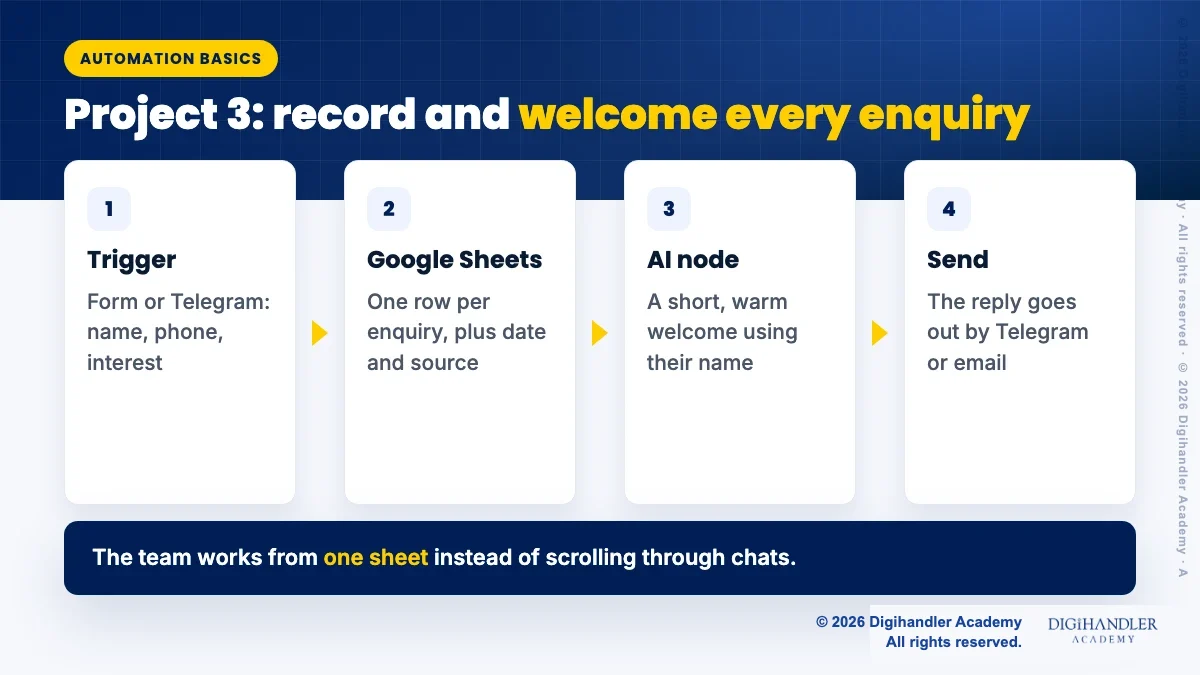
The third project turns the chatbot into a lead tool. Add a simple form trigger, or extend the Telegram flow, so that a new enquiry collects a name, phone number and what the person is interested in. Connect a Google Sheets node, sign in with your Google account as a credential, choose the sheet, and map each form field to a column. Add a column for the date and the source, so you know later where each enquiry came from.
Then pass the same details to the AI node with an instruction like: write a short, warm welcome message for this person, mention the course or service they asked about, and tell them when someone will call. Send that message back through Telegram or email. The result is a workflow where every enquiry is recorded, every person gets a reply that uses their name and their interest, and the team works from one sheet instead of scrolling through chats.
Costs and limits, stated honestly
n8n can be self-hosted, which needs a server and someone comfortable maintaining it, or used on n8n’s own cloud plans, which are paid after any trial period. The Gemini API has a free tier with usage limits that is enough for learning and testing; a busy business chatbot will eventually need a paid plan. Telegram bots are free. Google Sheets works on a normal Google account but is not a database, and becomes slow and messy once thousands of rows pile up.
Check the current pricing and limits on each provider’s own page before building anything for a client, because these change, and plan for the fact that every AI reply has a small running cost once you move beyond free tiers.
Where automation goes wrong
Most broken automations we see were not technically wrong. They were trusted too early. Someone built a workflow, tested it with two messages, switched it on and stopped watching. Then the API key expired, or a field name changed in the form, and enquiries quietly stopped landing in the sheet for a week.
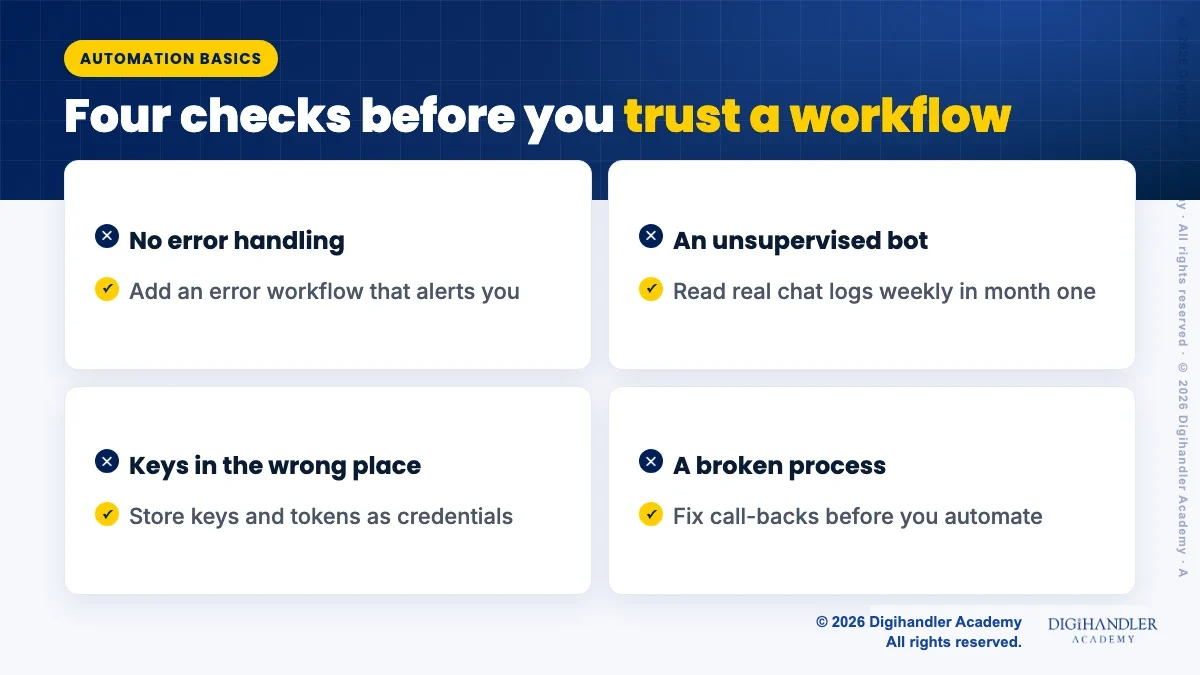
Build every workflow assuming something will eventually fail, and decide in advance who notices and who fixes it. These are the problems we check for first:
- No error handling: set up an error workflow in n8n that alerts you on Telegram or email when any workflow fails.
- An unsupervised bot: read real chat logs every week for the first month. Bots invent answers, including prices and promises.
- Keys in the wrong place: always store API keys and tokens as credentials, never in node text or shared screenshots.
- Automating a broken process: if nobody calls enquiries back today, an automation only collects more people to disappoint.
- Privacy: tell people what you store, keep only what you need, and limit who can open the sheet.

Riya writes Digihandler Academy's guides and roadmaps. Every article is fact-checked and reviewed by Lovish Madaan, founder & trainer, who has run the Digihandler agency since 2018. More from Riya →
Where we teach this
Common questions
No. Everything in this tutorial is built on the visual canvas by adding nodes and filling in fields. Coding helps later, because n8n has a Code node for small JavaScript or Python snippets and understanding JSON makes data mapping easier. But a beginner can build a working chatbot, connect it to Telegram and save enquiries to Google Sheets without writing code. What you do need is patience with testing, because most problems are a wrong field name or a missing credential, not a programming error.
n8n’s source is available and you can self-host it, which avoids n8n subscription charges but means paying for and maintaining a server yourself. The hosted cloud version is a paid service after any trial. Connected services have their own pricing: the Gemini API has a free tier with limits that is fine for learning, and Telegram bots are free. Always check each provider’s current pricing page before promising a client that an automation will cost nothing to run.
Learn on Telegram, deploy on whichever platform the business’s customers actually use, which in India is usually WhatsApp. Telegram lets you create a bot in minutes with a single token, so you can focus on the workflow and the AI instructions. WhatsApp requires the WhatsApp Business Platform through Meta, a verified business setup and template rules for certain messages. Once your logic works on Telegram, moving it to WhatsApp mostly means swapping the trigger and the sending node.
It should not, and we do not build them that way. A chatbot is good at answering repeated questions at any hour, collecting details and sending a prompt first reply. It is poor at judgement, negotiation and anything sensitive, and it can state wrong information confidently. The workflow in this post is designed to hand every enquiry to a person with the details already recorded. Treat the bot as the first desk, not the whole office, and review its conversations regularly.
More from the blog
AI SEO: how to get cited inside AI search results
Search is shifting from ten blue links to generated answers. What decides whether an AI assistant quotes your page, and the fixes worth doing first.
The power of a local business listing: the setup checklist we teach
For a shop in Rohtak, a properly set up Google Business Profile out-earns most paid campaigns. The exact checklist, in the order that matters.