8 Best Vibe Coding Tools in 2026 (Free Plans Compared)
The best vibe coding tools let you build a website or app by typing what you want in plain English. This list covers eight of them, checked on each vendor's own pricing page in November 2026: what each tool does, what the free plan really gives you, who it suits and one honest limitation. You also get a free printable picker to choose the right one.
Riya Malik 8 min read Updated November 2026
What are vibe coding tools, and how did we pick these 8?
Vibe coding means you describe what you want, and an AI writes the code. It is like telling a tailor what shirt you want instead of stitching it yourself. If the idea is new to you, start with our plain guide to vibe coding.
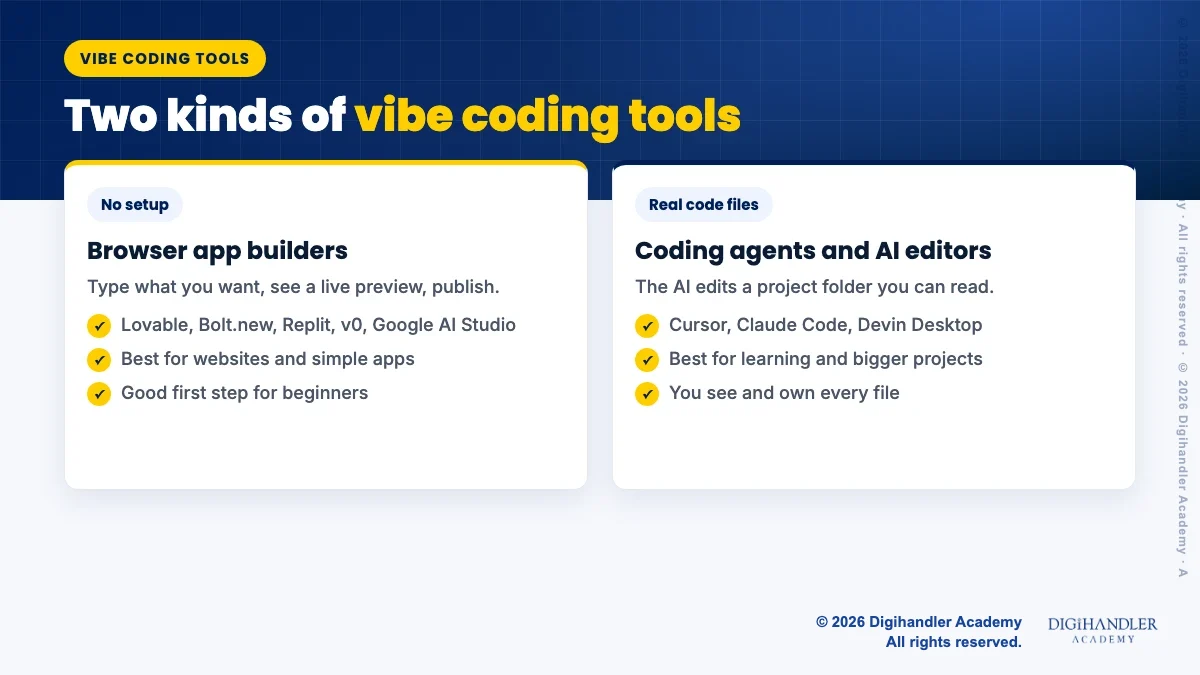
These tools come in two groups. Browser app builders (Lovable, Bolt.new, Replit, v0 and Google AI Studio) need no setup at all. Coding agents and editors (Cursor, Claude Code and Devin Desktop) work on code files and suit people learning to code.
We picked tools for a free plan or low starting price, ease for beginners, and whether you can take your code with you. The pricing pages showed prices in US dollars, and most say taxes such as GST are added on top. Prices and offers change often, so check the official page before you pay.
Browser builders need no setup. Coding agents work on real code files.
1. Lovable: the easiest way to get a working web app
Lovable is a chat based app builder. You type something like "Build a landing page for a Rohtak coaching centre with a demo class form" and it builds a web app you can publish.
Free plan:: 5 build credits a day, up to 30 a month, plus 20 Cloud credits a month for hosting, as listed on Lovable's pricing page in November 2026.
Paid and student deal:: Pro starts at $25 a month for 100 credits, as listed in Lovable's plan docs in November 2026 (prices may change). Students with a school email can get 50% off that plan for up to 12 months on Lovable's student page.
Suits:: Anyone who wants a site or simple app fast.
Limitation:: Credits go fast on big requests. Lovable's own examples show a small button change costing 0.5 credits and a full landing page with images costing 2, which Lovable calls illustrative examples.
Free PDF: Vibe Coding Tool Picker
A printable comparison of all 8 tools, a fill-in project brief, a tool picker with tick boxes, and credit-saving and pre-launch checklists to use before you build.
2. Bolt.new: best for a real domain on a small budget
Bolt.new builds websites, apps, slides and prototypes from chat. Hosting and databases come through Bolt Cloud.
Free plan:: 300,000 tokens a day and 1 million tokens a month, with Bolt branding on your site, as listed on Bolt's pricing page in November 2026. Free tokens do not roll over.
Paid:: Pro is $25 a month with no daily limit, from 10 million tokens a month, custom domain support and no Bolt branding, as listed in November 2026 (prices may change).
Suits:: Small businesses, like a Jaipur boutique, that want their own domain on the site.
Limitation:: Bolt uses tokens when it reads your prompts and project files, so a bigger project can use up the free limit sooner.
3. Replit Agent: best when your app needs a database
Replit Agent builds the app, checks its own work and fixes problems. It has a Plan mode and checkpoints you can roll back to, as its Agent docs explain.
Free plan:: The Starter plan gives daily Agent credits up to a monthly cap, the faster Lite build mode, and one free published app, as listed in Replit's plan docs.
Paid:: Core is $20 a month, or $18 a month billed yearly. Pro is $100 a month, or $90 billed yearly, as listed on Replit pricing in November 2026 (prices may change).
Suits:: Builders who want app, database and hosting in one place.
Limitation:: The free published app link goes down after 30 days, so use it for testing, not for a live business.
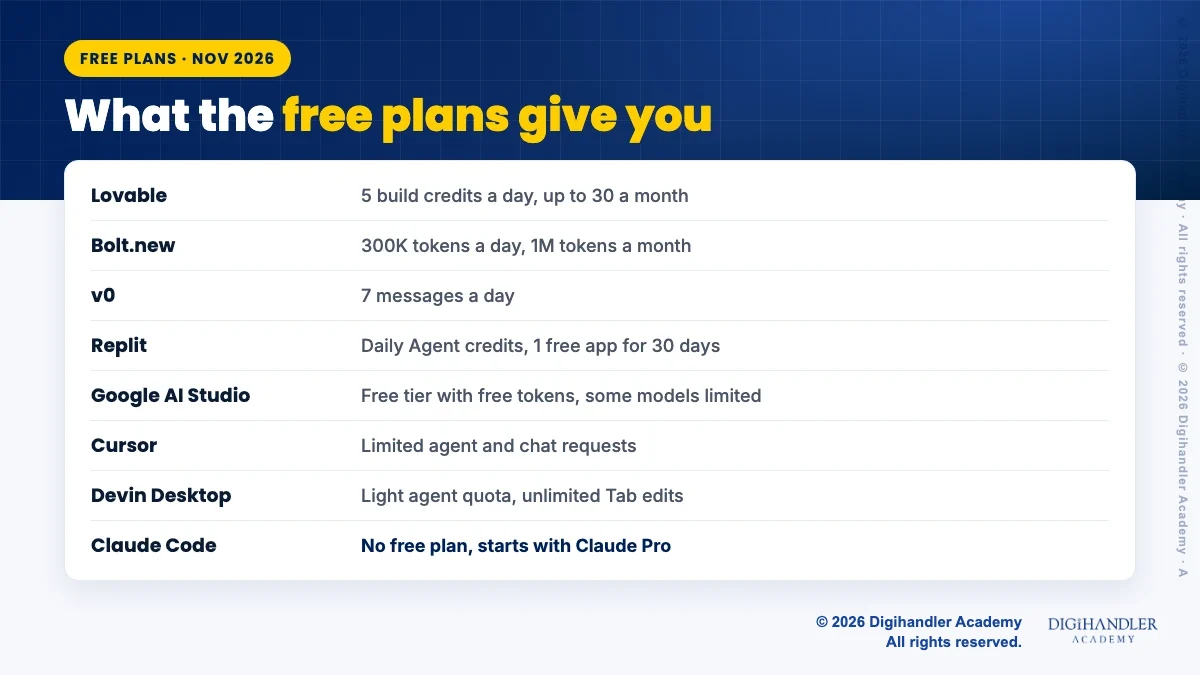
What each free plan gives you, as listed in November 2026.
4. v0 by Vercel: best for good looking pages
v0 is Vercel's app builder. It is good at clean web designs, lets you edit visually with Design Mode, syncs with GitHub and deploys to Vercel.
Free plan:: Free access with a limit of 7 messages a day, as listed on v0 pricing in November 2026.
Paid and student deal:: Plus is listed from $30 per user a month with $30 of monthly credits in November 2026 (prices may change). Prices are in USD and exclude GST. Verified students at eligible schools can get one year of free access on v0 for Students.
Suits:: Designers and marketers who care how the page looks.
Limitation:: Seven messages a day runs out fast, so write one full, clear prompt.
5. Google AI Studio Build mode: best free way to add Gemini to an app
Build mode is the vibe coding part of Google AI Studio. You describe an app and it writes a React web app or a native Android app with a live preview, as its Build mode docs explain.
Free plan:: The Gemini API free tier includes Google AI Studio access and free input and output tokens, with limited access to some models, per Google's pricing page. Google says free tier content is used to improve its products.
Useful extras:: GitHub sync, ZIP download and deploy to Cloud Run, with your API key kept on the server.
Suits:: Anyone who wants an app with AI features inside, like a caption writer for a cafe.
Limitation:: Google notes Cloud Run hosting may cost money based on use.
6. Cursor: an AI code editor for learners
Cursor is an AI code editor. You open a project folder, chat with its agent, and it edits the files. As of November 2026, its pricing page bundles Cursor with Grok and X subscription features.
Free plan:: Limited agent requests and limited chat requests, as listed on Cursor pricing in November 2026.
Paid:: Plus is an introductory $8 a month and uses only Grok models. Premium is $30 a month. Prices exclude taxes and were listed in November 2026 (they may change).
Suits:: Learners who want to see and understand the code the AI writes.
Limitation:: Third party models are only on Premium and above, and that usage is billed separately at API list price, so your bill can grow.
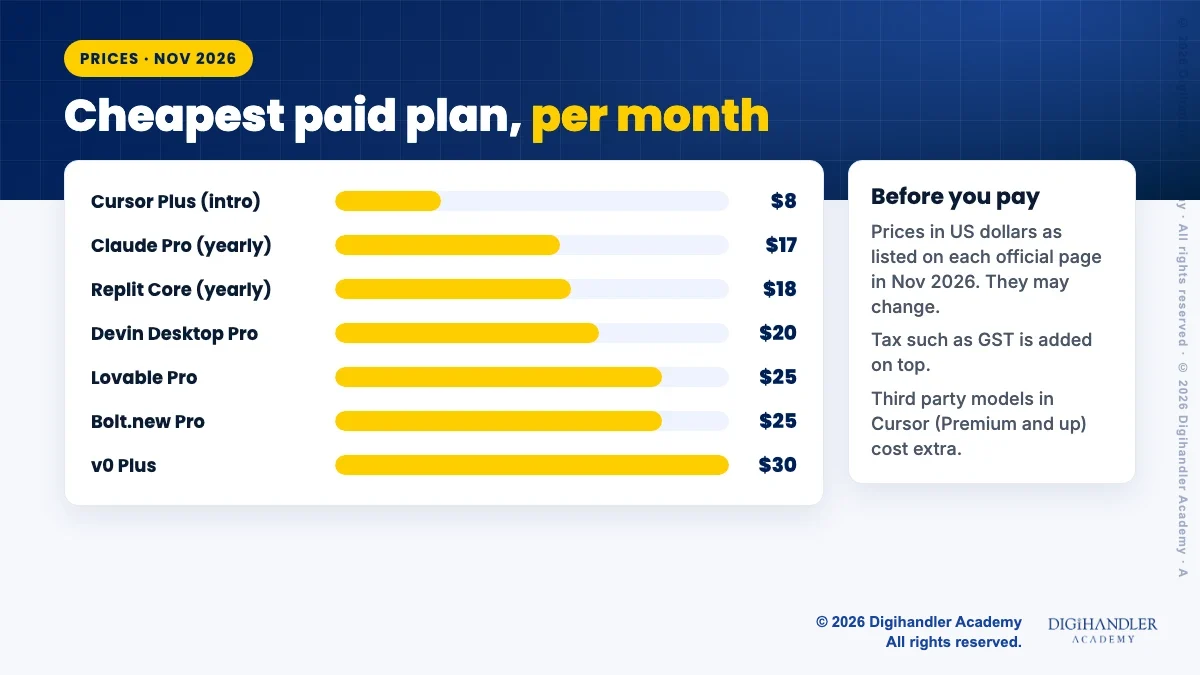
The first paid step for each tool, before tax.
7. Claude Code: a coding agent that grows with you
Claude Code is Anthropic's coding agent. It reads your project, edits files, runs commands and works with git. It runs in the terminal, VS Code, the desktop app and the browser, as the Claude Code docs explain.
Plan:: Not on the free plan. It comes with Claude Pro at $20 a month, or $17 a month on a yearly plan, as listed on Claude pricing in November 2026 (prices may change).
Hack:: Add a CLAUDE.md file to your project with your rules, such as brand colours or "explain every change simply". Claude Code reads it at the start of every session.
Suits:: Freshers moving into real coding, and marketers who automate reports. See our AI tools roadmap for where it fits.
Limitation:: The terminal feels strange at first. Start in the desktop app or the web version.
8. Devin Desktop (formerly Windsurf): a free AI editor to practise in
Windsurf has a new name. Its site now says Devin Desktop is the new name for Windsurf, and that the editor, settings and plans carry over, as shown on the Devin Desktop page.
Free plan:: A light quota for agent coding, limited models, and unlimited Tab completions and inline edits, as listed on Devin pricing in November 2026.
Paid:: Pro is $20 a month, as listed in November 2026 (prices may change).
Suits:: People who want to practise in an AI editor without paying.
Limitation:: Many tutorials still say Windsurf, which can confuse beginners. Its own FAQ suggests smaller models for routine tasks so your quota lasts longer.
How do I choose the right vibe coding tool?
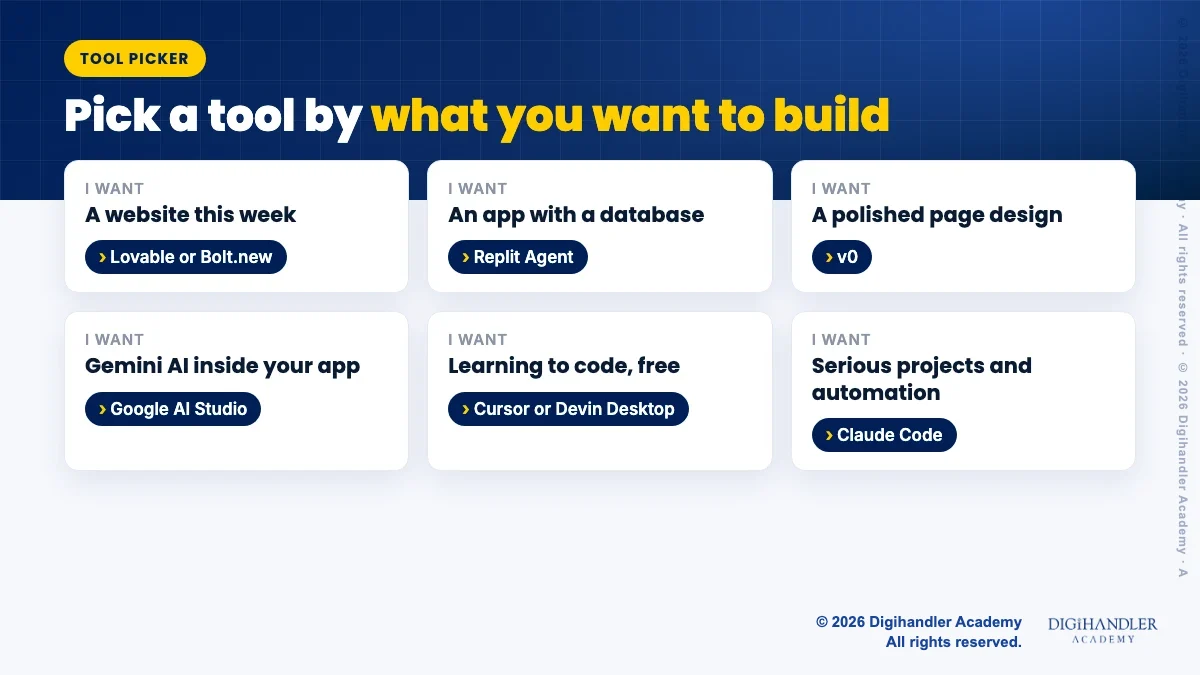
Start from your goal, not from the most famous name. Then try the free plan for one small project before you pay. The free picker PDF above walks you through this with tick boxes.
A website this week:: Lovable or Bolt.new.
An app with a database:: Replit Agent.
A polished design:: v0.
An AI feature inside your app, free:: Google AI Studio.
Learning to code:: Cursor or Devin Desktop on their free plans.
Serious projects and automation:: Claude Code.
Pick by what you want to build first.
What are the best hacks to save credits?
Free plans are small, so every message counts. These habits come straight from the tools' own help pages and work in almost all of them. For more, read our vibe coding tips and hacks.
Plan first. Lovable's Plan Mode costs 1 credit per message, and Replit has a Plan mode too.
Ask for one change per message, and say exactly where it goes.
Save working versions with checkpoints or GitHub sync before big changes.
Use free daily allowances every day, because they do not roll over.
Switch to a smaller model for routine edits when the tool lets you.
What should I check before I share my app?
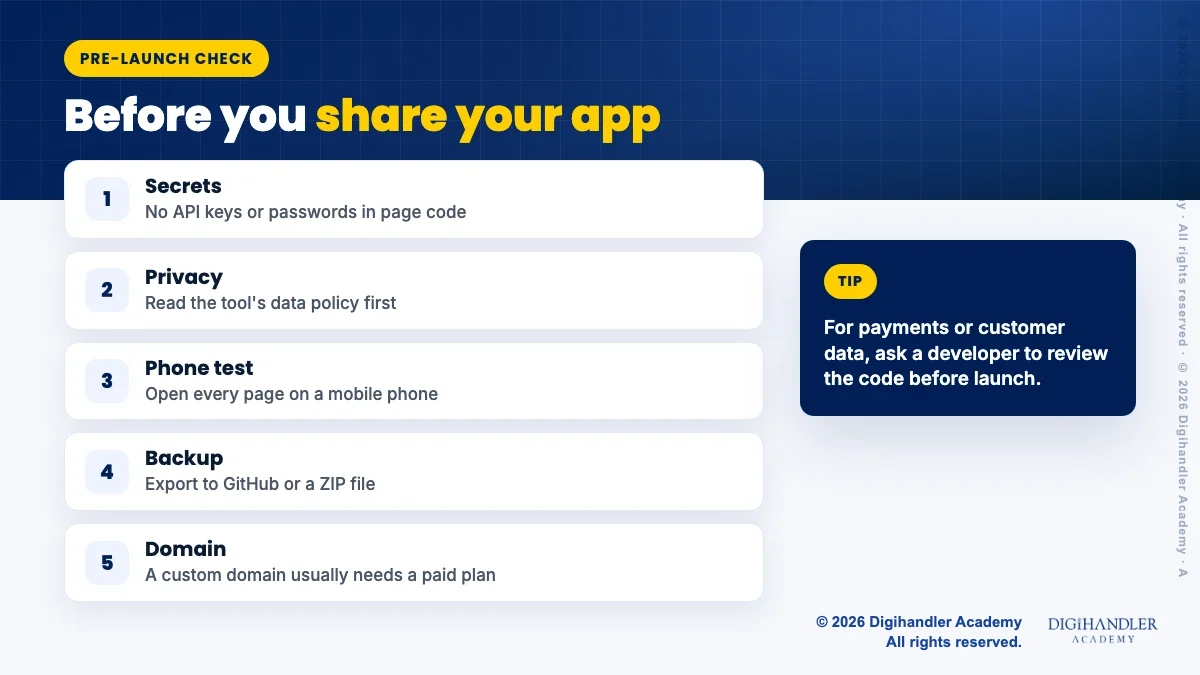
A tool that builds fast can also make mistakes fast. Run this short check before real customers see your app. If you only need a simple business site, this no code website guide may be enough.
Secrets:: No API keys or passwords inside page code. Google AI Studio keeps your Gemini key on the server for this reason.
Privacy:: Read each tool's data policy before adding customer details.
Phone test:: Open every page on a mobile phone, since many visitors arrive on mobile.
Backup:: Export to GitHub or a ZIP so you are not locked in.
Learn with a trainer:: If you want guidance, the academy's AI Tools course lets you try a free demo class first.
Five checks before real customers see your app.
Written by Riya MalikContent Writer, Digihandler Academy
Riya writes Digihandler Academy's guides and roadmaps. Every article is fact-checked and reviewed by Lovish Madaan, founder & trainer, who has run the Digihandler agency since 2018. More from Riya →
For a complete beginner, Lovable or Bolt.new is the easiest start because both run in the browser and need no setup. You type what you want, see a live preview and publish. Lovable's free plan gives 5 build credits a day, and Bolt's free plan gives 300,000 tokens a day, as listed on their pricing pages in November 2026. If you want to learn real coding as you go, try a free AI editor such as Cursor or Devin Desktop instead, so you can read the code the AI writes.
Yes. Lovable, Bolt.new, v0, Replit, Google AI Studio, Cursor and Devin Desktop all list a free plan in November 2026. The limits are small: v0 allows 7 messages a day, Lovable up to 30 build credits a month, and Bolt 1 million tokens a month. Free plans suit learning and testing one small project. For a live business site you will usually need a paid plan for a custom domain or more usage. Claude Code is not on Claude's free plan, it starts with the Pro plan.
It can be, if you check it like any other website. Make sure no API keys or passwords sit inside the page code, test every form and page on a phone, and read the tool's data policy before you collect customer details. Keep a backup by exporting the code to GitHub or a ZIP file. For a simple brochure site, a vibe coded page is often fine. For payments or sensitive data, have a developer review the code before launch.
Both build web apps from chat and both list Pro at $25 a month in November 2026 (prices may change), so the choice comes down to style. Lovable counts credits per message and offers a 50% student discount for up to 12 months with a school email. Bolt counts tokens, gives a larger free daily allowance and includes custom domain support on Pro, with unused paid tokens kept for up to two months. Try both free plans on the same small project and keep the one that feels easier.
No, you can build a simple site or app without writing code in tools like Lovable, Bolt.new or v0. But some basic knowledge helps a lot. When something breaks, understanding pages, databases and error messages lets you write better prompts and fix problems faster. A good path is to start in a browser builder, then move to an AI editor like Cursor or a coding agent like Claude Code as you grow. Many freshers learn the basics this way, one small project at a time.
More from the blog
AI in digital marketing: what actually works right now
Where AI genuinely saves marketers time on real client work, and where it quietly makes things worse.