AI in digital marketing: what actually works right now
Where AI genuinely saves marketers time on real client work, and where it quietly makes things worse.
Read article →
Claude Projects are the easiest way to stop explaining yourself to Claude again and again. Instead of pasting the same brief, style guide and background files into every new chat, you put them in one Project once. Every chat you start inside that Project already knows them. This guide covers what a Project is, how to set one up, how it affects your usage, who can share one, and when a skill or a simple saved prompt is the better tool.
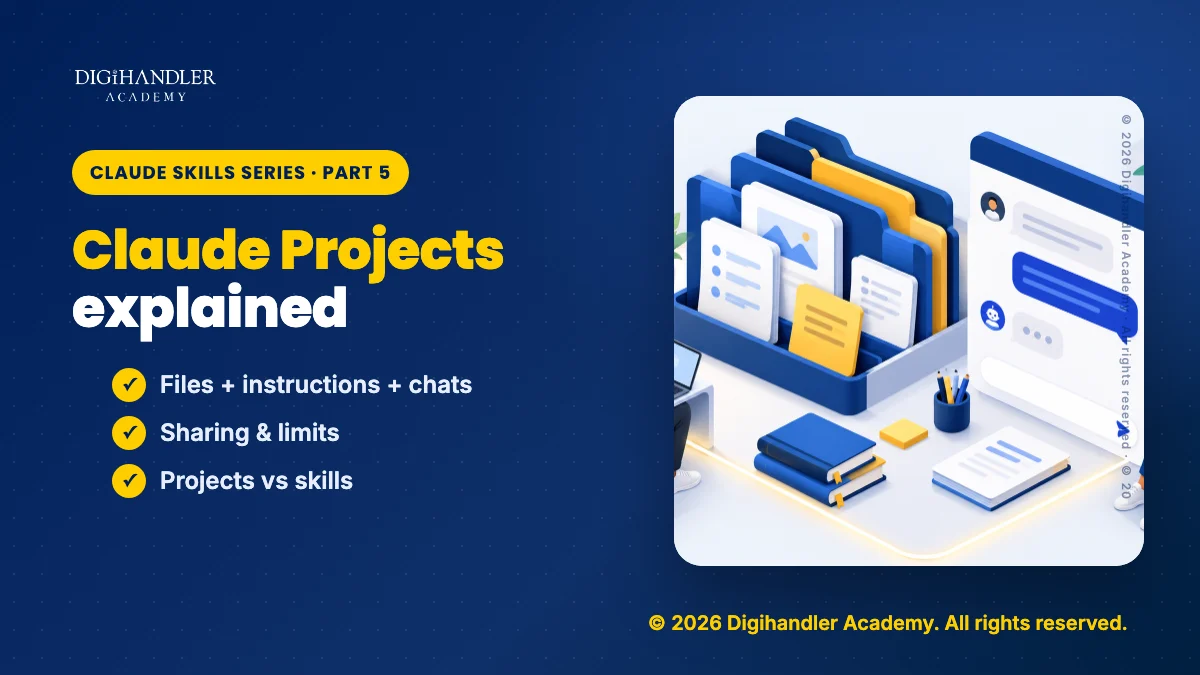
A Claude Project is a self-contained workspace inside Claude. Anthropic describes each one as having its own chat history and its own knowledge base. Think of it as a labelled folder on your desk: the brief, the notes and the rules for one job all live inside it.
Projects are one of several ways to shape how Claude works. Skills are another, and our guide to what Claude skills are explains that side. Every Project has three main parts:
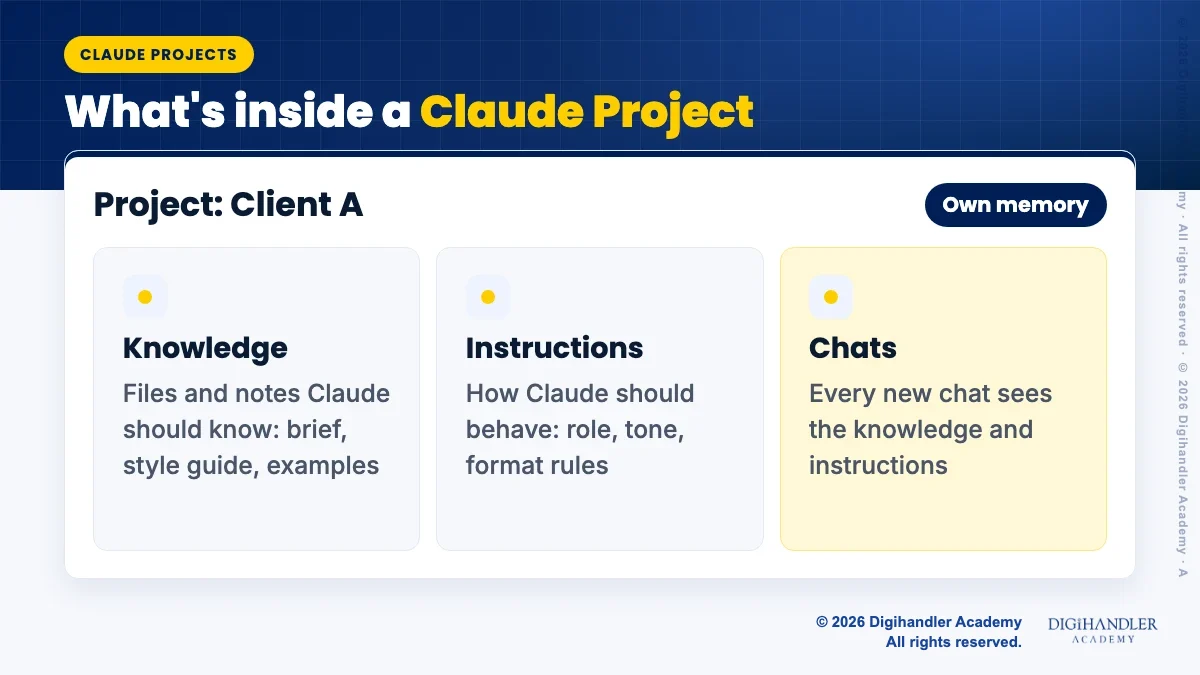
When you open a new chat inside a Project, Claude starts with the Project's instructions and knowledge already in view. You just ask.
Chats inside the same Project do not read each other. If you settle something important in one chat, add it to the project knowledge so the next chat knows it too.
The Project's name and description are for you. Anthropic notes that Claude cannot see them, so anything Claude must know belongs in the instructions or the knowledge.
Memory is kept per Project too. Inside a Project, Claude uses that Project's memory plus your general account memory, but never memory from your other Projects. If you want a Project fully sealed off, turn off the 'Use account memory' option on the Project's page.
You can do this in the Claude web app in about five minutes. These steps follow Anthropic's own help centre.
claude.ai/projects.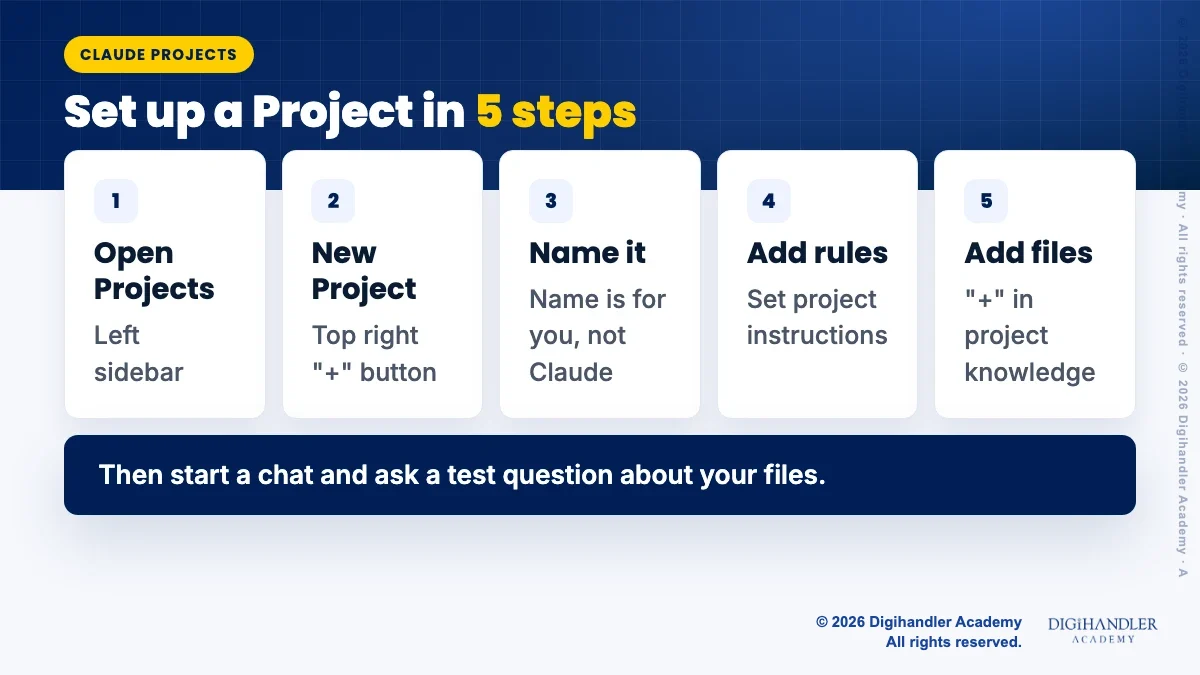
Keep the two jobs separate. Knowledge is what Claude should know. Instructions are how Claude should behave. Good uses for a Project include one per client, one per course you teach, or one for a long report.
Below is a full set of project instructions for a made-up cafe client. Copy it and change the details. For help writing your own, the same rules that make a good chat prompt apply, and our simple prompt formula for Claude works well here.
You are the content assistant for GreenLeaf Cafe, a vegetarian cafe.
Audience: college students and young professionals.
Tone: warm, simple, no jargon.
Follow brand-guide.pdf for words to use and avoid.
Keep Instagram captions under 60 words.
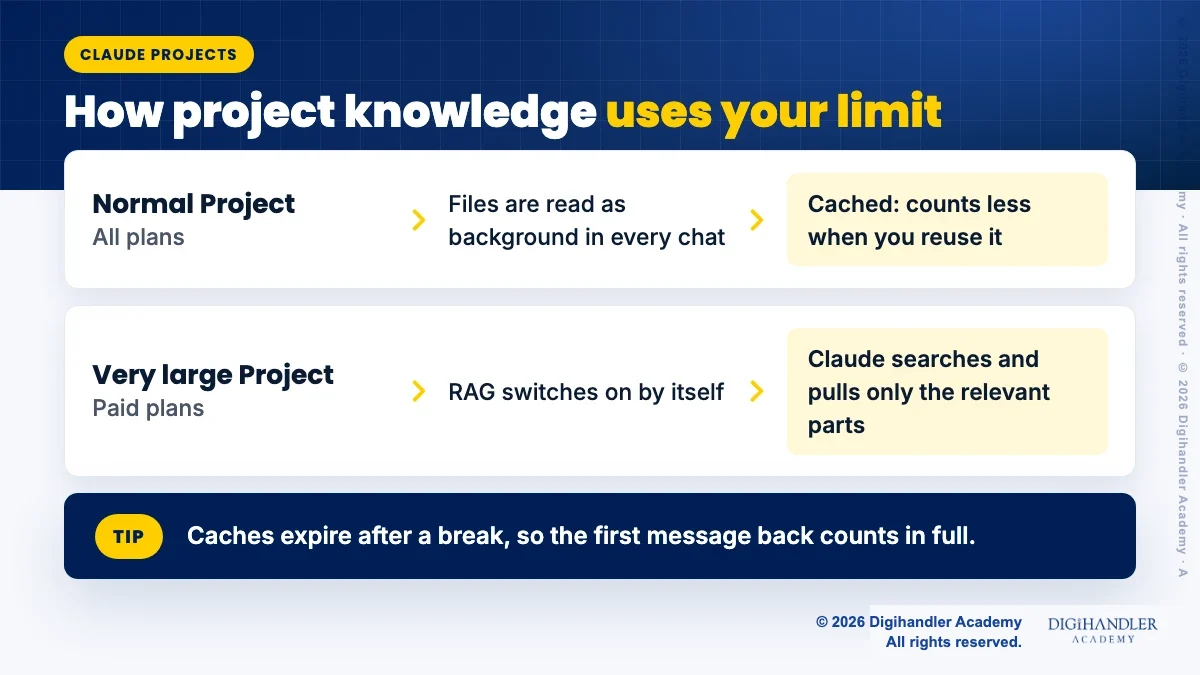
If a detail is not in the project files, ask me instead of guessing.Short answer: a Project with lots of files can use more of your limit per message, but it is usually cheaper than uploading the same files again in every chat.
Here is why. Your project knowledge is loaded as background for every chat in the Project, so a bigger knowledge base means more for Claude to read with each message. The good news, from Anthropic's usage guide, is that Project content is cached, and cached content counts less against your limits when it is reused. The catch is that caches expire after a period of inactivity, so the first message after a long break counts in full again.
Very large Projects work differently on paid plans (Pro, Max, Team and Enterprise). When project knowledge gets close to what Claude can hold at once, Claude switches on retrieval, called RAG, automatically. Instead of reading every file, it searches your knowledge and pulls in only the relevant parts. Anthropic says this lets a Project hold up to 10 times more content.
Tip: upload your core documents once, remove files you no longer need, and keep related questions in the same Project.
Anthropic is testing a new version of Projects. In this beta, a Project is one ongoing conversation where Claude splits work into parallel threads that run in the cloud. It is reaching select Pro and Max users in Claude Code first, and chat Projects stay on the current version for now.
Here are the current limits for chat Projects, from Anthropic's help centre:
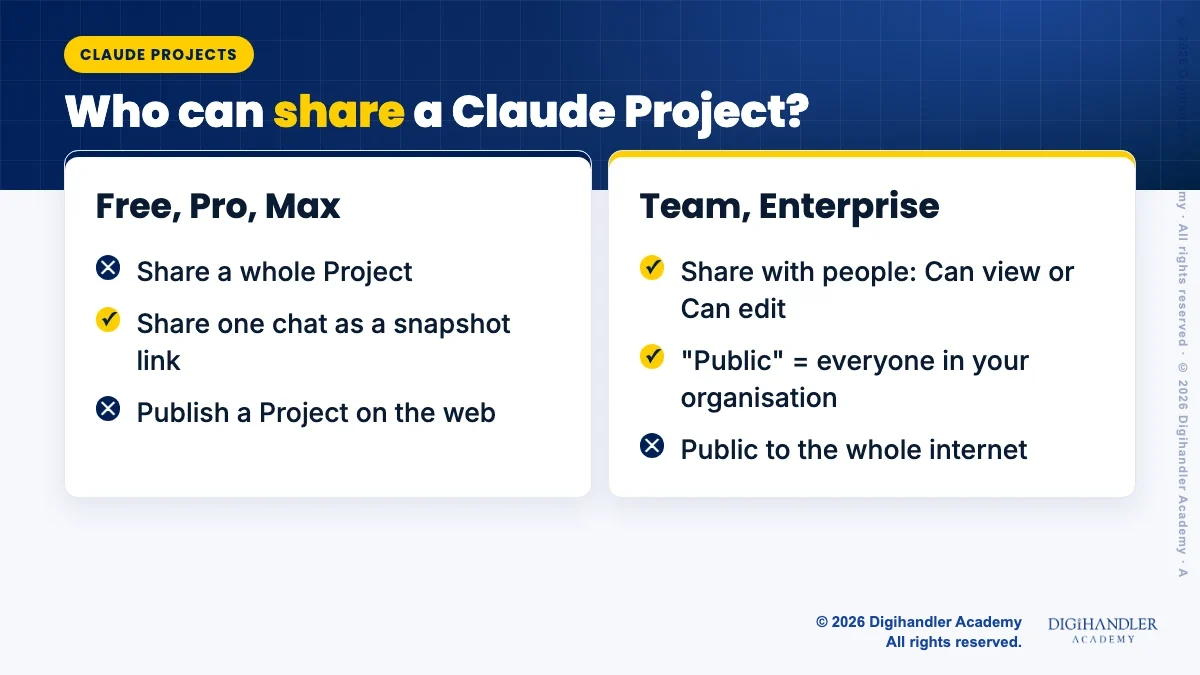
Project sharing is available on Team and Enterprise plans only. There you can keep a Project private or make it public, but 'public' means everyone in your organisation, not the whole internet. To share, click 'Share project' next to the Project name, add people, and pick 'Can view' (see the Project and chat in it) or 'Can edit' (change instructions and knowledge, and manage members).
Your own chats stay private even inside a shared Project, unless you share a chat yourself.
On Free, Pro and Max there is no way to share a Project, and Anthropic does not describe any way to publish a Project on the open web. What you can do is share a single chat as a snapshot link. Anyone with the link sees the messages up to the moment you shared it. On Team and Enterprise plans, chat links only work inside your organisation.
Anthropic's help centre explains how to delete a Project: open the three dots menu, choose 'Delete', then confirm with 'Yes, delete'. It does not describe any way to restore a Project after that. Treat deleting as permanent.
If you might need a Project again, archive it instead. Archiving keeps the knowledge, members and sharing settings. Archived Projects sit in the archived projects tab, and you can bring one back through the three dots menu with 'Unarchive'. An archived Project cannot be deleted until you unarchive it, which adds a useful safety step.
These three tools solve different problems. Anthropic sums it up well: a Project gives Claude what it needs to know, while a skill teaches Claude how to do something.
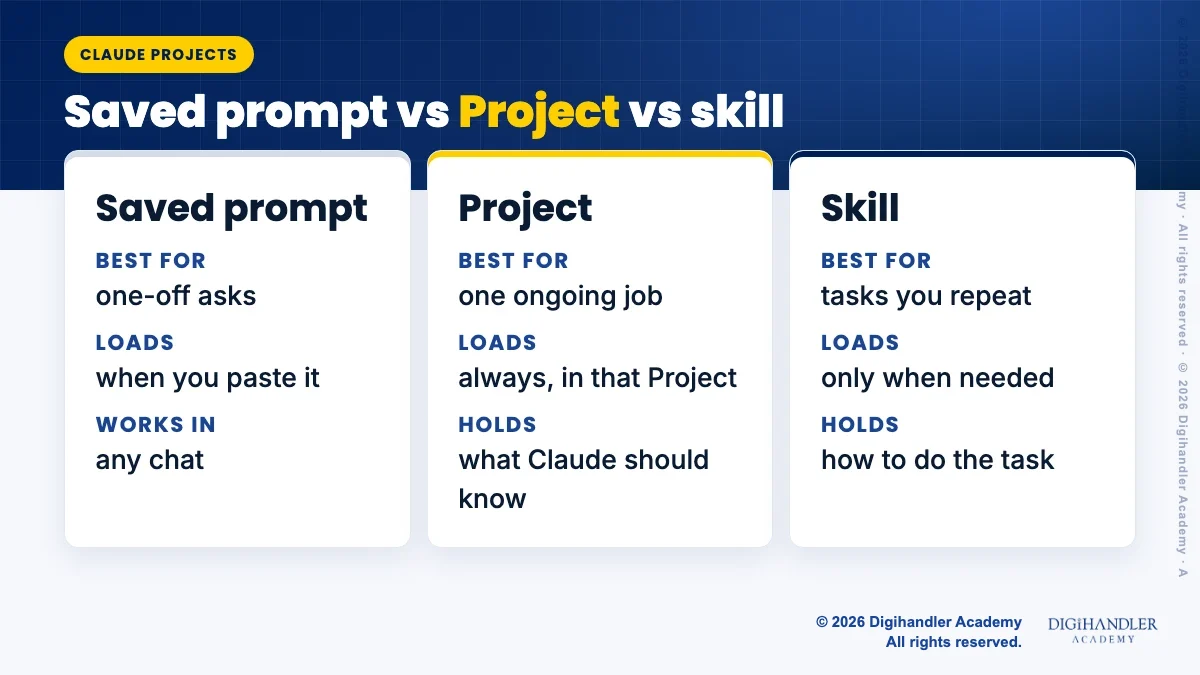
If you keep retyping the same prompt, or copying the same instructions into several Projects, turn it into a skill. Our guide on how to create your own Claude skill walks you through it without any code.
The two also work well together. The Project holds a client's files, and the skill holds your method. If you want guided practice with Claude and other AI tools for marketing work, see our AI tools course.

Riya writes Digihandler Academy's guides and roadmaps. Every article is fact-checked and reviewed by Lovish Madaan, founder & trainer, who has run the Digihandler agency since 2018. More from Riya →
A Claude Project is a workspace inside Claude for one ongoing job, such as a client, a course or a report. You upload files to its project knowledge and write project instructions once. Every chat you start inside the Project can then use those files and follow those instructions automatically, so you do not need to paste the same background into each new conversation. Each Project also keeps its own chat history and its own memory, separate from your other Projects.
Yes. According to Anthropic's help centre, Projects are available to all users, including the free plan, but free users can create a maximum of five Projects. Paid plans (Pro, Max, Team and Enterprise) add an automatic retrieval mode for very large Projects, which lets a Project hold up to 10 times more content. Sharing a Project with colleagues is limited to the Team and Enterprise plans.
Project knowledge is loaded as background for every chat in the Project, so a large knowledge base means more content per message. However, Anthropic says Project content is cached and counts less against your usage limits when it is reused, which usually makes it cheaper than uploading the same files again in each chat. Caches expire after inactivity. On paid plans, very large Projects switch to retrieval, where Claude searches for only the relevant parts.
Not to the open internet. Anthropic's help centre only describes Project sharing on Team and Enterprise plans, and there 'public' means visible to everyone in your organisation. You can also invite specific people with 'Can view' or 'Can edit' access. On Free, Pro and Max you cannot share a Project at all, but you can share a single chat as a snapshot link that anyone with the link can open.
Anthropic's help centre explains how to delete a Project but does not describe any way to restore one, so treat deletion as permanent. If you think you may need a Project later, archive it instead. Archiving keeps its knowledge, members and sharing settings, and you can unarchive it any time from the archived projects tab. Before deleting, download any files you want to keep and save a copy of your project instructions.
Where AI genuinely saves marketers time on real client work, and where it quietly makes things worse.
Read article →
What decides whether an AI assistant quotes your page, and the fixes worth doing first.
Read article →