AI in digital marketing: what actually works right now
Where AI genuinely saves marketers time on real client work, and where it quietly makes things worse.
Read article →
ChatGPT vs Gemini vs Claude is the question almost every marketer in India asks after a few weeks of using AI. All three can write a caption. All three can summarise a report. So which one should you actually open for which job, and is the paid plan worth it? This guide compares them job by job, using only what OpenAI, Google and Anthropic say on their own pages, and tells you plainly where the choice is just a matter of taste.
There is no single winner. Think of them like three good cooks. Each can make dal, but one has the bigger kitchen, one lives next to your pantry, and one is calm with long recipes. The right pick depends on the dish.
If you are new to AI assistants in general, start with our plain guide to AI agents for marketers, then come back here.
Here is the short version, based on each company's own feature pages in November 2026. ChatGPT and Gemini can both make images; Claude does not make photos or illustrations. Gemini sits inside Gmail, Docs and Sheets on Google's paid personal plans. Claude now has a beta sidebar for Google Docs, Sheets and Slides on paid plans. All three can search the web and read long files.
Everything else, like which one writes the nicest Instagram caption, is mostly taste. We will say so when it is.
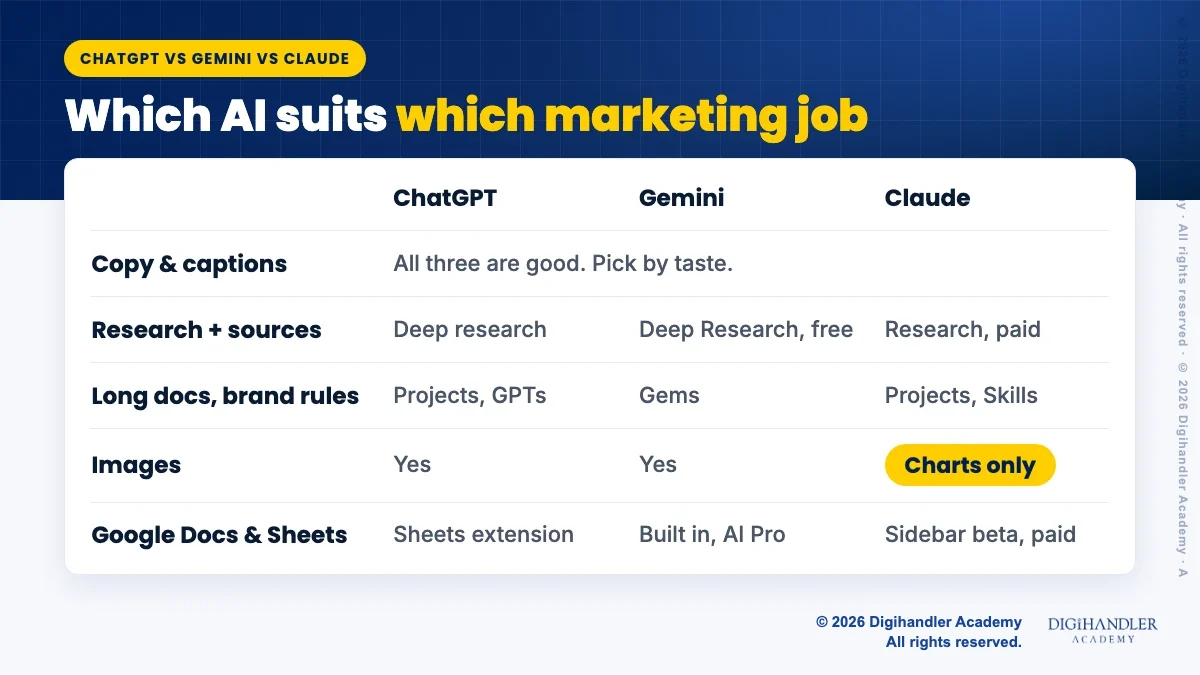
For short copy, all three are good enough. Ad headlines, Instagram captions, WhatsApp broadcast messages and email subject lines are easy jobs for any of them.
The difference you will notice is style, and style is personal. Some people find one assistant warmer, another more direct. None of the three companies publishes a fair test of "marketing copy quality", so be careful with any blog that crowns a winner.
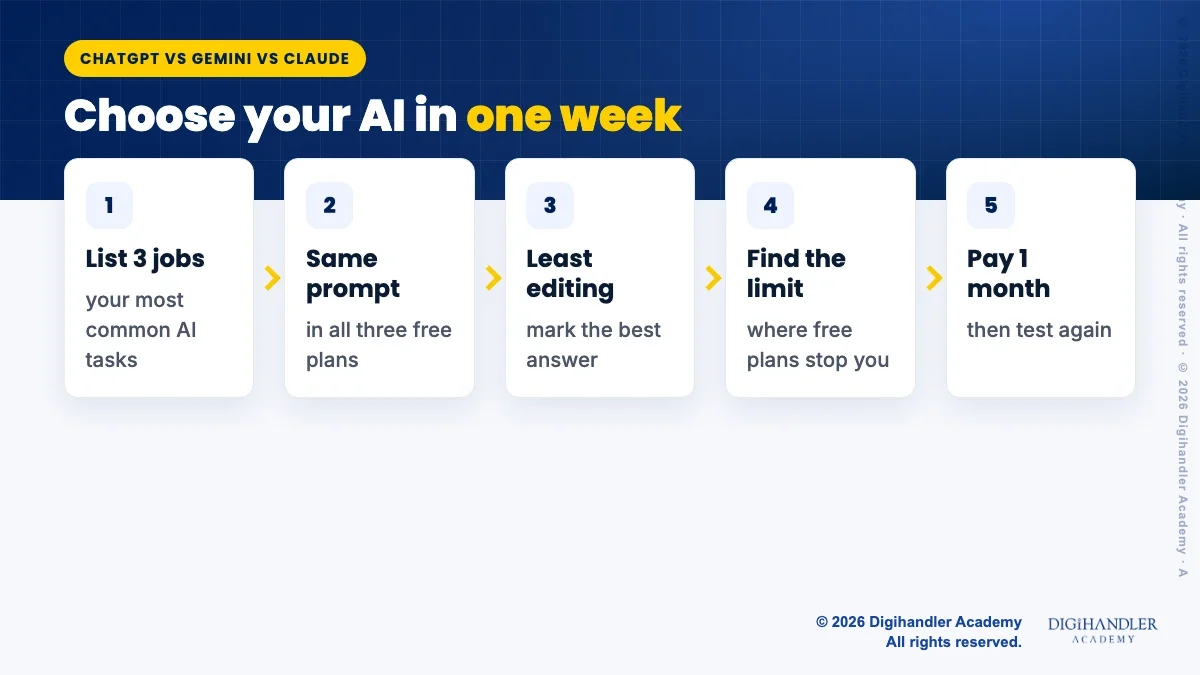
The better test is your own. Take one real brief, say a Diwali offer post for a Jaipur boutique, and paste the same prompt into all three. Keep the one you would edit least. Your prompt matters more than the tool, and our guide to prompt engineering for marketers shows how to write a brief the AI can follow.
One thing all three need from you: facts. Give them the real price, offer dates and store address. Never let any assistant guess those.
All three can search the web and show links on their free plans. For longer reports, each has a deeper mode.
ChatGPT calls it deep research. Its pricing page lists it as limited on Free and Go, and fuller on Plus and Pro. Gemini's plan page lists Deep Research even on the free plan. Claude's pricing page lists web search on Free, but its longer Research feature only on paid plans.
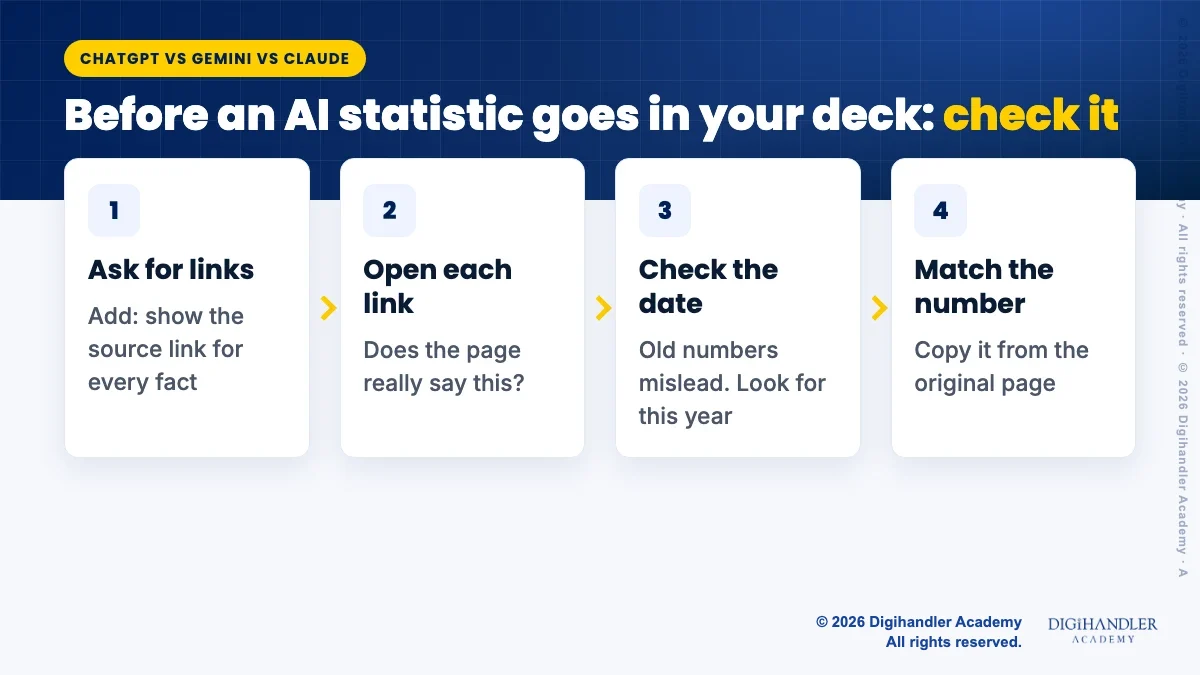
Whichever you use, treat the report like a draft from a new intern. It may be right. It may also quote an old article or mix up two numbers. Before you put a statistic in a client deck, open the link and check the date and the exact wording yourself.
This is the clearest difference, because it is written on the official pages.
ChatGPT lists image creation on every plan, limited on Free and growing on Go, Plus and Pro. Gemini lists image generation and editing on its free plan, and Google's paid plans add more access, plus video generation from AI Plus upwards.
Claude is different. Anthropic's own help page says Claude does not generate photos or illustrations the way image tools do. It can build diagrams, charts and simple interactive visuals, and it can look at images you upload and give feedback.
So for a quick product mock-up or a festive banner idea, ChatGPT or Gemini is the practical choice. For final ad creatives, many teams still finish the design in Canva or with a designer, because brand colours and text on images need a human check.
Marketers often need the AI to read a 40-page brand book, a long research PDF or a year of customer reviews. All three can do this, with limits that depend on the plan.
ChatGPT's pricing page is the most specific. It says the free plan's fast model takes about 12 pages of text at once, Go and Plus about 40 pages, and Pro about 250 pages, with its reasoning models taking more on paid plans. Google's page says AI Pro can work with up to 1,500 pages of file uploads. Claude's page says the context window is up to 1 million tokens, depending on the model, on every plan.
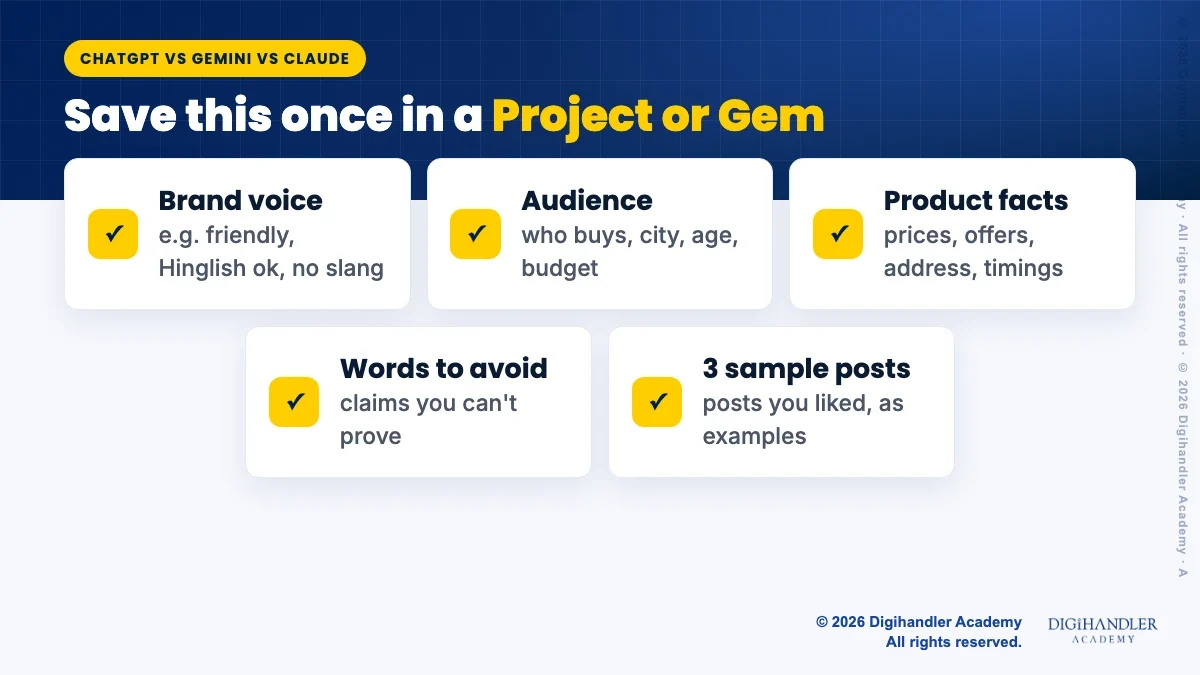
For brand guidelines, the bigger help is a saved workspace, so you don't paste the same rules every day. ChatGPT has Projects and custom GPTs. Gemini has Gems, listed on the free plan. Claude has Projects (up to five on Free) and Skills, which we explain in what are Claude Skills.
Put the same five things in whichever tool you choose: voice, audience, product facts, words to avoid and a few posts you liked.
If your team lives in Gmail, Google Docs and Google Sheets, Gemini has the home advantage. Google's help page says Gemini features in Docs, Sheets, Slides and Drive come with Google AI Pro and Ultra. The cheaper AI Plus plan covers Gmail features like Help me write, but not those Docs and Sheets features.
Claude for Google Workspace is newer. Anthropic's help page says it is in beta for paid plans. It adds a Claude sidebar inside Docs, Sheets and Slides that can edit the open file and fix formulas. It only works on the file you have open, and it does not support Firefox yet.
ChatGPT lists extensions for Excel, Word, PowerPoint and Google Sheets, limited on Free and Go and fuller on Plus. Its data analysis can read an uploaded spreadsheet on every plan, and Plus adds interactive tables and charts.
A simple example: a Rohtak coaching centre exports its monthly leads from a form into Google Sheets. Any of the three can count leads by course and spot the busiest days. Gemini or Claude can do it inside the sheet; with ChatGPT you usually upload the file.
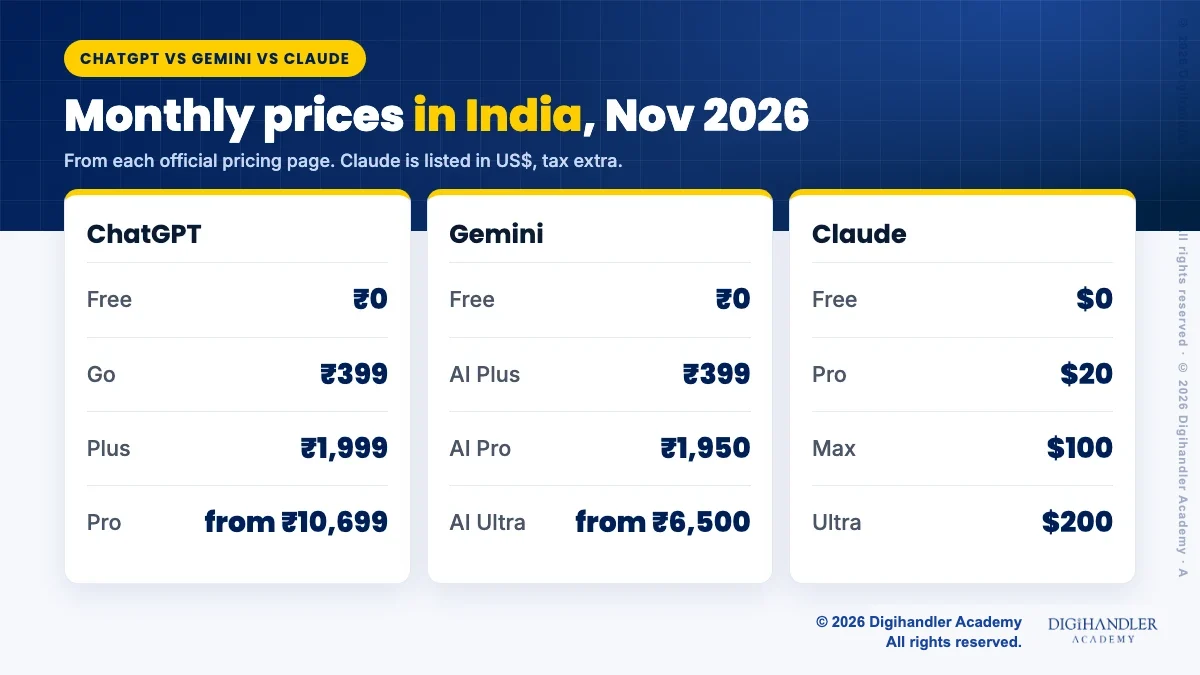
These are the prices shown on each official pricing page at the time of writing, 3 November 2026. Prices and plans change often, so check the page before you pay.
Two notes. ChatGPT's page says the Go plan may include ads. Claude's page shows US dollar prices, says tax is extra, and offers Pro at $17 a month if you pay $200 for the year up front.
Safe enough, if you set a few rules. ChatGPT's and Claude's pricing pages both say you can opt out of your chats being used to train their models on personal plans. For Gemini, check the activity settings in your Google account. Turn these settings on before you paste anything about a client.
Even then, keep customer phone numbers, payment details and private contracts out of personal accounts. Business plans exist for that.
If you plan to publish AI-written blogs, read what Google actually says about AI content first. If your main channel is chat with customers, WhatsApp Business AI tools may matter more to you than any of these three.
Use the free plans for one week before you pay for anything. This simple test works for a freelancer or a five-person agency.
If you would rather try it with a trainer beside you, a free demo class of our AI tools course is one way to do that.

Riya writes Digihandler Academy's guides and roadmaps. Every article is fact-checked and reviewed by Lovish Madaan, founder & trainer, who has run the Digihandler agency since 2018. More from Riya →
None of them is best at everything. Based on their official pages, ChatGPT and Gemini can generate images while Claude cannot make photos or illustrations. Gemini is built into Gmail, Docs and Sheets on Google AI Pro, and Claude has a beta sidebar for Google Docs, Sheets and Slides on paid plans. For writing captions and ad copy, all three are capable and the choice is mostly personal taste. The best way to decide is to run the same real marketing task in all three free plans and keep the one you edit least.
At the time of writing (3 November 2026), OpenAI's pricing page shows four personal plans in India: Free at ₹0, Go at ₹399 a month, Plus at ₹1,999 a month and Pro starting from ₹10,699 a month. Go gives more messages, uploads and image creation than Free, and OpenAI notes that the Go plan may include ads. Plus adds fuller deep research, interactive tables and charts, and more memory. Prices change, so always check the official pricing page before you subscribe.
No, not in the way image tools do. Anthropic's help page says Claude does not generate photos or illustrations. It can build diagrams, charts and simple interactive visuals inside a chat, and it can review images you upload, for example checking whether a banner's text is readable. If you need a quick product visual or festive post image, use ChatGPT or Gemini, both of which list image generation on their free plans, and then finish the design in a tool like Canva.
Gemini does, on Google's paid personal plans. Google's help page says Gemini features in Docs, Sheets, Slides and Drive are part of Google AI Pro and Ultra, while the cheaper AI Plus plan covers Gmail features only. Claude for Google Workspace is a newer beta for paid Claude plans that adds a sidebar inside Docs, Sheets and Slides. ChatGPT offers a Google Sheets extension, limited on Free and Go and fuller on Plus. Work accounts get Gemini through Google Workspace plans instead.
Most small businesses and freelancers do not. The free plans of all three are enough for occasional captions, emails and quick research. Pay for one plan only when you keep hitting a limit that slows real work, such as image creation, deep research or long file uploads. Pick the tool that fits where you already work: Gemini if your team uses Google apps all day, and whichever one gave you the least editing in your own one-week test.
Where AI genuinely saves marketers time on real client work, and where it quietly makes things worse.
Read article →
What decides whether an AI assistant quotes your page, and the fixes worth doing first.
Read article →