AI in digital marketing: what actually works right now
Where AI genuinely saves marketers time on real client work, and where it quietly makes things worse.
Read article →
Open Meta Ads Manager today and you will see a small Advantage+ switch already turned on. This guide explains Meta Advantage Plus in simple words for a small business in India: what each part does, when to trust it, when to take back control, and how to make sure the AI never shows your product as something it is not.
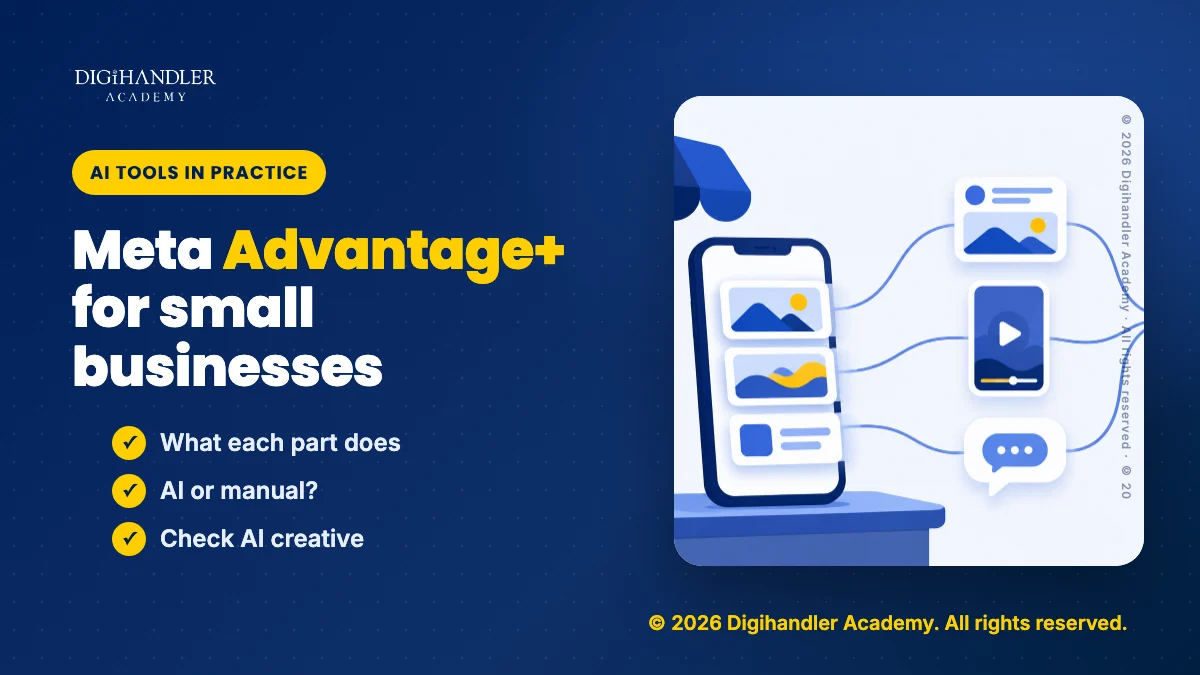
Meta Advantage Plus (written Advantage+) is Meta's name for a set of AI features inside Ads Manager. Meta describes it as a suite of products that uses AI to optimise campaigns in real time and match ads to the people most likely to act.
It is AI that makes decisions for you inside one tool. For the bigger picture, read our plain guide to AI agents for marketers.
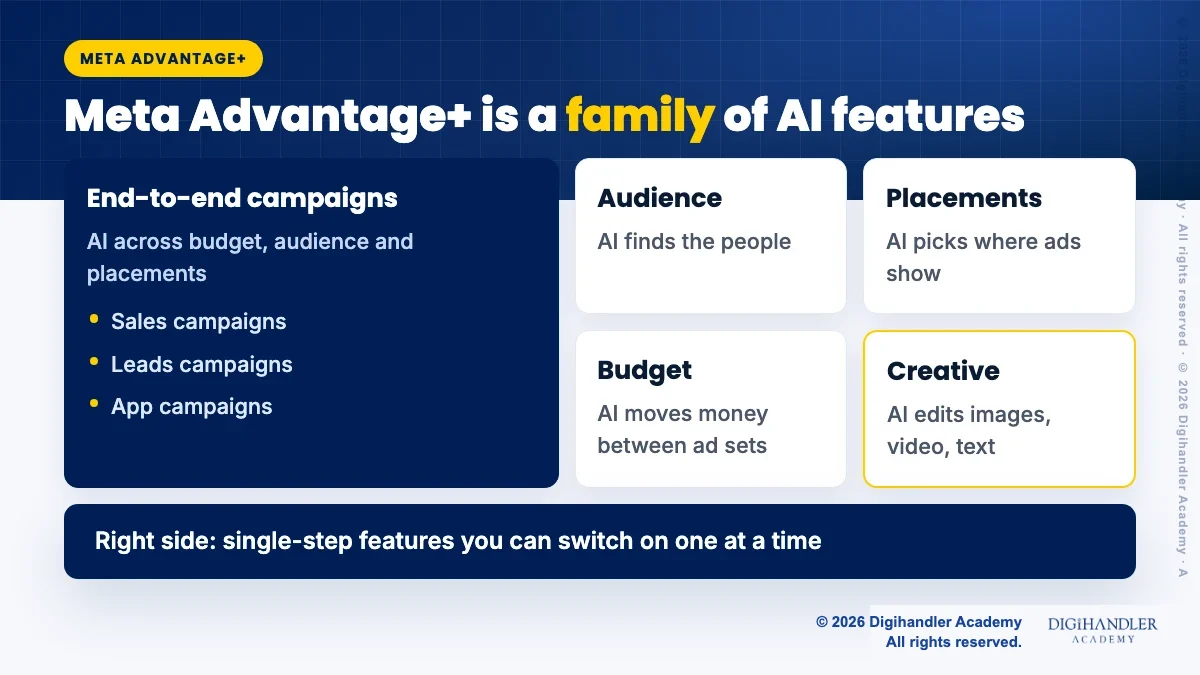
Meta splits Advantage+ into two kinds. End-to-end solutions apply AI across the whole campaign: Advantage+ sales campaigns (earlier called Advantage+ shopping campaigns), Advantage+ app campaigns and Advantage+ leads campaigns. Single-step solutions let you switch on AI for one part only: audience, placements, budget, creative, catalog ads or destination.
Think of it like a car with driver assist. You choose where to go and how much fuel to add. The system picks lanes and speed, and you can take the wheel any time.
According to Meta's help pages, when you choose the Sales, Leads or App promotion objective, you start in the Advantage+ setup. You will see Advantage+ shown as On in the top right. Meta says this means you are opted into the features it has found drive the best performance.
Three sections carry the AI: Budget, Audience and Placements. If you narrow any of them too far, that section shows Advantage+ off and you are no longer running an Advantage+ campaign. Your ad still runs. It just runs with fewer AI decisions.
Manual campaign features are all still available, Meta says. You may also see a campaign score and an opportunity score. Meta notes that a high score does not guarantee results, so treat these as hints.
With Advantage+ audience, Meta's AI finds the people for your ad. It learns from signals such as past conversions, Meta Pixel data and reactions to your earlier ads.
Meta splits your inputs into two groups. Controls are hard limits: location, minimum age, languages and custom audience exclusions. Suggestions, like age range, gender and detailed targeting, are hints the AI may go beyond, but never outside your controls.
For a Rohtak coaching centre, set the location control to the area students can actually travel from, and let interests be suggestions. The AI cannot send your ad to Chennai if your control says Rohtak and nearby.
Meta says Advantage+ audience is not recommended for retargeting. Meta also claims its Advantage+ audience campaigns achieved 9.7% lower cost per result with the Traffic, Engagement and Leads objectives. That is Meta's figure about its own product, not a promise for your account.
For fixed limits, such as no ads to people under 18, Meta offers account controls in Advertising settings. They apply to every campaign and do not switch Advantage+ off.
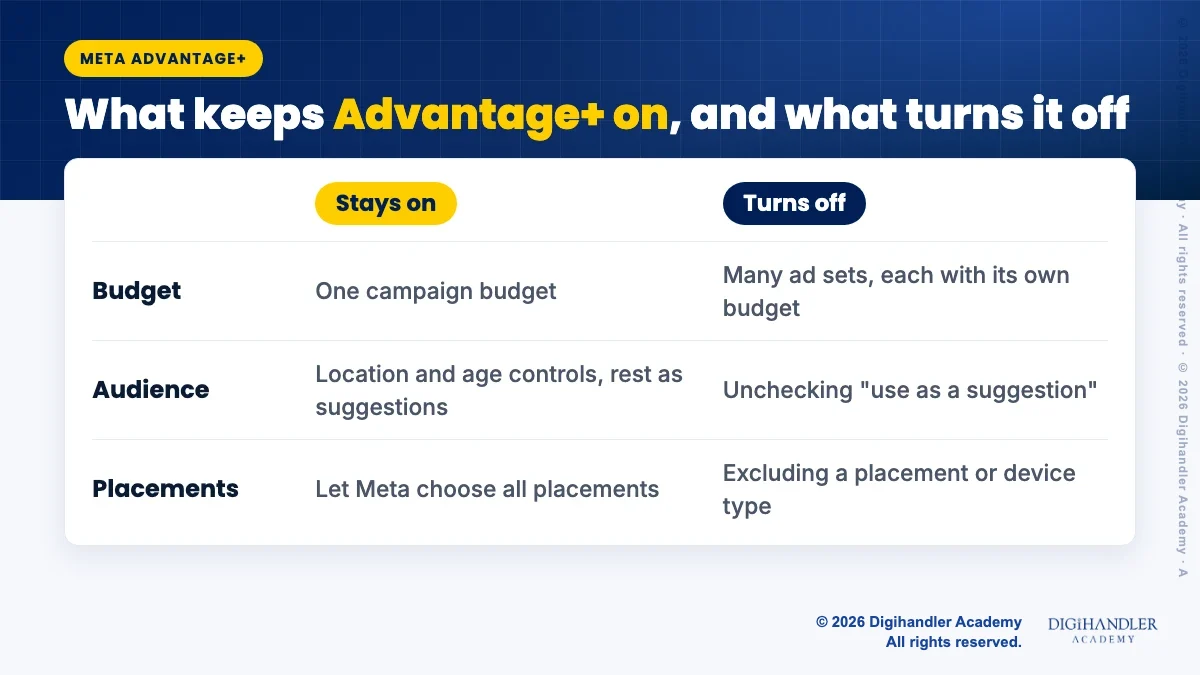
Placements are the spots where your ad appears. Meta lists Facebook, Messenger, Instagram, WhatsApp, Audience Network and Threads. With Advantage+ placements, the system looks across all of them for the cheapest good results.
Many owners miss this change. Meta says it is gradually making Leads, App promotion and Sales campaigns default to Advantage+ placements, with the option to pick placements in the ad set removed. Awareness, Traffic and Engagement campaigns still let you choose.
Meta claims that in an experiment, Advantage+ placements gave an 11.7% lower cost per action on average than manual placements. Again, that is Meta's claim. Your job is to make sure the creative looks right in each place.
Advantage+ creative adjusts your images, videos and text into versions Meta expects people to respond to, while keeping the core message. Meta says some enhancements may be on by default, and you can turn them off at any time.
Meta tags its generative AI features with an AI label. They include text generation, image generation, background generation, image touch-ups, add animation, add music, translations and video subtitles. What you see depends on format, placements and catalog use.
Two points matter in India. Meta says it automatically adds an AI info label when tools like background generation, image generation or add animation create or significantly edit media. Meta also lists India among regions where advertisers may get the option to self-disclose generative AI use.
Some categories may not get every feature yet, including financial services, health, housing, employment and credit ads, and political or social issue ads.
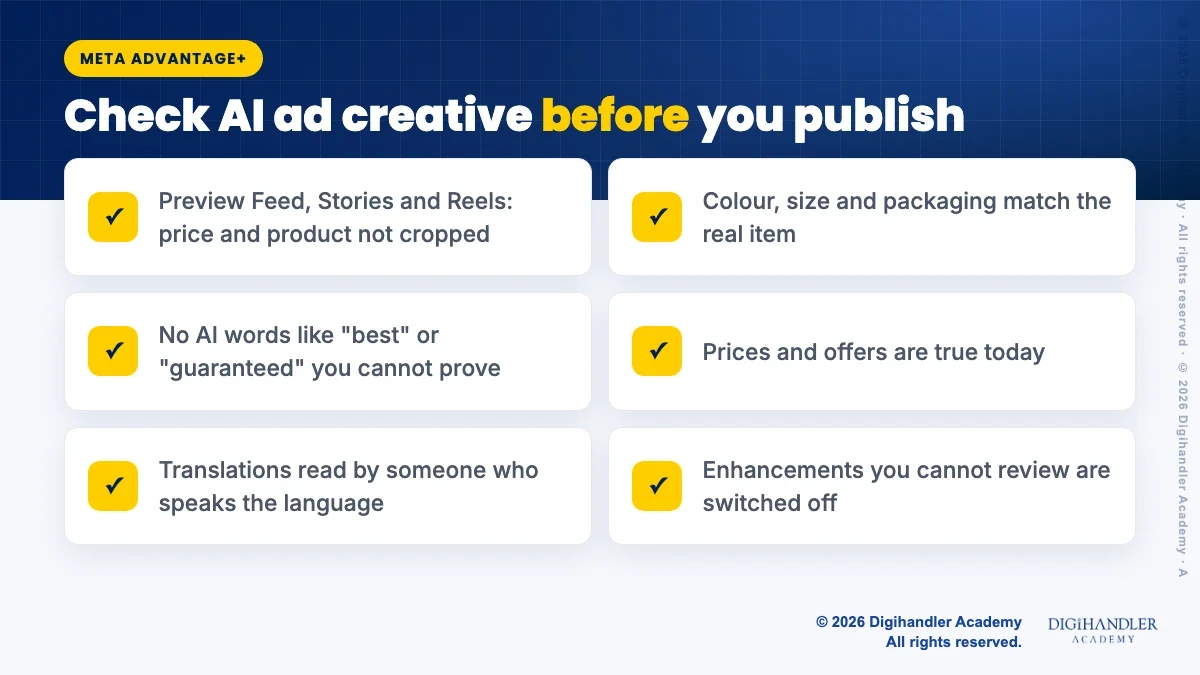
AI makes ads faster, but it can also make a lehenga look brighter or add a promise you never made. The ad still carries your name, so run this check before publishing.
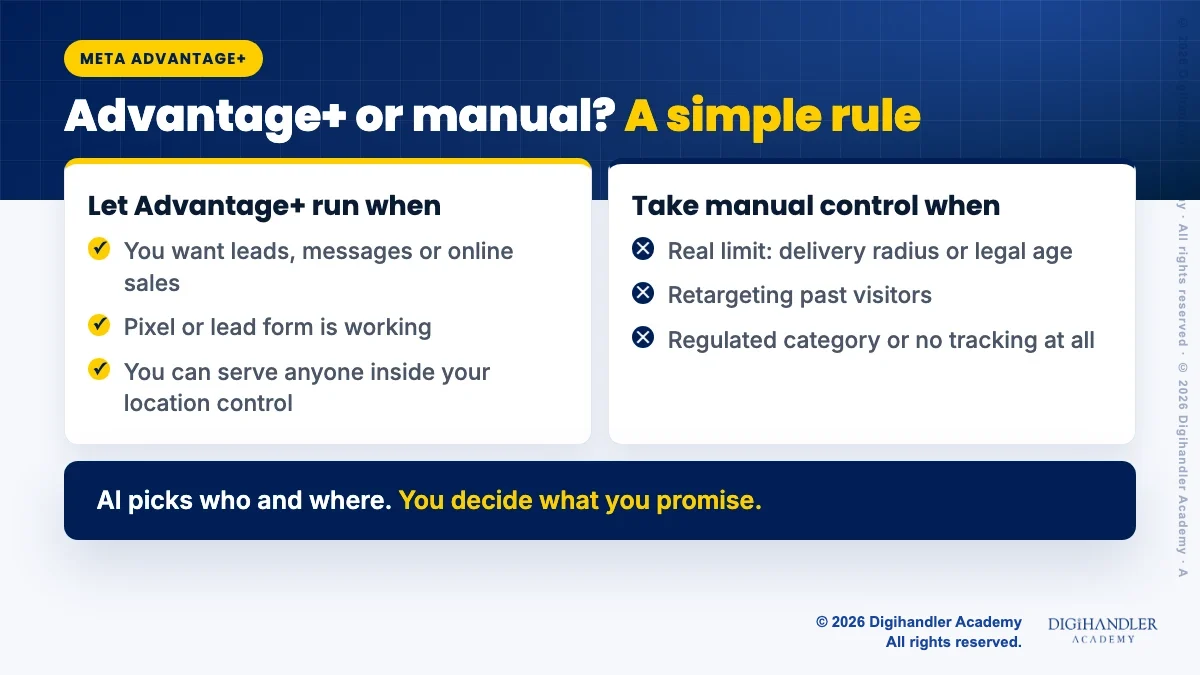
Meta's guidance leans towards Advantage+ for Sales, Leads and App campaigns. A simple rule for small businesses: let the AI choose who and where, and you control what you promise.
There is no single rupee number, and anyone quoting one as a rule is guessing. Meta's minimum budget page says minimums vary by country and objective, and depend on bid strategy, optimisation event, currency and schedule. Ads Manager alerts you if your budget is too low.
What Meta does say clearly is about learning. An ad set usually leaves the learning phase after about 50 results in the week after its last significant edit. So the real question is: can your budget buy around 50 of your chosen result in a week?
A Jaipur boutique optimising for purchases may struggle to reach that on a small budget. Meta suggests picking an easier event if you do not want to spend more. Leads or messages are often easier first goals. If you choose messages, our guide to WhatsApp Business AI for Indian businesses covers what happens after the chat starts.
Also avoid big edits during learning, because they restart it. If you use a cost per result goal, Meta recommends a daily budget of at least five times that goal.
Here is a simple first setup based on Meta's help pages. Menu names change often, so follow the words on your screen.
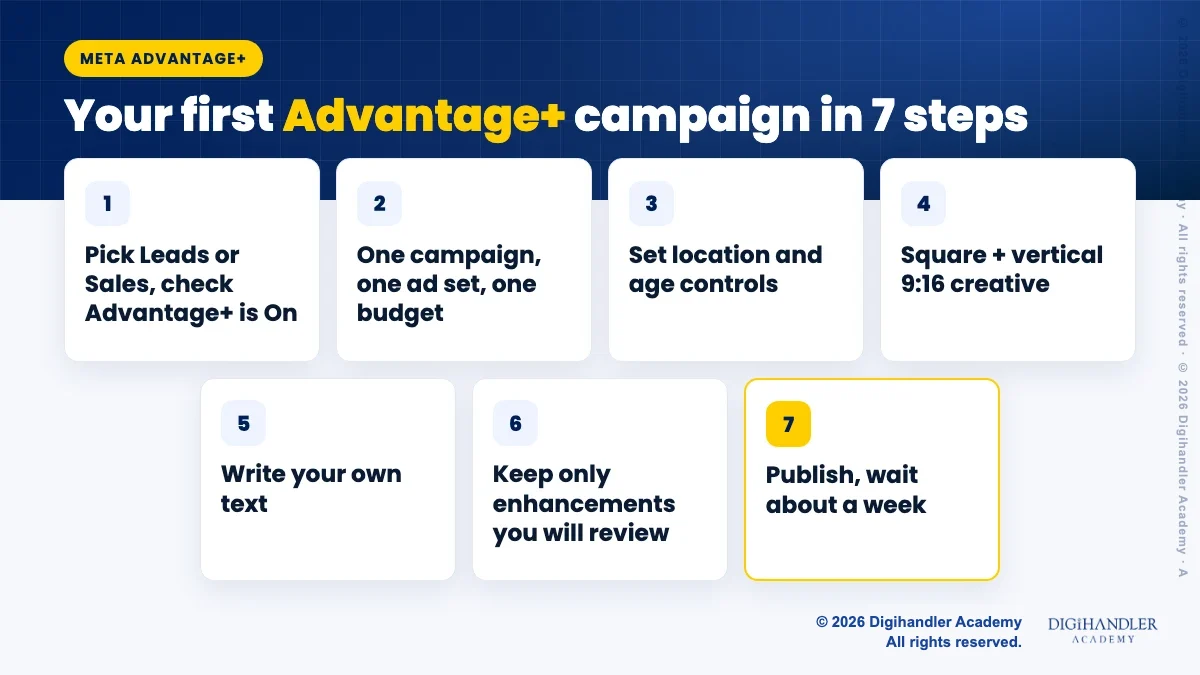
Advantage+ cannot fix a wrong objective, missing tracking or weak creative. Our list of common Meta ads beginner mistakes covers those gaps. To practise setups with feedback, the Meta Ads course walks through real campaigns.

Riya writes Digihandler Academy's guides and roadmaps. Every article is fact-checked and reviewed by Lovish Madaan, founder & trainer, who has run the Digihandler agency since 2018. More from Riya →
Meta Advantage Plus, written Advantage+, is a set of AI features in Meta Ads Manager for Facebook and Instagram ads. Meta describes it as a suite that uses AI to optimise campaigns in real time and match ads to people likely to act. It has end-to-end campaigns for the Sales, Leads and App promotion objectives, plus single-step features you can switch on for one part only, such as audience, placements, campaign budget or creative. Manual settings are still available, and narrowing a section too far simply turns Advantage+ off for that part.
It can be, if the basics are in place. Advantage+ works best when it has signals to learn from, such as a working Meta Pixel, a lead form or message replies, and when your budget can buy enough results in a week. Meta says ad sets usually leave the learning phase after about 50 results in the week after the last significant edit. A small local business should set location and age controls carefully, keep one ad set, choose an achievable goal like leads or messages, and review every AI-made creative before it goes live.
Meta does not publish one fixed rupee minimum for all Advantage+ campaigns. Its help page on minimum budgets says the minimum varies by country and objective and depends on factors such as bid strategy, optimisation event, currency and schedule. Ads Manager shows an alert when your budget is too low. A more useful question is whether your budget can buy around 50 of your chosen results in a week. If it cannot, Meta suggests optimising for an easier event rather than chasing a harder one on a small budget.
Yes, section by section. Meta's help pages say that if you narrow Budget, Audience or Placements too far, that section shows Advantage+ off. For example, using separate ad set budgets across several ad sets, unchecking Use as a suggestion for audience settings, or excluding placements or devices will switch it off. Advantage+ creative enhancements can also be turned off one by one. Note that Meta is rolling out a change where Sales, Leads and App promotion campaigns no longer let you pick placements in the ad set, while Awareness, Traffic and Engagement still do.
Often, yes. Meta says it automatically adds an AI info label when its tools such as background generation, image generation or add animation create or significantly edit an image or video. It may also label ads made with third-party AI tools when it detects industry standard metadata like C2PA. You find the label in the ad's three-dot menu under About this ad. Meta lists India among the regions where advertisers may be able to self-disclose generative AI use, in which case the label appears next to the ad label.
Where AI genuinely saves marketers time on real client work, and where it quietly makes things worse.
Read article →
What decides whether an AI assistant quotes your page, and the fixes worth doing first.
Read article →