3 Days Free Demo Class — sit in on real classes before you enrol.Book your free demo → 9991 729 730

10 Digital Marketing Projects for Students (Free, Honest, Real)

Employers rarely ask freshers for marks. They ask, "What have you actually done?" These 10 digital marketing projects for students give you a real answer. Each one is free, can be done with a local shop or your own page, and is easy to show honestly in an interview.

Riya Malik 8 min read Updated November 2026
10 Digital Marketing Projects for Students (Free, Honest, Real)

What are the best digital marketing projects for students?

The best projects are small, real and checkable. Small means you can finish one in a weekend. Real means it uses a real business or your own real page. Checkable means an interviewer can open it and see your work.

Think of each project like a driving test. Nobody cares how many books you read about driving. They want to watch you drive one short route without mistakes.

Each project below matches a skill employers in India ask for. To see which skills appear most in entry-level listings, read the skills employers ask for right now.

Three rules apply to every project. Get the owner's permission before you touch or publish anything for a business. Label practice work as practice. Never invent results. A plan with no numbers is honest. A plan with made-up numbers can cost you the job.

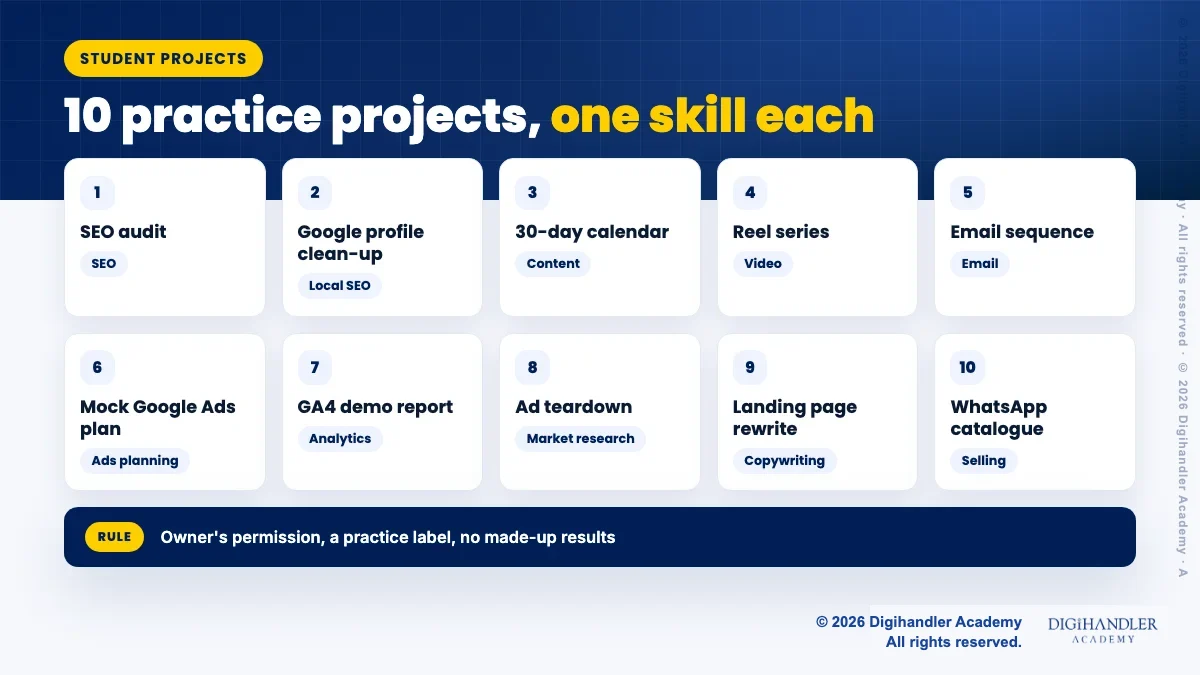
Grid of 10 student practice projects, each tagged with the skill it shows: SEO, local SEO, content, video, email, Google Ads, analytics, Meta ads, copywriting and WhatsApp
Ten projects, one core skill each.

Projects 1 and 2: SEO audit and Google Business Profile clean-up

  • 1. SEO audit of a local website.: Pick a local business site, like a Rohtak coaching centre. Check page titles, mobile speed, broken links and whether each service has its own page. Tools: Google's free PageSpeed Insights and a plain Google search. Write five fixes, ranked by impact. It proves you can find problems and set priorities. Present it as "an audit I shared with the owner", not "I ranked them".
  • 2. Google Business Profile clean-up.: Many shops have wrong hours, few photos and no replies to reviews. Creating and managing a profile is free. The owner can add you as a Manager under People and access, so you never need their password. Fix hours, categories and photos, and draft review replies for the owner to approve. It proves local SEO and client handling. Show before and after screenshots, with the owner's okay.

Projects 3 and 4: a 30-day content calendar and a reel series

If social media is your main interest, our Instagram marketing basics guide explains profiles, reels and insights in more depth.

  • 3. A 30-day content calendar.: Plan a month of posts for a Jaipur boutique or a gym. Use a free Google Sheet with columns for date, format, idea, caption and goal. Give each week a theme. It proves you can plan, not just post. If the owner does not publish it, say so: "Plan only, not posted."
  • 4. A reel series.: Shoot three to five short reels for the same business on your phone. Edit them in Instagram's own editor, and make cover frames on Canva's free plan. Each reel needs a clear hook in the first seconds. It proves you can make video, not just talk about it. Post them only with permission. Show real views if posted, or label them as samples if not.
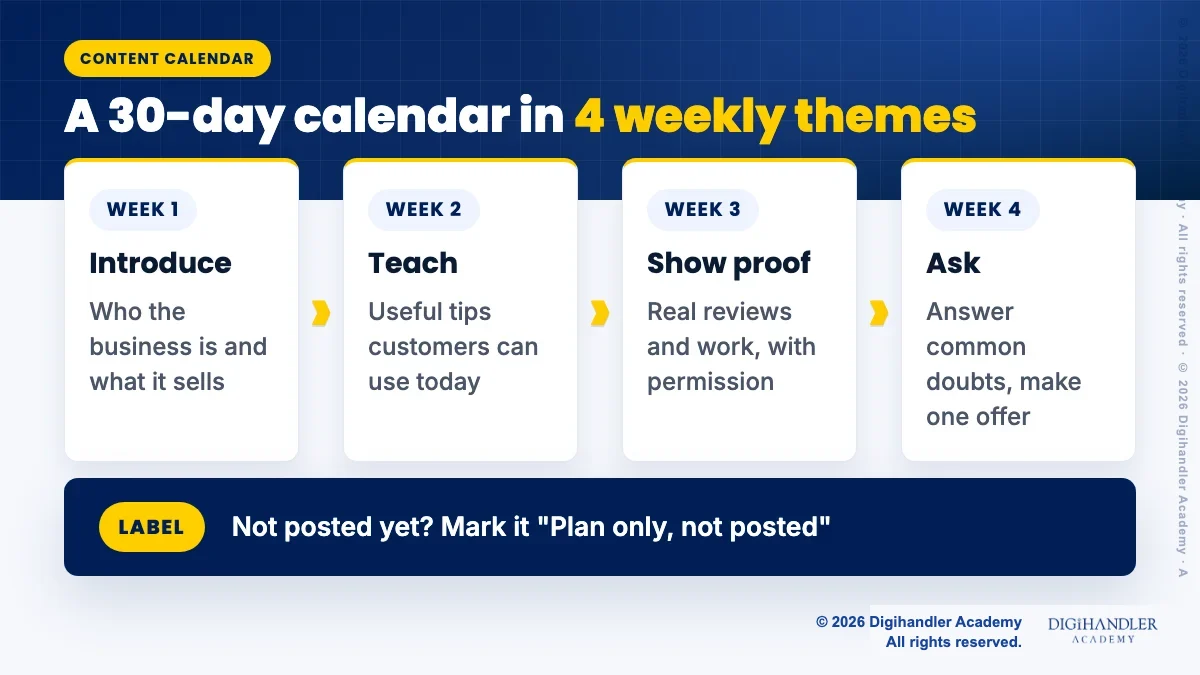
Four weekly themes for a 30-day content calendar: introduce the business, teach something useful, show real proof with permission, answer questions and make an offer
One theme per week keeps a 30-day calendar easy to plan.

Projects 5 and 6: an email sequence and a mock Google Ads plan

  • 5. A welcome email sequence.: Write three emails a new customer would get after signing up: a welcome, a useful tip and a soft offer. Write them in Google Docs. You do not need to send them. Never email people who did not sign up. It proves you can write for one reader with one goal. Writing that sells is a skill of its own, so read content writing vs copywriting.
  • 6. A mock Google Ads plan, clearly labelled "not run".: Plan one Search campaign on paper: goal, budget, ad groups, 15 to 20 keywords, two ads and the landing page. Find keyword ideas with Google Trends and Google's own autocomplete. Google's Keyword Planner asks you to complete account setup with billing details, so do not add a card just for practice. Put "Mock plan, not run" at the top. It proves you understand structure. Our Google Ads tutorial for beginners covers the structure step by step.

Projects 7 and 8: a GA4 demo report and a competitor ad teardown

  • 7. A GA4 report from the demo account.: Google gives any Google user free Viewer access to a demo Analytics account. It has data from the Google Merchandise Store website and the Flood-It! game. Answer three questions, like "Where do most visitors come from?" Exports are switched off in the demo, so take screenshots and write what you would change. It proves you can read data. Say clearly that the data is Google's sample data.
  • 8. A competitor ad teardown.: Meta's Ad Library lets anyone search the ads currently running across Meta's apps. Pick three coaching institutes or three cafes in one city. For each ad, note the hook, offer, format and where it leads. It proves you can study the market before spending money. Describe ads in your own words, and do not claim to know their results, because the library does not show sales.
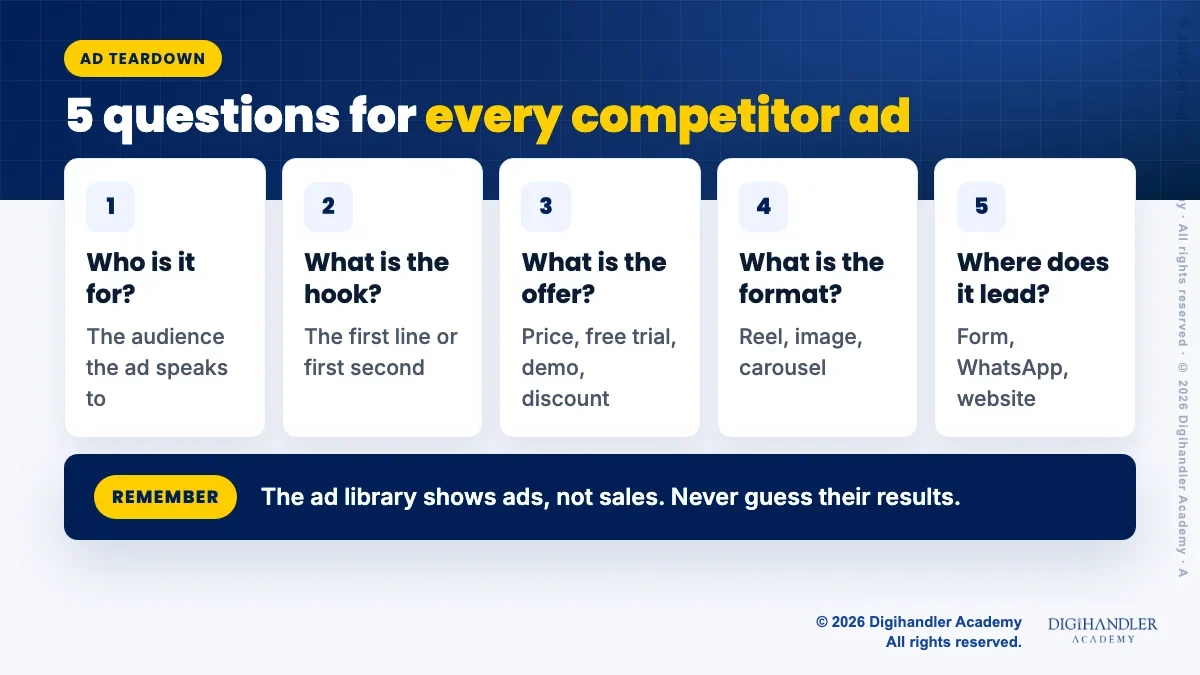
Five questions to ask about every competitor ad: who it is for, what the hook is, what the offer is, what the format is, and where the click goes
Ask the same five questions of every ad you study.

Projects 9 and 10: a landing page rewrite and a WhatsApp catalogue

  • 9. A landing page rewrite.: Take one weak page, like a course page with no fees section or no clear button. Put the old text and your new version side by side in Google Docs. Fix the headline, add answers to common doubts and make one clear call to action. It proves copywriting and user thinking. Call it "a suggested rewrite" unless the owner actually uses it.
  • 10. A WhatsApp catalogue setup.: Many small shops in India sell on WhatsApp. The WhatsApp Business app has a catalogue that holds up to 500 items, each with up to 10 photos or videos, and items can be hidden when out of stock. Set it up on the owner's phone with them sitting next to you. Write clear names, prices and short descriptions. It proves you can help a business sell where its customers already are.

How do you present digital marketing practice projects honestly?

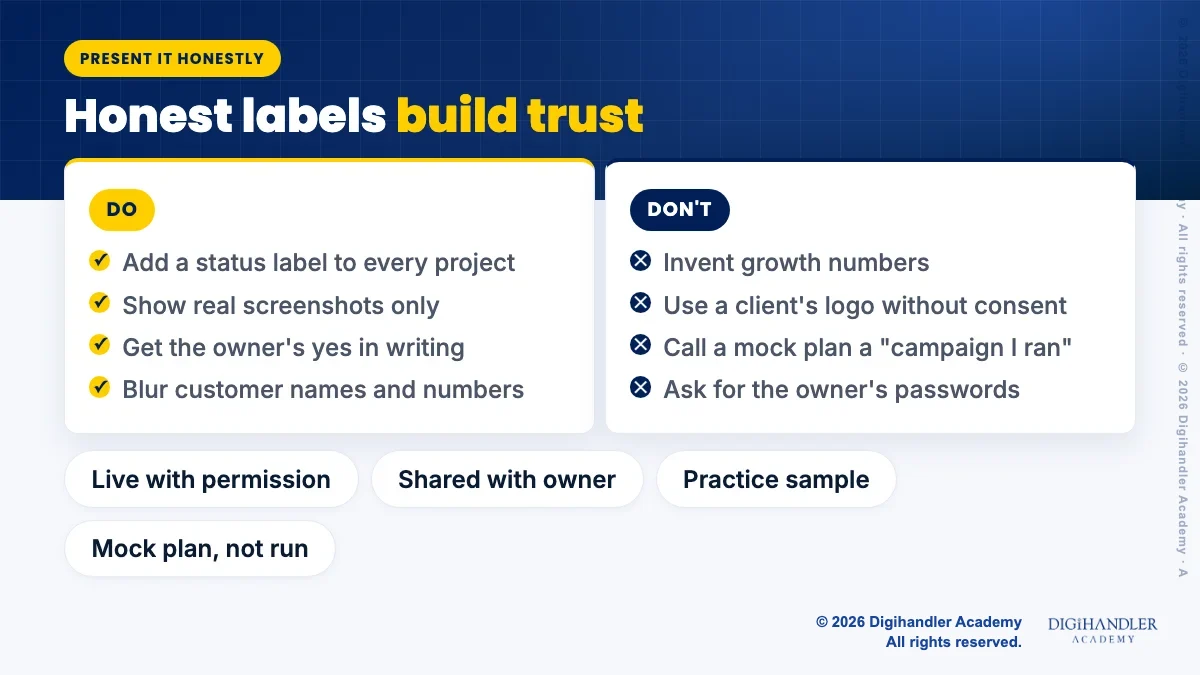
Give every project one page with four parts: the problem, what you did, the tools, and an honest status label. Status labels are simple: "Live with owner's permission", "Shared with owner", "Practice sample" or "Mock plan, not run".

Use only numbers you can show. If a reel was posted, show a screenshot of its real views. If nothing was posted, write what you would measure instead. Interviewers respect "I would track enquiries per week" far more than a fake "300% growth".

Hide private details. Blur customer names, phone numbers and anything the owner asks you to remove.

Our 30-day portfolio plan shows how to turn pieces like these into a simple portfolio site.

Do and don't comparison: do use status labels, real screenshots and the owner's permission; don't invent results, use client logos without consent or call a plan a campaign
Honest labels make a small project more believable, not less.

How do you ask a local business to let you practise?

Most owners say yes when the ask is small, free and clear. Walk in during a quiet hour, or message on WhatsApp. Say what you will do, how long it takes, and that nothing goes live without their approval.

A simple message works: "I am a marketing student. I would like to fix your Google listing for free as a practice project. Can I show you my plan first?"

Ask before you start if you may show the work in your portfolio. A screenshot of their "yes" in your chat is enough proof for you.

Which digital marketing project ideas should you start with?

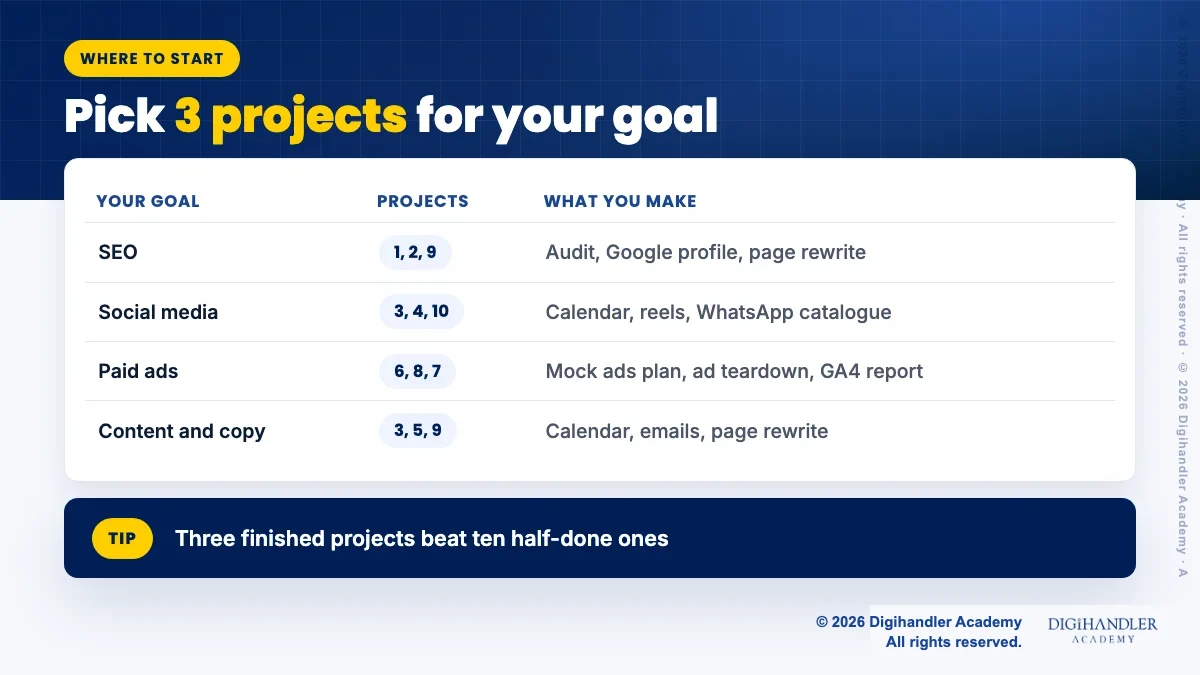
Do not try all ten at once. Pick the three that match the job you want. Finished projects beat half-done ones every time.

Three finished projects with honest labels make a strong start. They also give you real things to talk about when you apply, which helps a lot with getting your first digital marketing internship.

Self-study with these projects can take you far. If you would like a trainer to review your work and guide live practice, a free demo class on our digital marketing course is one way to see if that suits you.

Table matching career goals to starter projects: SEO goal uses projects 1, 2 and 9; social media uses 3, 4 and 10; paid ads uses 6, 8 and 7; content and copy uses 3, 5 and 9
Pick three projects that match the role you want.
Riya Malik
Written by Riya MalikContent Writer, Digihandler Academy

Riya writes Digihandler Academy's guides and roadmaps. Every article is fact-checked and reviewed by Lovish Madaan, founder & trainer, who has run the Digihandler agency since 2018. More from Riya →

First steps in digital marketing

  1. Part 1: Practice projects for students (you are here)
  2. Part 2: Getting your first internship
  3. Part 3: Skills employers ask for coming soon
  4. Part 4: Google Ads for beginners coming soon
  5. Part 5: Instagram marketing basics coming soon
  6. Part 6: Content writing vs copywriting coming soon

From our Instagram

What every Digihandler Academy student gets (swipe) · View on Instagram
Dhairya’s journey into a digital marketing career · View on Instagram

Common questions

Start with small projects that use a real local business or your own page. Good first choices are a Google Business Profile clean-up for a shop, an SEO audit of a local website, a 30-day content calendar, a short reel series and a mock Google Ads plan. Each can be done with free tools in a weekend or two. Get the owner's permission first, label practice work as practice, and never invent results. Three finished, honest projects tell an employer more than a long list of certificates.

Yes. Google Business Profile, PageSpeed Insights, Google Trends, Google Sheets and Docs, the Google Analytics demo account, Meta's Ad Library and the WhatsApp Business app can all be used without paying. You do not need to run real ads to learn planning. A mock Google Ads plan clearly labelled "not run" still shows that you understand account structure, keywords and ad copy. Avoid adding a card to any ad account only for practice, because real ads can spend real money.

Add a short Projects section with three lines per project: what the problem was, what you did, and the tools you used. Add a status label such as "Shared with owner" or "Mock plan, not run". Link to a simple portfolio page or a Google Drive folder with screenshots. Only mention numbers you can prove with a screenshot. If there are no numbers, say what you would measure. Interviewers trust honest, specific projects far more than vague claims of growth.

Yes. Ask before you start, and get a clear yes in writing, even a WhatsApp message. Ask separately if you may show the work publicly. Never ask for an owner's passwords. Tools like Google Business Profile let an owner add you as a Manager instead. Blur customer names, phone numbers and anything private before sharing. If you study a business from outside, like an ad teardown, describe what you saw in your own words and do not claim to know their results.

Yes. Google offers a free demo Analytics account that any Google user can open with Viewer access. It has sample data from the Google Merchandise Store website and the Flood-It! game, so you can practise reading traffic, events and sales reports. Exports are switched off, so use screenshots for your project. Pick three business questions, answer them from the reports and suggest one change for each. Always say clearly that the data is Google's sample data, not a client's.

More from the blog

AI in digital marketing: what actually works right now

AI in digital marketing: what actually works right now

Where AI genuinely saves marketers time on real client work, and where it quietly makes things worse.

Read article →

AI SEO: how to get cited inside AI search results

AI SEO: how to get cited inside AI search results

What decides whether an AI assistant quotes your page, and the fixes worth doing first.

Read article →

Learn this properly

3 days free · Rohtak campus & live online

We'll call you within 24 hours. No spam, ever.

Prefer to talk? Call 9991 729 730.